Hi Automate Community!
I've had this question come up a few times so I figured a quick tip will help. If you're going to an SAP web page that has app tiles you might have a combination of Fiori apps and GUI for HTML apps:
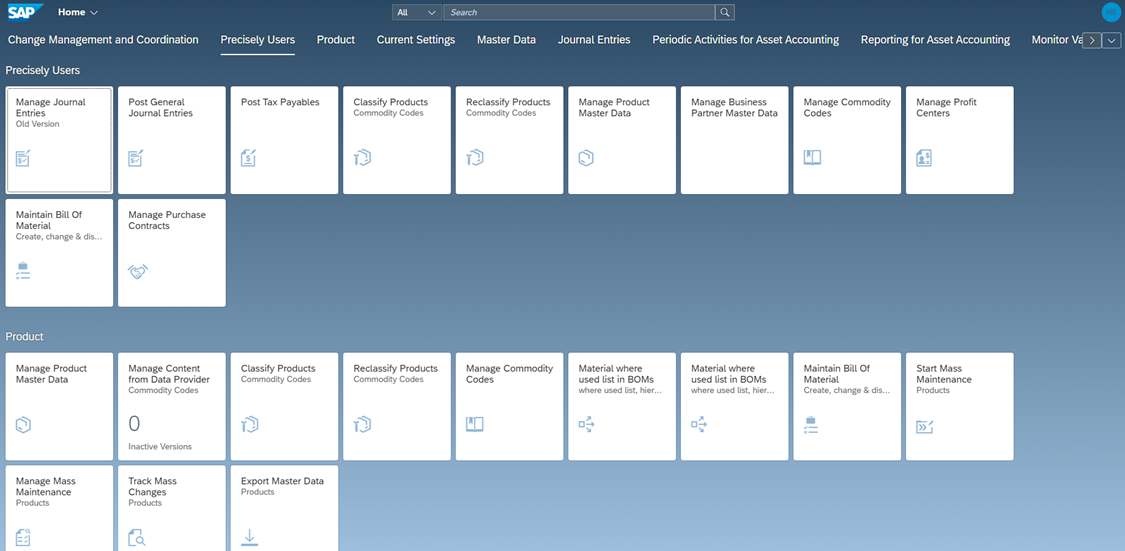
When you're recording a script for one of these apps, you'll need to know in advance if it's a Fiori or GUI for HTML app so you can choose the right module in Studio.
When you go in the SAP app (tile), click your initials in the upper right corner, and select "About". Look at the Application section for the Framework ID. If it has "UI5" then this is a Fiori app and you'll need to use the Fiori module. If it has "GUI" then this is a GUI for HTML app and you'll need to use the GUI for HTML module. If you select the incorrect module you will run into an error. You can also use the SAP Fiori Apps Reference Library to see if it's a Fiori or GUI for HTML app.
Example screenshot for Fiori app: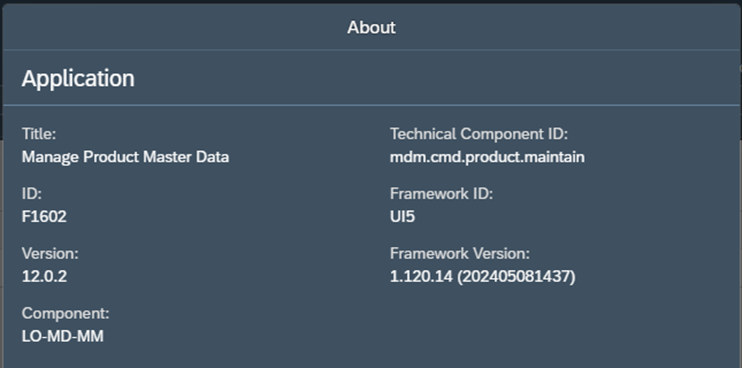
Example screenshot for GUI for HTML app:
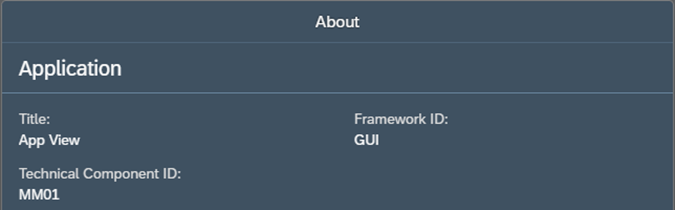
Screenshot from Studio with module options:

The script creation process is the same for Fiori and GUI for HTML as it is for Transaction – Record, map, run. For Fiori we only work with Transactional apps so please keep that in mind when using the Fiori module.
If the Fiori module is grayed out for you in Studio, and you need to automate a Fiori app, then you will need to upgrade to a Studio Pro license. This upgrade only applies to users creating scripts (Developers). Runner users do not need to upgrade and can run any type of script, including Fiori scripts (assuming they have the correct SAP authorizations). Please contact your Account Executive if you need more information about a license upgrade.
Thank you!
------------------------------
Maria Ebner
*Precisely Software Inc.
------------------------------