Dear Automate Community,
Today we focus on the capabilities of validation services in the Precisely Data Integrity Suite (DIS). Due to pre-configured APIs, these can be built into Evolve processes within minutes.
The purpose of integrating Precisely DIS APIs into an Evolve solution is to ensure that business data is accurate, complete, and usable at the point of entry.
Instead of correcting errors downstream (e.g., in SAP or CRM systems), data quality and enrichment services are applied during business workflows, such as:
- Customer or vendor onboarding
- Master data change requests
- Self-service forms for business users.
You can find these APIs here: Connections > Precisely APIs
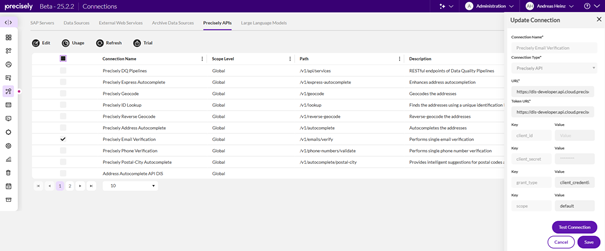
After selecting an API in the Administration App, choose Edit to maintain the client_id and client_secret. A trial can be requested for testing purposes. (Outside the US, you must requested the trial from your account team.)
Steps to use these APIs (on the example of the Email Verification)
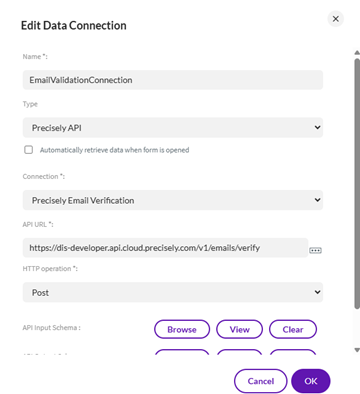
1. Create Data Connection
- Specify Name
- Type = Precisely API
- Connection = Precisely Email Verification
- API URL and HTTP operation get filled automatically
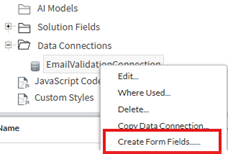
2. Create Form Fields
From the Data Connection we just created, form fields can be generated:
- Enter Description
- Enter Group Name
- Enter Web Service Name
- Select Operation – in this case "Post"
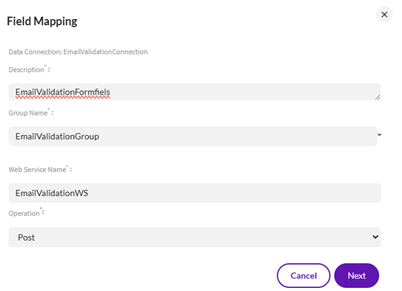
After clicking the "Next" button, you can select whether you want to map already existing form fields against the web service.
3. In the next step, we can select the groups of fields or single fields from the web service and drag&drop them onto the form.
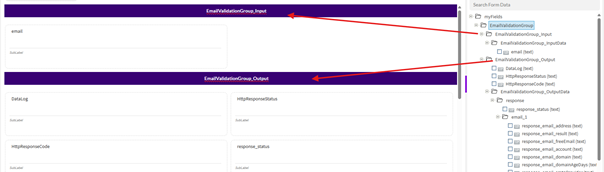
4. Finally, we add a "Web Service" Element from the "Advanced Elements" section to the form.
- Enter a name
- Select the name of the previously defined web service
- Select whether the service should be invoked by a rule or a button
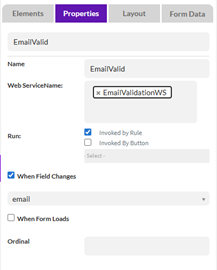
That's already it, now you can test the email validation service.
For additional information I recommend these resources:
- Evolve help site for the integration of DIS APIs:
https://help.precisely.com/r/t/1016755375/2025-10-30/Automate-Evolve/pub/Latest/en-US/Automate-Evolve-User-Guide/Integrate-Precisely-APIs-with-Evolve
- - More about DIS APIs:
https://help.cloud.precisely.com/r/t/1009843828/2025-11-18/Precisely-Data-Integrity-Suite/disapi/Latest/en-US/Data-Integrity-Suite-APIs/Email-Verification-API
------------------------------
Andreas Heinz
Principal Sales Engineer
*Precisely Software Inc.
------------------------------