Tip of the Week - Evolve – Set Values, Totals & Counts in a table
In Evolve solutions, we may have occasions to have repeating content that we may want to count or total, as well as set values for all rows in the table. Examples:
§ The totals may drive different paths for approvals, potentially requiring additional approvals if over a specific threshold.
§ The counts could stop someone from moving forward until errors are handled or all rows are processed. If validating or posting in the background, you could compare number of rows to number of successful validations/posts and route accordingly in case someone needs to make corrections or review what happened.
Here's an example solution form view with repeating content for a Material Basic Data 1 update script.
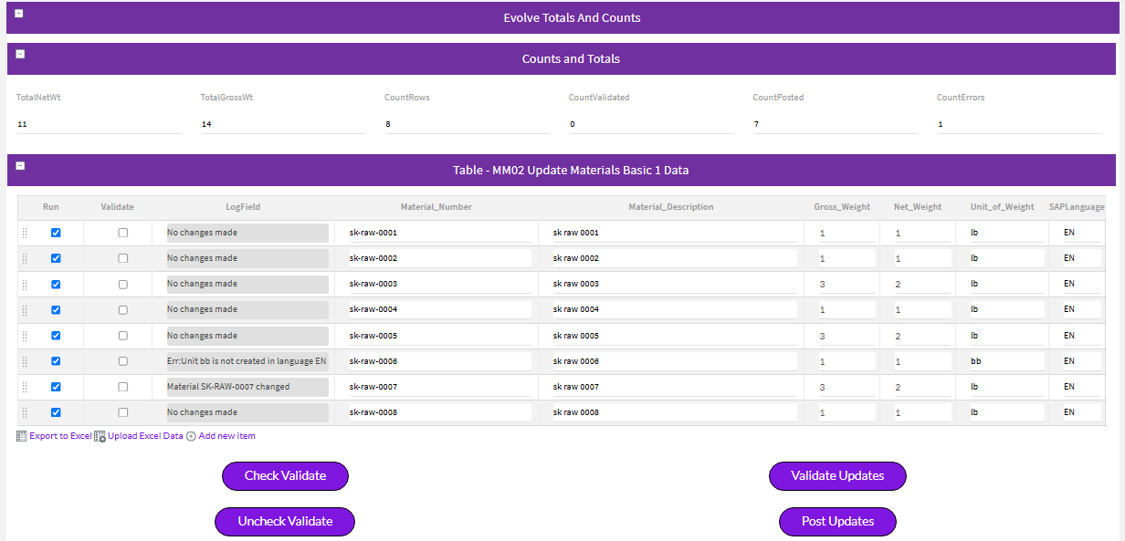
Along to the top are two types of values
· Totals – in this case totaling Gross Weight and Net Weight, but the same concept could total sales or purchase order line items
· Counts – number of rows, count of rows validated (Success), count of rows posted and count of rows with errors
Then we have the rows of data in a repeating table.
At the bottom we have buttons to set to clear the Validate checkbox in the table, as well as buttons to validate or post the rows – which could easily be one button.
Let's unpack how this all works:
Setting values for all rows in the table
· Use a Set a Field Value rule to set values of fields (columns).
· The rule would be triggered from something outside of the table.
· The Check Validate and Uncheck Validate buttons push the "true" or "false" value into the Validate field from the top level, i.e. outside of the table.
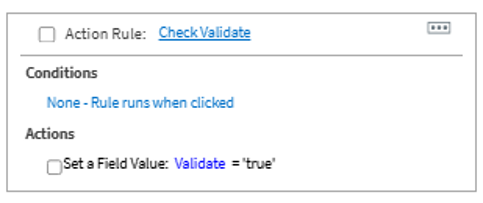
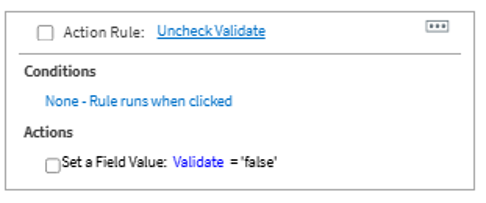
· So when we want to set a value for all rows in a repeating table, simply write a rule using a field value, button, checkbox, etc., to set all row values to that value. The rule is run on something from outside of the table. Think of it like the header pushing values to columns in the line items.
Totals
· For totals, you want to sum the values from the table row fields and "push" it to a total field outside of the table - like line items pushing values up to a header field.
· Use the sum(fieldName) function on fields inside the table to set a value outside of the table
· On Gross Wt and Net Wt in the table I have a rule to SUM the values and push it to the total field
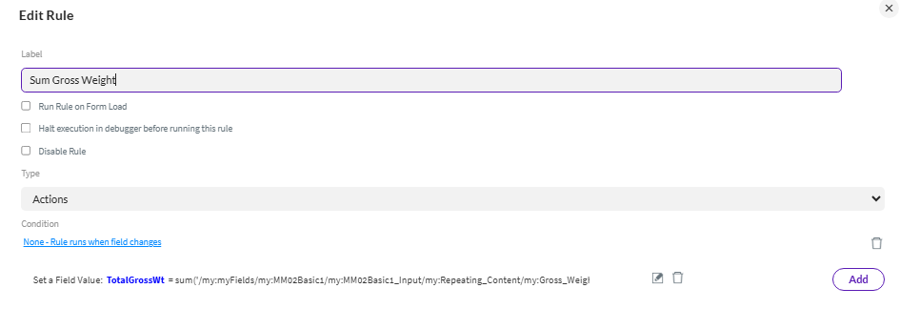
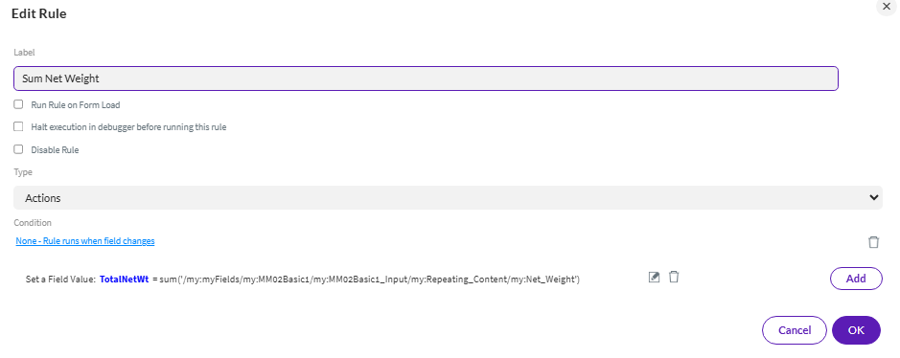
· Again, the logic is set the rule at the field in the table. Use a rule to SUM the values into a field outside of the table.
· The same logic would work on totals in a Journal Entry or Purchase Order or any totals of numeric values.
· In the rule builder choose Insert Function and then sum

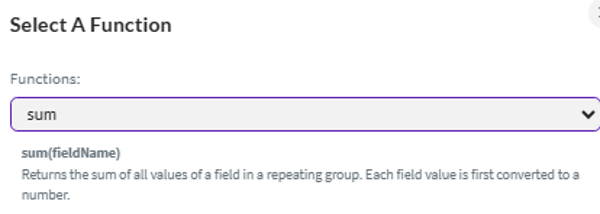
· For the sum(fieldName) function, be sure to use the field name – not the field value
Example: sum('/my:myFields/my:MM02Basic1/my:MM02Basic1_Input/my:Repeating_Content/my:Net_Weight')
Not sum($form.getValue('/my:myFields/my:MM02Basic1/my:MM02Basic1_Input/my:Repeating_Content/my:Net_Weight'))
· As you build the rule, click Insert Field Name not Insert Field Value
Counts
· For counts, you would use a similar approach as Totals but use the count(fieldname,[regex]) function. Please be sure to check the run on form load, as this could run on a script logfield, which gets updated from a web service call
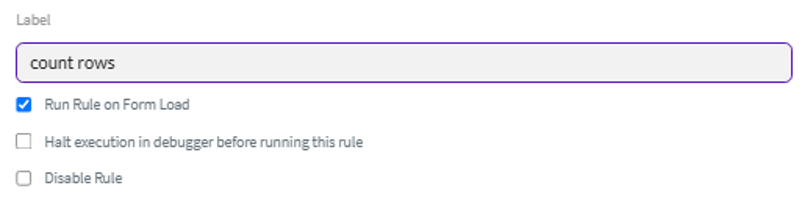
· As needed, use regex to only count rows that match your requirement.
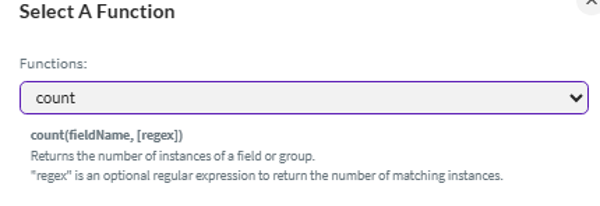
· Count rows – use function count(fieldName) – for my form example, I did this on the material number field in the table but could have picked any field in the table. Again, please use the field name, not the field value.
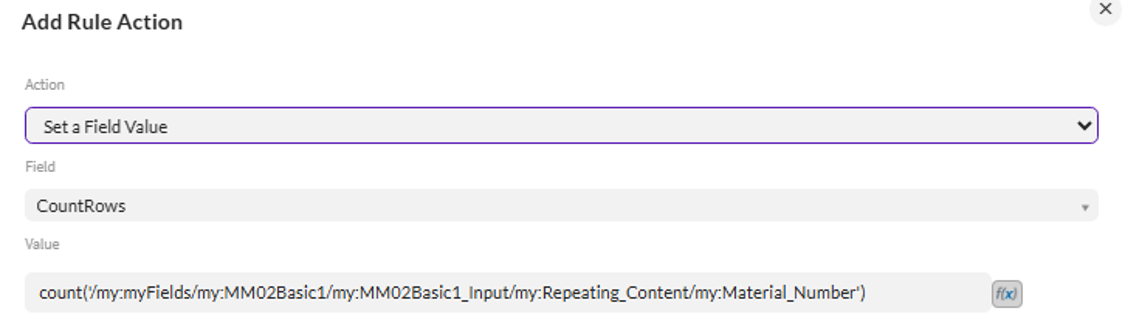
· Counts of validated, posted or errors are all based on the logfield field in the table
· It uses the same count() function as mentioned above, but also leverages the optional regex after the logfield name
o Count Validated looks for 'Success' as the regex in the logfield field.
o Count Posted looks for 'change' as the regex in the logfield – this works for actual changes and no changes made
§ Material SK-RAW-0007 changed
§ No changes made
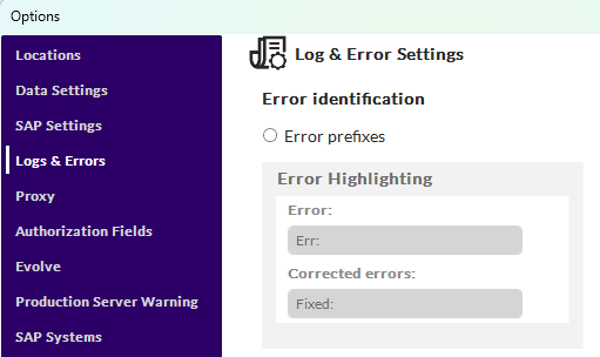
o Count Errors looks for "Err:" as the regex in the Logfield, which is the default error string prefix in case of unsuccessful validations or posts.
§ Ex: Err:Unit bb is not created in language EN
§ The value used is set in Studio – Options - Logs & Errors
· The Regex can be more complex and look for other values – value1 or value2. Example: 'Success|create' – this would allow for one count field to capture the total number of rows with Success or create in the logfield message, thus successfully validated or posted. Think of the "|" pipe as an OR. For those who know regex, go crazy :)
Here is a link to the Evolve User Guide documentation on Functions in Rules
https://help.precisely.com/r/t/1016755466/2023-12-31/Automate-Evolve/pub/Latest/en-US/Automate-Evolve-User-Guide/Global-helper-functions
Quick summary:
§ To set all field (columns) in a table to a value, use a Set Field Value rule on something outside of the table to push values to fields (columns) in the table
§ To total a field (column) value in a table, write a rule with the sum() function on a field (column) in the table you want to total and set the value to a field outside of the table.
§ To count a field (column) value in a table, write a rule with the count() function on a field (column) in the table – often the logfield – and optionally use the regex option to count specific rows. Set the resulting count to a field outside of the table.
I'm attaching the solution example in case it's helpful.
Have you set table column values or used table totals or counts in your solution in an interesting/helpful way? If so, please share below.
Happy solution designing!
Sigrid
------------------------------
Sigrid Kok
*Precisely Software Inc.
------------------------------