Stop Copying Table Data Manually - Let Evolve Do It For You
If your Evolve forms have multiple repeating tables and users need to move data between them, you already know the pain - re-entering data row by row, risking errors, wasting time.
The Copy Table Data rule in Automate Evolve's Solution Builder was built to solve exactly this.
What Does It Do?
The Copy Table Data rule lets you copy rows from a source table to a target table within the same form view - automatically, based on conditions you define.
No scripting. No manual re-entry. Just configure it in Solution Builder and the rule handles the rest.
Key Parameters to Configure
|
Parameter
|
What It Does
|
Required
|
|
Primary Source
|
The repeating table/group you're copying from. Supports single or multiple rows.
|
Mandatory
|
|
Additional Source
|
Non-repeating fields to include alongside the primary source.
|
Optional
|
|
Target Table
|
The table where copied data lands.
|
Mandatory
|
|
Condition
|
Filters which rows get copied - only rows meeting this condition are transferred.
|
Optional
|
|
Mapping
|
Maps source fields to the correct target fields.
|
Mandatory
|
|
Update Type
|
Controls how data is written to the target table (see below).
|
Mandatory
|
Update Type - Choose the Right Mode
- Overwrite Rows - Clears the target table first, then writes from row 1. If the condition isn't met, the target table is cleared entirely.
- Append Rows - Adds copied rows starting from the last available row in the target table.
Example: SAP BOM Component Selection
Here's a live example from an Automate Evolve solution built on SAP.
The scenario: A form retrieves Bill of Materials (BOM) components from SAP into a source table. The user needs to select specific components and add them to a "Finished Good Components List" for further processing.
Step 1 - Select the rows you need from the source table
The source table shows 4 BOM components.
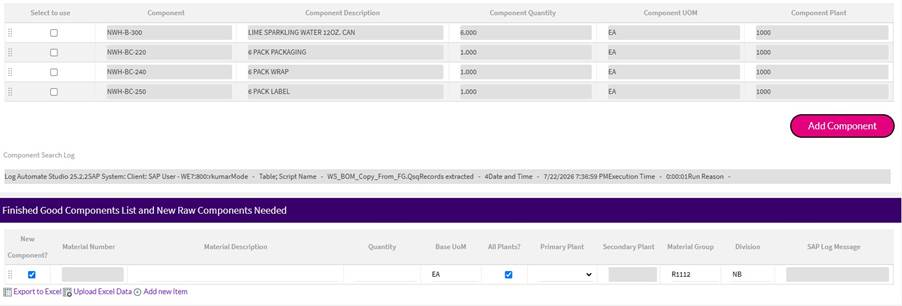
The user checks rows 1, 3, and 4:
- ✅ NWH-B-300 - LIME SPARKLING WATER 12OZ. CAN (Qty: 6)
- ⬜ NWH-BC-220 - 6 PACK PACKAGING (not selected)
- ✅ NWH-BC-240 - 6 PACK WRAP (Qty: 1)
- ✅ NWH-BC-250 - 6 PACK LABEL (Qty: 1)
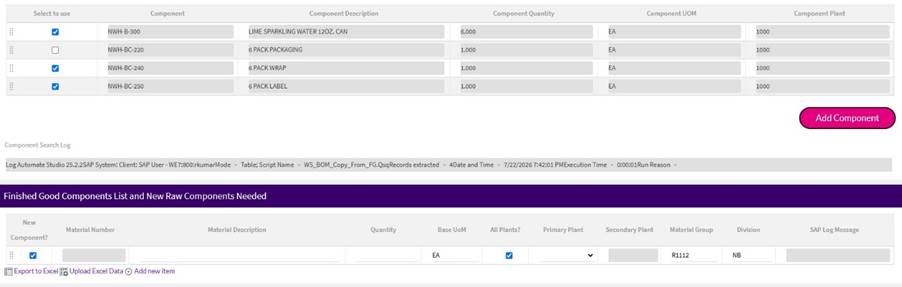
The user clicks Add Component button on which the Copy Table Data rule is configured.
Step 2 - Copy Table Data rule fires
The target table - initially empty with pre-defined defaults - is now populated with exactly the 3 selected rows:
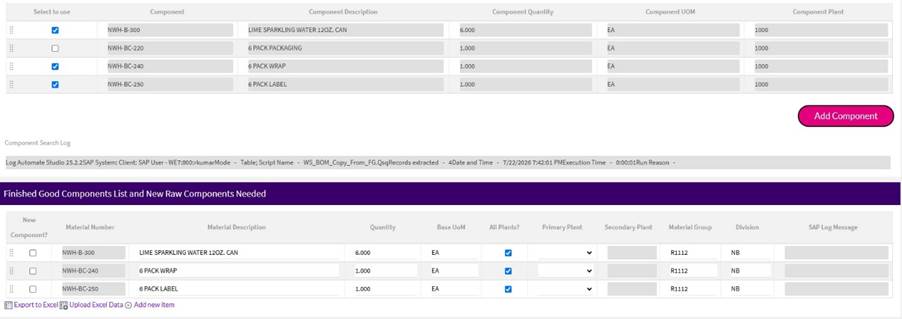
|
Material Number
|
Description
|
Qty
|
UOM
|
Material Group
|
Division
|
|
NWH-B-300
|
LIME SPARKLING WATER 12OZ. CAN
|
6.000
|
EA
|
R1112
|
NB
|
|
NWH-BC-240
|
6 PACK WRAP
|
1.000
|
EA
|
R1112
|
NB
|
|
NWH-BC-250
|
6 PACK LABEL
|
1.000
|
EA
|
R1112
|
NB
|
NWH-BC-220 (6 PACK PACKAGING) was not selected - and it was not copied. Clean, precise, no extra logic needed.
The pre-defined default values (Material Group, Division, Base UoM) set in the target table were automatically inherited by all copied rows - exactly as mapped.
Things to Keep in Mind
· Source and Target fields must have matching data types - Date to Date, Text to Text, etc.
· Source and Target tables must be in the same form view.
· The following elements cannot be copied:
o Labels
o Attachments
o Selectable Tables with Pagination.
· Rules do not execute on the Target table after data is copied.
Key Benefits
- Saves time - tied directly to the BOM/SAP high-volume context
- User-controlled selectivity - user can choose which rows to copy and which ones to leave
- Eliminates manual entry errors - source data is already validated, no re-typing risk
- Flexible for multiple use cases - Overwrite vs. Append for different scenarios
- Preserves target table defaults - Only touches the mapped fields of source and destination table.
- No scripting required - empowers solution builders without dev dependency
------------------------------
Rishav Kumar
*Precisely Software Inc.
------------------------------