Hi Renette
This is much like cost center hierarchy. You can set accessibility mode and will have tables you can navigate instead of the graphical hierarchy.
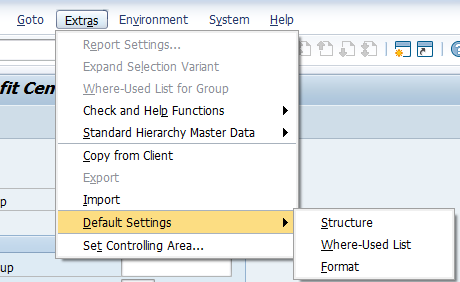
On the first screen choose Extras, Default Settings, Format and check the box.
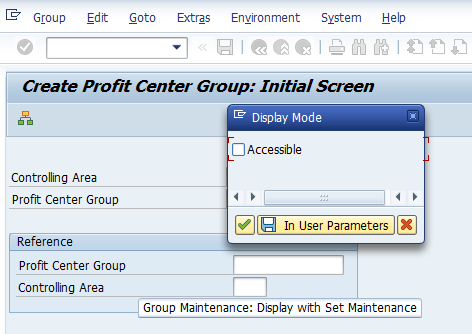
You can use binoculars to find a row and there are insert and delete options. Set the accessiblity off afterwards so the end user who goes into the GUI won't have an issue with the display. For me this was 3 scripts - turn on accessibility - do your updates - turn off accessibility.
Note my screen shot is for cost center hierarchy because I can't edit the PC one - but the look and options are the same. :)
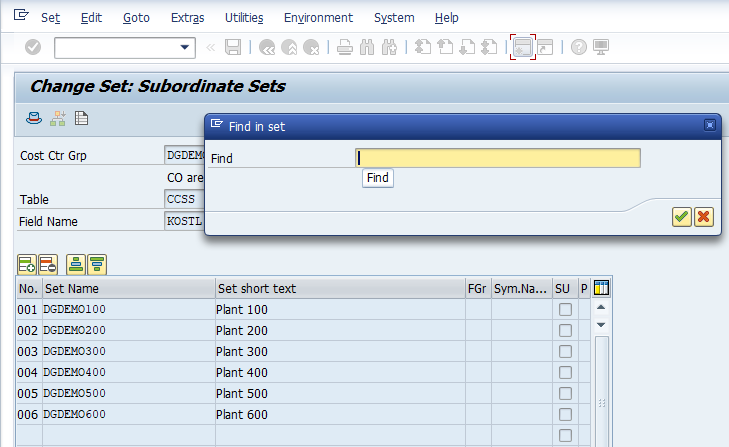
give it a try. I used this for an Evolve form solution to maintain both cost centers and their placement in the hierarchy - and another one to maintain the hierarchy itself. SAP doesn't make it easy, but it's possible.
I think there may be BAPIs but they're limited in what they do/how they do it. I only used one to get the hierarchy at a specific node in my solutions.
Best Regards,
Sigrid
------------------------------
Sigrid Kok
*Precisely Software Inc.
------------------------------