Sorry it was frustrating, Kurt. I've grown a few grey hairs and lost some these past 16+ years myself. :)
Glad that it works for you now, and I hope that you posting this question here will help someone in the future.
*Precisely Software Inc.
Original Message:
Sent: 05-27-2026 15:34
From: Kurt Marshman
Subject: Promoting Description for Fields from a Reference data list
Sigrid,
This was the issue - "First thing - select to automatically retrieve when form is opened. When you place rules on fields from a reference data list, this seems to be required".
Spent 7 hours of my life and a little more grey in my hair over a checkbox.
I appreciate your time and your examples and thank you.
Kurt
------------------------------
Kurt Marshman
Old World Industries, LLC
------------------------------
Original Message:
Sent: 05-27-2026 14:12
From: Sigrid Kok
Subject: Promoting Description for Fields from a Reference data list
Hi Kurt
Thanks for sharing. I can see you tried a lot of things on your own, which I admire!
First thing - select to automatically retrieve when form is opened. When you place rules on fields from a reference data list, this seems to be required
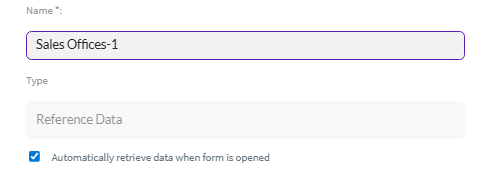
I got a bit confused by multiple fields called the same thing and multiple data sources and JavaScript, so I cleaned it up.
I then re-established the rule on the dropdown to set the description field:
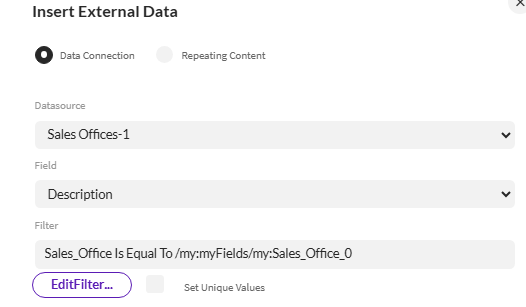
Filter

It will look like this in the rule editor

And it works. :)

I'm attaching your simplified solution in a zip file. I hope this helps.
Best Regards,
Sigrid
------------------------------
Sigrid Kok
*Precisely Software Inc.
Original Message:
Sent: 05-27-2026 11:24
From: Kurt Marshman
Subject: Promoting Description for Fields from a Reference data list
Sigrid,
I appreciate your example. I was able to get it up and running with no issue, however I can not replicate it and can not figure out why.
Attached is my example.
Your thoughts.
Thanks,
Kurt
------------------------------
Kurt Marshman
Old World Industries, LLC
Original Message:
Sent: 05-26-2026 14:41
From: Sigrid Kok
Subject: Promoting Description for Fields from a Reference data list
Hi Kurt
Thanks but JavaScript is not required for this. Can you share your solution?
I'm attaching a simple one that I tried this on - the reference data list and solution - in case it helps.
Best Regards,
Sigrid
------------------------------
Sigrid Kok
*Precisely Software Inc.
Original Message:
Sent: 05-22-2026 15:59
From: Kurt Marshman
Subject: Promoting Description for Fields from a Reference data list
Here is the actual javascript for the field:
$form.setValue('/my:myFields/my:Sales_Office_Description',$form.getExternalValue("Sales Office","aDescription", '@aSales32Office = "'+$form.getValue('/my:myFields/my:TR_BP_G_C/my:TR_BP_G_C_Input/my:Sales_Office')+'"',false));
------------------------------
Kurt Marshman
Old World Industries, LLC
Original Message:
Sent: 05-22-2026 14:52
From: Kurt Marshman
Subject: Promoting Description for Fields from a Reference data list
Sigrid,
I appreciate your time and your post. I have tried to implement your suggestion several times and I am not getting any data response back from the Data Connection.
I even tried a direct call (probably 8 different ways) and here is an example:
var val = $form.getExternalValue('Sales Office', 'Description', 'Sales Office=0075');
$form.setValue('/my:myFields/my:Sales_Office_Description', val);
Thoughts on why I can not get any data returned?
Kurt
------------------------------
Kurt Marshman
Old World Industries, LLC
Original Message:
Sent: 05-21-2026 19:59
From: Sigrid Kok
Subject: Promoting Description for Fields from a Reference data list
Hi Kurt
You'd have to pull in the partner function description from the reference data list into a form field in order to promote it. Since you're pulling in the partner function code, that would be simple to do with a rule setting the description field to an external source.
My example is a reference data list for company codes with code and name and a bunch of other fields.
I select company code from a drop down from a reference data list. When I do, I have a rule on the company code field to set another field to hold the description.
Use a Set field value action and choose insert external data

Select the reference data list, the value you want to pull - the description - and then use the IF statement to match the reference data list "code" to the form field "code" (it fills in the "xpath" for you to the form field)
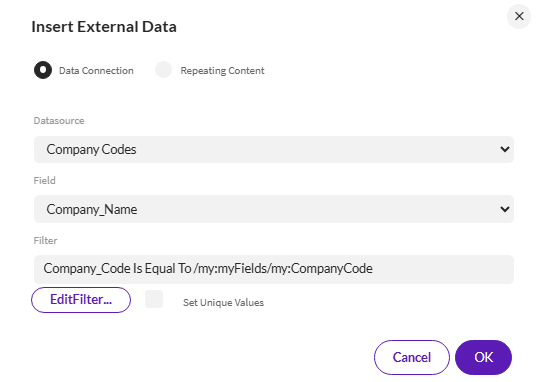
So when I pick company code it sets the description from the reference data list in a form field

Promote both fields.
Hope that helps,
Sigrid
------------------------------
Sigrid Kok
*Precisely Software Inc.