for as far it might help... with a recording made on MM01/MM02 you could try this;
Record going to Salesorg1 view, enter the Sales Area data, arrived in that screen (where SAP shows you only 2 Tax data classifications), enter in the command bar "=PB07".
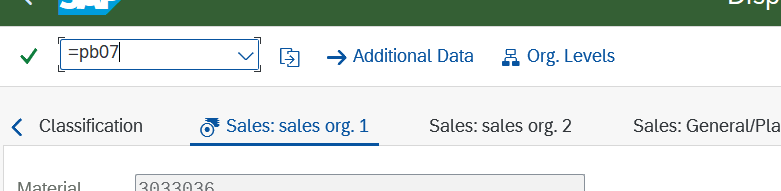
This will open another screen where all tax classifications are shown and you can handle them with row numbers. As far as I know, the line up of the Tax Classifications is always the same per Sales Org. If you want to change the third one (of 5) for example, you can set row 01 and 02 to skip, 03 to changed value and 04, 05 to skip again. Potentially with if condition on form field value.
------------------------------
Ed Meiners
Lead Consultant MDIM
Wessanen Nederland Holding BV
Amsterdam
------------------------------
Original Message:
Sent: 03-19-2026 16:25
From: Sigrid Kok
Subject: how to update only tax classification view
Hi Derek
Thanks for sharing the details. Took a quick look at the scripts and I see this in the log field - so you're close. :)
Log Winshuttle Studio 12.1
SAP System: Client: SAP User - Q02:400:DSAYRES
Script Name - mdm_BAPI_MATERIAL_SAVEDATA_update tax classifications.Txr
Mode - DirectTemplate
Start Row - 2 End Row - 0
Number of Errors - 0 Records Uploaded - 1
Date and Time - 3/19/2026 9:45:02 AM
Execution Time - 0:00:06
Run Reason - Running mdm_BAPI_MATERIAL_SAVEDATA_update tax classifications.Txr at 09:44 AM
But because you didn't tell which area in SAP you were updating in Headdata, it didn't do the update. Because this BAPI is massive, it requires you select the area you are updating in Headdata, and then in the various tables select the fields. If you have a matching "X" table, you have to also tell SAP which fields you are uploading - but that is not needed for the tax classification - just the headdata settings.
I think you need to select Sales View in Headdata and set it to X (capital "X") to tell SAP you are updating data in that area.
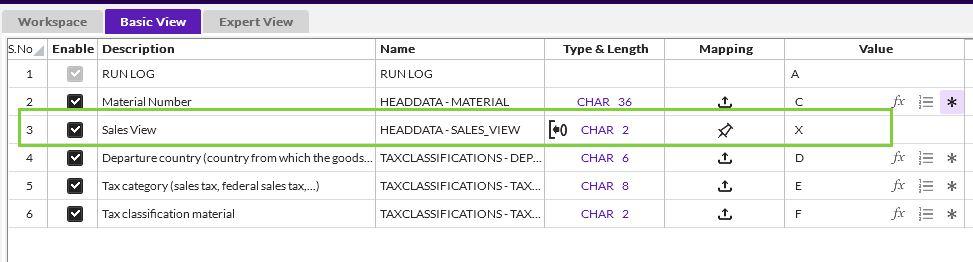
I just ran your script with the above and it worked in my system.
Please give it a go.
Best Regards,
Sigrid
------------------------------
Sigrid Kok
*Precisely Software Inc.
------------------------------
Original Message:
Sent: 03-19-2026 11:38
From: Derek Sayres
Subject: how to update only tax classification view
Hi Sigrid,
when I downloaded your script and template it did not work for me. I created a new one, leaving the loop in it, but it's still not updating. Any chance it's missing some additional data that needs to be passed to get the BAPI to work?
Thanks,
Derek
------------------------------
Derek Sayres
Manager, Data Analytics
Entegris
Original Message:
Sent: 11-26-2024 11:03
From: Sigrid Kok
Subject: how to update only tax classification view
Hi Deekshita,
.If you're only looking to update certain tax country/tax classes
- You can try using GUI scripting if you are only searching on country or tax class, but you can't use both to position to the right row/tax class. IndexedIf's only support one index.
- You can use a BAPI script, which I prefer
Here's an example BAPI script in which I removed the loop, but you can add a loop to update multiple tax classes.
Best Regards,
Sigrid
------------------------------
Sigrid Kok
Precisely Software Inc.