Hi Renette,
We have reporting views in the Evolve DB.
If you want to see that at the process level, please use this view: [yourEvolveDBName].[dbo].[RPT_ProcessReportingDetailsView]
If you want to see it at the activity (task) level, please use this view: [yourEvolveDBName].[dbo].[RPT_AssignmentView]
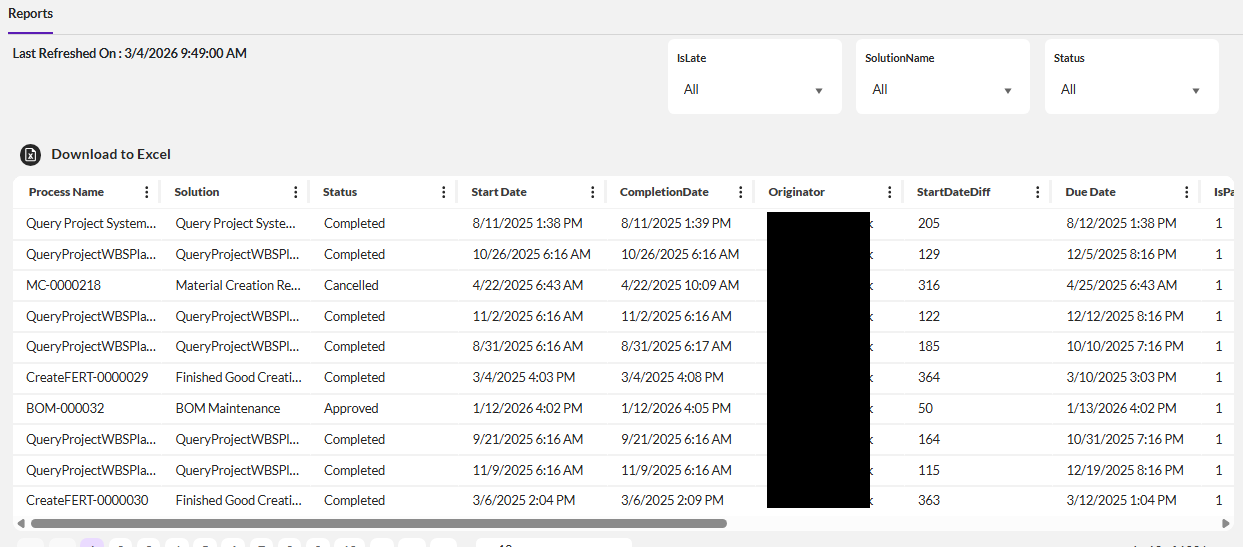
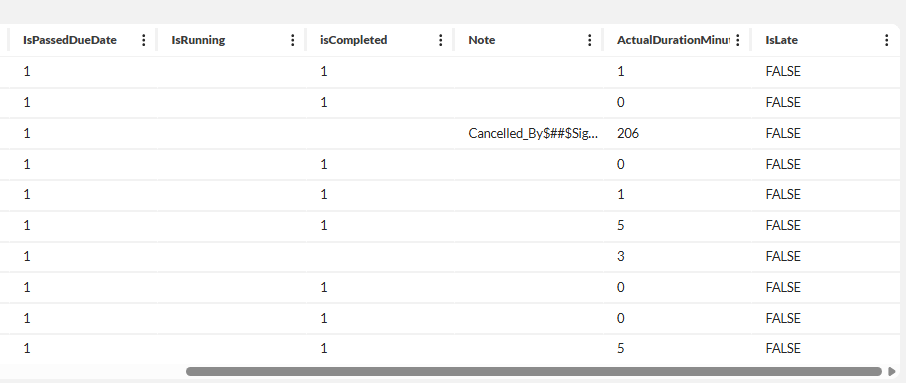
Here's an example query that can be used to generate a tabular Evolve Report or used to feed reporting tools like PowerBI
SELECT
[RPT_ProcessReportingDetailsView].[ProcessName] AS ProcessName
,[RPT_ProcessReportingDetailsView].[SolutionName] as SolutionName
,[RPT_ProcessReportingDetailsView].[AppName] as AppName
,[RPT_ProcessReportingDetailsView].[LibraryName] as LibraryName
,[RPT_ProcessReportingDetailsView].[Status] as Status
,[RPT_ProcessReportingDetailsView].[CreationDate] as StartDate
,[RPT_ProcessReportingDetailsView].[CompletionDate] as CompletionDate
,[RPT_ProcessReportingDetailsView].[Originator] as Originator
,[RPT_ProcessReportingDetailsView].[CreationDateDiff] as StartDateDiff
,[RPT_ProcessReportingDetailsView].[DueDate] as DueDate
,[RPT_ProcessReportingDetailsView].[IsPassedDueDate] as IsPassedDueDate
,[IsRunning] as IsRunning ,[IsCompleted] as isCompleted, Note as Note
,CASE WHEN ([RPT_ProcessReportingDetailsView].[CompletionDate] is Null) THEN DateDIFF(MINUTE,[RPT_ProcessReportingDetailsView].[CreationDate],GETDATE()) ELSE DateDIFF(MINUTE,[RPT_ProcessReportingDetailsView].[CreationDate],[RPT_ProcessReportingDetailsView].[CompletionDate]) END AS ActualDurationMinutes
,CASE WHEN ( [RPT_ProcessReportingDetailsView].[CompletionDate] > [RPT_ProcessReportingDetailsView].[DueDate] ) or ( [RPT_ProcessReportingDetailsView].[CompletionDate] is Null and GETDATE() > [RPT_ProcessReportingDetailsView].[DueDate] ) THEN 'TRUE' ELSE 'FALSE' END AS IsLate
FROM [RPT_ProcessReportingDetailsView] /* do not put the db name with the table/view name */
where [RPT_ProcessReportingDetailsView].[AppName] = 'Sigrid'
and [RPT_ProcessReportingDetailsView].[CreationDate] between GETDATE ()-365 and GETDATE()
Here's an example
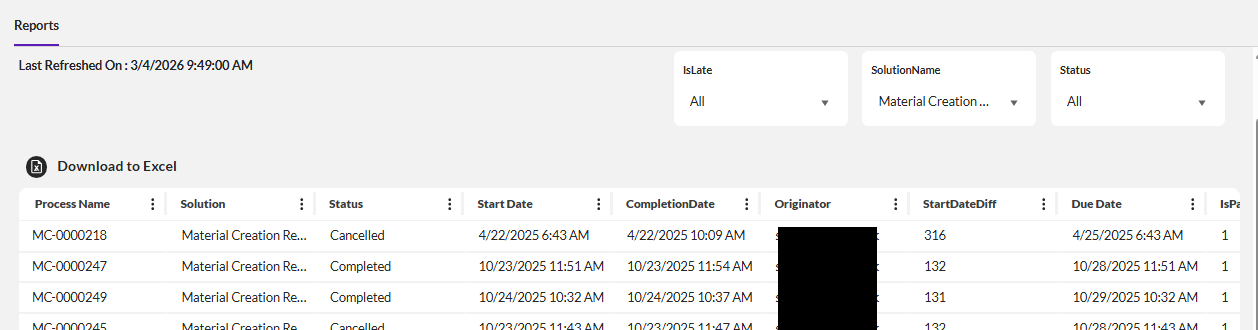
With filter set to a specific solution
Notes
- I fixed the appname
- You can fix the SolutionName if you like or use it as a filter like I have above
- I used a date range to limit it to a year from today but you can remove or set it to a timeframe you like.
- You can choose not to display all of the columns - such as appname since it's fixed, libraryname would just be forms so I skipped it
- I calculated some new columns - actual duration as minutes (you could do hours or days) and IsLate - you don't have to do that
- do NOT include the DB name with the table for an Evolve Report
- change the WHERE criteria as needed.
- you can use COUNTs to not show the details, as needed
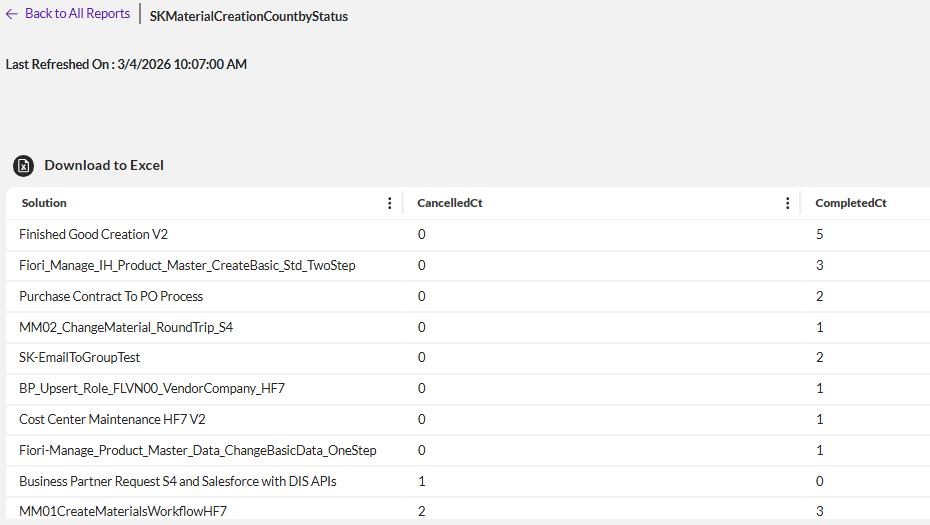
For just counts I did this
Select RPT_ProcessReportingDetailsView.SolutionName AS SolutionName,Count(Case RPT_ProcessReportingDetailsView.Status When 'Cancelled' Then 1 Else Null End) AS CancelledCt,Count(Case RPT_ProcessReportingDetailsView.Status When 'Completed' Then 1 Else Null End) AS CompletedCt
FROM [RPT_ProcessReportingDetailsView]
where [RPT_ProcessReportingDetailsView].[AppName] = 'Sigrid'
and [RPT_ProcessReportingDetailsView].[CreationDate] between GETDATE ()-365 and GETDATE()
GROUP BY SolutionName
I didn't filter on a specific solution but you could. It looks like this
A link to the doc for Evolve reports https://help.precisely.com/r/t/1016755385/2025-06-09/Automate-Evolve/pub/Latest/en-US/Automate-Evolve-User-Guide/Reports?tocId=sY5OqPtR_LtZYjEF8pq39g
I hope this helps.
Best Regards,
Sigrid
------------------------------
Sigrid Kok
*Precisely Software Inc.
------------------------------