Thank you Vanessa. Your time is appreciated.
Original Message:
Sent: 06-26-2026 11:17
From: Vanessa Kutasi
Subject: Different Scripts on Different Excel Tabs
If you are using only the desktop application and not also using the Foundation or Evolve applications in conjunction, then my previous advice won't help. If the link Archana provided doesn't add clarity, you may want to open a support ticket.
------------------------------
Vanessa Kutasi
Evolve Admin./Application Analyst II
IDEXX
USA
------------------------------
Original Message:
Sent: 06-26-2026 09:45
From: Carl Hirst
Subject: Different Scripts on Different Excel Tabs
I'm on Precisely Automate Studio and it errors saying that attachments cannot be added for Transactions XK01 or MK01.
------------------------------
Carl Hirst
Barnsley Metropolitan Borough Council
------------------------------
Original Message:
Sent: 06-25-2026 12:09
From: Vanessa Kutasi
Subject: Different Scripts on Different Excel Tabs
Ah, I see what you mean!
Are you on Foundation?
If so - here's what you want to do.
Attached the template to the XK01 script, point the script to the XK01 sheet/tab & publish the script to Foundation
Download a copy of the published template from Foundation
Attached the downloaded template to MK01, point the script to the MK01 sheet/tab and publish the script to Foundation
Now, download a copy of the MK01 template from foundation and you will see both scripts embedded into the template.
When you are logged into Foundation through the excel template, you will see both scripts embedded. As you switch between the XK01 and MK01 tabs, the script will change with it. The correct script would always run in association to the appropriate tab.
If you are on Evolve - I have found this is no longer possible as Evolve strips any existing scripts from the template when it is published.
------------------------------
Vanessa Kutasi
Evolve Admin./Application Analyst II
IDEXX
USA
------------------------------
Original Message:
Sent: 06-25-2026 11:46
From: Carl Hirst
Subject: Different Scripts on Different Excel Tabs
Hi Vanessa
I feel I am missing something really obvious as would have thought it fairly easy to get the outcome desired and the set-up seems correct.
On the attached document (VMD Creation - Master) I have 3 tabs/sheets. I need a script to sit on the sheet for XK01 and one for the sheet MK01.
I have mapped both scripts and can chose them by removing the other before running, but a previous version (also attached- Winshuttle Vendor Form Master) saved 2 different scripts to the 2 different sheets. The old version was created around 10 years ago, hence the need to update things.
Any advice would be greatly appreciated.
Kind regards
Carl
------------------------------
Carl Hirst
Barnsley Metropolitan Borough Council
------------------------------
Original Message:
Sent: 06-25-2026 09:07
From: Vanessa Kutasi
Subject: Different Scripts on Different Excel Tabs
Hi Carl,
You can have the outputs for multiple scripts/queries in a single sheet, you just want to make sure the mapping isn't overlapping. If you want the outputs for each script to be completely separate, I would recommend separate sheets within the template.
In the attached example, we have multiple queries and scripts mapped to the same sheet in the template.
Example - Special Pricing tab
- Query 1 - uses cell B3 for criteria, then outputs to columns G & H, log column is mapped to column Z
- Query 2 - uses cell B3 for criteria, then outputs to columns I & J, log column is mapped to column AA
- Script 1 - uploads columns L - O, log column mapped to R
- Script 2 - uploads columns S - V, log column mapped to Y
------------------------------
Vanessa Kutasi
Evolve Admin./Application Analyst II
IDEXX
USA
------------------------------
Original Message:
Sent: 06-25-2026 04:24
From: Carl Hirst
Subject: Different Scripts on Different Excel Tabs
Hi Vanessa
Thank you so much for coming back to me.
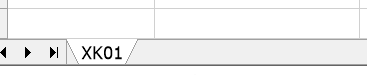
From what I can see, I have things set up as per your screenshot. The only difference I see is that you have the multiple tabs within the application. I do not, as I created both scripts separately. Do I need to add a second sheet to this XK01 script and re-map for MK01:
Apologies, I am quite new to this so am learning as I go along.
Many thanks
Carl
------------------------------
Carl Hirst
Barnsley Metropolitan Borough Council
------------------------------
Original Message:
Sent: 06-24-2026 08:27
From: Vanessa Kutasi
Subject: Different Scripts on Different Excel Tabs
Hi Carl,
You will want to save the script with the correct tab showing. When I have multi sheet processes, I always use the lock sheet feature. This way, if someone has the script pointed to the wrong sheet (or template), they will receive a warning and then the script will adjust to the proper sheet and execute (provided it is the correct template). 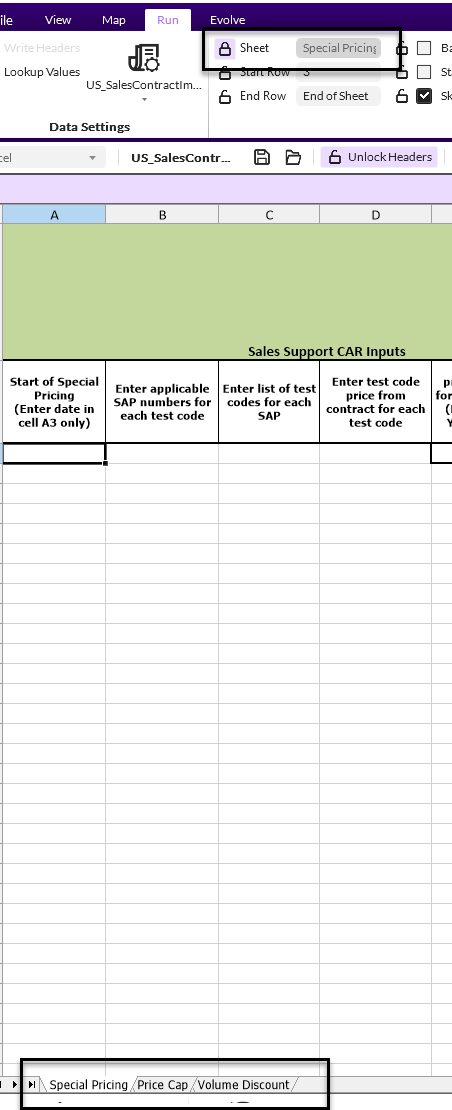
You can also chain them, but execute separately if you wish. Just use the chain setting "All from Individual Scripts". Once the first script in the chain completes, you will receive a pop up box to log into SAP again, at which point you can do so and continue running, or cancel and the chain ends.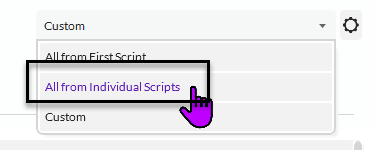
------------------------------
Vanessa Kutasi
Evolve Admin./Application Analyst II
IDEXX Operations, Inc.
USA
------------------------------