Automate

Welcome to the Automate community!  Please feel free to start a discussion in the discussion tab or join in a conversation.

Here are some useful links where you can find more information:

Product Announcements  Ideas Portal

Discussions

Members

Resources

Events

 View Only
  • 1.  Date setting discrepancies between runners/developers

    Posted 9 hours ago

    We have a new Runner in Europe who is having issues with date errors in existing scripts. 

    The scripts in question will be primarily dealing with the dates in the material master, PIR, and Source list and were developed

    User's SAP settings: 
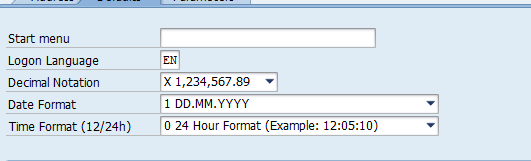
    Does he need to set his Automate Studio settings to "Override regional settings for dates?" 

    Most of the dates in the scripts for this department involve validity dates:  X-chain, d-chain, source list, purchasing info record.  The most common dates for upload are TODAY and 12/31/9999.

    Between user SAP date settings, user Automate Studio date settings, transform formulas, and Excel formulas, what needs to be done to make sure these and future scripts are built for global users?

    Thank you for any advice you can provide.  


    ------------------------------
    Katherine Cobb
    Fender Musical Instruments Corporation
    ------------------------------


  • 2.  RE: Date setting discrepancies between runners/developers

    Employee
    Posted 5 minutes ago

    Hi Katherine,

    Thanks for your message.

    For global Automate Studio scripts, date handling should be standardized rather than relying on each user's Windows regional settings. For the new Runner in Europe, enabling"Override regional settings for dates" and using a consistent date format across all users is recommended. 

    To avoid date-related issues in Material Master, PIR, and Source List scripts:

    • Store dates as true Excel date values whenever possible.
    • Use formulas such as =TODAY() and =DATE(9999,12,31) instead of hardcoded text dates.
    • Avoid ambiguous formats like MM/DD/YYYY or DD/MM/YYYY.
    • Use a consistent format (preferably one agreed across the organization) and document it in the template.
    • Review SAP user date settings, Studio date settings, Excel formatting, and any transformations used in the script when troubleshooting existing date errors.

    Following these practices will help ensure scripts work consistently for users across different regions.

    https://help.precisely.com/search?content-lang=en-US&query=Override%20regional%20settings%20for%20dates&value-filters=ProductFamily_clean~%22Automate%22

    In case of any errors, please open a support ticketket.

    Thanks
    Jagat


    ------------------------------
    jagat kaushal
    *Precisely Software Inc.
    ------------------------------