Automate

Welcome to the Automate community!  Please feel free to start a discussion in the discussion tab or join in a conversation.

Here are some useful links where you can find more information:

Product Announcements  Ideas Portal

Discussions

Members

Resources

Events

 View Only
  • 1.  ck74n Runtime error RAISE_EXCEPTION has occurred

    Posted 09-21-2022 09:31
    hi, when running script for ck74n, I get error message 
    Runtime error RAISE_EXCEPTION has occurred
    when running in debug no error message appears, but I have to do a manual save in the transaction,and then the transaction is ok,  is there any possibility to avoid this error message ? 
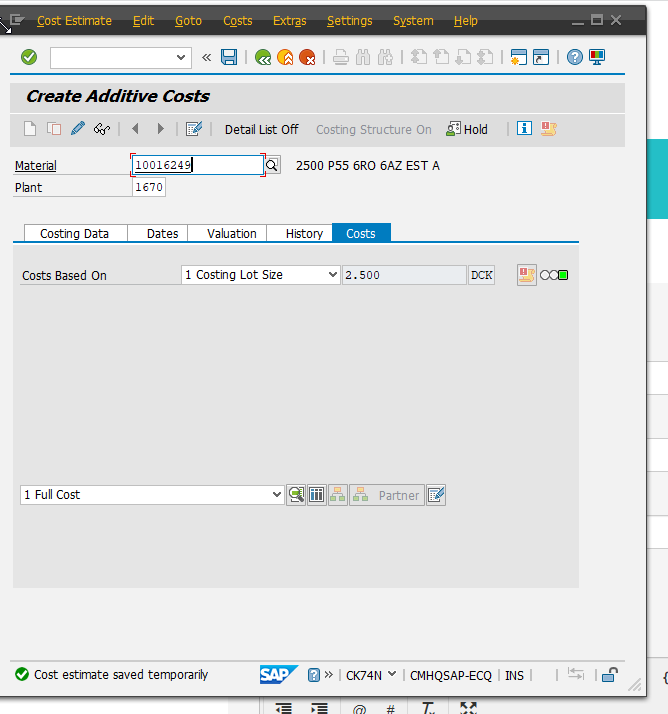
    I tried to record the script in batch mode, but this was not possible to execute
    attached you can find my normal script 
    kristel


    ------------------------------
    Kristel Smeyers | SAP Specialist
    Cartamundi | +3214445944
    ------------------------------

    Attachment(s)


  • 2.  RE: ck74n Runtime error RAISE_EXCEPTION has occurred

    Employee
    Posted 09-27-2022 12:39
    Hi Kristel,

    I looked at the script. Go to Expert View and disable row 27 (uncheck the box):


    If that doesn't work, go to the Properties panel on the right and change the recording mode from Standard (Non-Batch with SAP Controls) to Standard (Batch):


    Let me know if either works. 

    Thanks,

    ------------------------------
    Maria Simpson | Senior Sales Engineer
    Winshuttle North America | 4255276647
    ------------------------------


  • 3.  RE: ck74n Runtime error RAISE_EXCEPTION has occurred

    Posted 09-28-2022 10:53
    Hi Maria, 
    the first option, disable line 27 did not work.
    but the second option, changing recording mode to standard batch, did work,
    the update was done in SAP, thank you very much for your advice
    kristel

    ------------------------------
    Kristel Smeyers | SAP Specialist
    Cartamundi | +3214445944
    ------------------------------