Thank you for getting back. I suggest creating a support ticket at support.precisely.com, and one of the engineers will get on a call with you to debug or walk you through the steps.
*Precisely Software Inc.
Original Message:
Sent: 07-29-2026 08:39
From: Andrew Lewis
Subject: BP Customer Test
Hi Jagat
Thanks for responding so quickly. I can confirm that the AFM is installed and that we are currently running on Studio 20.03.2 (waiting to upgrade when authorised).
I have created a script with the long text functionality but it errors out because the fields are grey. How do I overcome this please if I am using the long text feature in S4 HANA to include all of the fields that we have configured for the company?
I have attached the script so please let me know what I am missing.
Thanks
------------------------------
Andrew Lewis
Global Master Data Analyst
QuidelOrtho
Wales
United Kingdom
www.QuidelOrtho.com
------------------------------
Original Message:
Sent: 07-27-2026 06:12
From: jagat kaushal
Subject: BP Customer Test
Hi Andrew,
Please confirm with your SAP team that AFM is installed on your SAP server and that the AFM transports have been imported into your working client, not client 000.
Thanks
Jagat
------------------------------
jagat kaushal
*Precisely Software Inc.
------------------------------
Original Message:
Sent: 07-24-2026 05:02
From: Andrew Lewis
Subject: BP Customer Test
Hi @Sigrid Kok
I also want to do the same but I have an error each time I try to add the long text functionality, stating that it is not available for this Transaction? How do I overcome this please? We have the function module installed and currently running on 20.3.06 for the time being.
------------------------------
Andrew Lewis
Global Master Data Analyst
QuidelOrtho
Wales
United Kingdom
www.QuidelOrtho.com
------------------------------
Original Message:
Sent: 01-30-2026 13:16
From: Sigrid Kok
Subject: BP Customer Test
Hi Steve
Do you have the Function Module installed in your SAP system? If so, you should be able to use the built-in long text feature - here is a link to the documentation:
https://help.precisely.com/r/t/1757358526682/2025-09-09/Automate-Studio/Connect/Latest/en-US/Automate-Studio-with-Studio-Administrator-User-Guide/Record-long-text
In Studio, just record opening a BP and then close it (unless you are uploading more data). Then on the Map tab you can add it. The list may vary based on your system depending on which long text options you have configured in your SAP system:
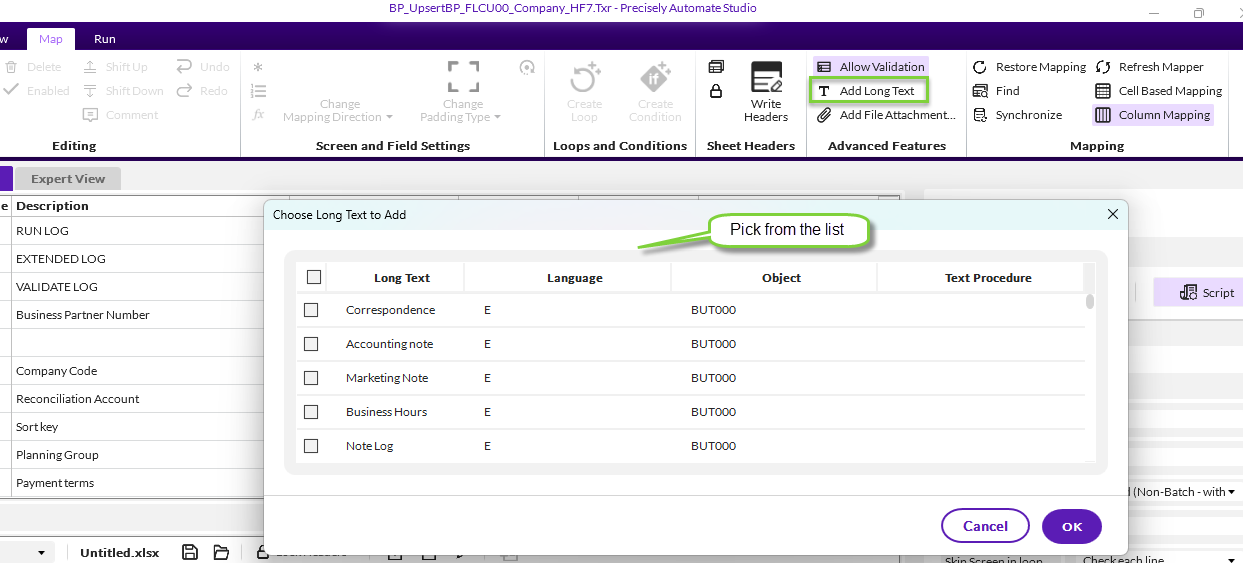
It will add new fields for each text type - the BP number, the language and long text. If company related, it will add the company code.

Just map them to whatever columns you need, and you can leave language fixed if only working in one language.
Hope that helps,
Sigrid
------------------------------
Sigrid Kok
*Precisely Software Inc.
------------------------------