Hi All
Got a request from a customer for help on how to record CJ01, so I'm including what I sent, in case it helps someone else.
Here are the recording steps I would use:
- Enter project number and profile
- Enter all of the the header aka project definition info on all tabs neede
- Go to the WBS elements page either by clicking the triangle or navigating Goto WBS element overview
Loop start (this is where your loop will start)
- Enter your first wbs element on the bottom row
- Place your cursor in the wbs element column and click Edit – object – position.
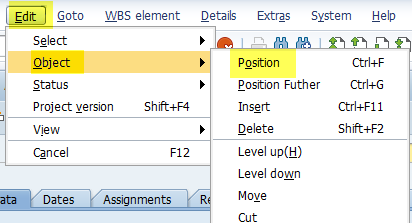
- Enter the same WBS element name and click the position button
-
- Click details button at the bottom to go into the WBS details you are positioned on
-
- Enter all of the details for the WBS element on all tabs you need
- Go back to the first tab before going back to the WBS overview page. Either Click Basic data or click the icon on the right and choose Basic data. Why? Because it remembers where you left off on the tabs, so the 2nd line will fail because you'll be on the control tab or some other tab, when you want it to be on the first tab each time. Then click the checkbox to close the WBS details
-
- Optional – click Unselect on the bottom of the WBS overview, as the WBS you were just on is still selected
-
- Then hit page to bottom (double down arrow) & Then hit page down (single down arrow) to make sure you're on a blank line for the next WBS element.

Loop end – this is where you loop ends
- Then hit save to save the project
Attaching a simple example that created this project – multiple WBS's and multiple levels.
Note I have quirk on my system where when I go to the 2nd tab of the WBS detail, I get a popup for a WBS profile entry. So I put an IF statement around it and only pass up the value if it's filled in. So only pass that up for the first one if you have the same pop-up.
IDK if you'll need that or not.
Cheers,
Sigrid
------------------------------
Sigrid Kok
PSE | Winshuttle NA
------------------------------