Automate

 View Only
  • 1.  Popup Not Recognized in Script (CO01)

    Posted 01-02-2020 15:29
    We are attempting to automate the creation of production orders in CO01. The script works fine until it becomes time to save. Upon saving, I receive the error message below. This popup is not present within the script, even when showing all disabled fields. I am able to generate this message one of two ways when entering the production order: By entering all values, and then clicking save; or by entering all values, then Functions ->Cost.

    Pulling the technical info through F1 yields a different, much smaller info set than with other windows. I would like to have this available in the script, as it will otherwise error out before completing. Any help would be greatly appreciated. Thank you.
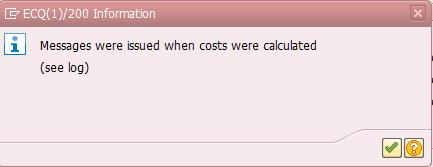
    Cost Error


    ------------------------------
    Robert Hawkins | Corporate Planning Manager
    Florida Tile Inc | 5028392055
    ------------------------------


  • 2.  RE: Popup Not Recognized in Script (CO01)

    Posted 01-02-2020 15:35
    I forgot to mention- We are on version 12.0, and are unable to have the function module installed. Thank you.

    ------------------------------
    Robert Hawkins | Planning Analyst
    Florida Tile Inc | 5028392055
    ------------------------------


  • 3.  RE: Popup Not Recognized in Script (CO01)

    Posted 01-03-2020 10:22
    Hi Robert,

    Can you send a screenshot of what is returned when gathering the F1 techincal information? What recording modes have you tried? If you can also send us a copy of the script we can take a look.

    Thank you!
    -Shelby

    ------------------------------
    Winshuttle Support |
    Winshuttle North America |
    ------------------------------


  • 4.  RE: Popup Not Recognized in Script (CO01)

    Posted 01-03-2020 10:41
      |   view attached
    Shelby-
    The technical information is in the original post(and below). Its a much smaller window than most other technical information windows that I see, and doesn't indicate anything I can point Winshuttle towards.  I've tried recording in Batch, and both modes of Non-batch, which I believe is all I am able to use with our instance of SAP.

    I've recreated the script, without any modifications. The popup currently appears after I hit the save button for the production order. Please let me know if I can provide any additional information. Thank you.


    ------------------------------
    Robert Hawkins | Planning Analyst
    Florida Tile Inc | 5028392055
    ------------------------------

    Attachment(s)


  • 5.  RE: Popup Not Recognized in Script (CO01)

    Posted 01-06-2020 10:34
    Hi Robert,

    Thank you. Based on your screenshot of the Technical Information the only potential recording mode that may work is GUI scripting. Due to the specific configuration for this within the tcode in SAP. A workaround for this script would be to run on errors or run and stop on errors and manually click through the pop up when using a batch or non-batch script.

    If you have access to tcode SHDB in SAP and want to review this further please open a Support ticket here support.winshuttle.com and we are happy to review that with you. SHDB is the same BDC recording that Winshuttle batch/non-batch uses. It is likely this would not be picked up using SHDB either due to the message configuration in the tcode.

    Thank you!
    -Shelby

    ------------------------------
    Winshuttle Support |
    Winshuttle North America |
    ------------------------------