Automate

 View Only
  • 1.  Recreate Script from Excel

    Posted 06-07-2019 17:04
    Hello - I cannot find the original Winshuttle Script file (.txr).  The script file exists within the excel file and I can execute just fine.

    Does anyone know how I can edit the script file?  It someone needs to be recreated.  Any help is appreciated.

    Thanks.

    Marty

    ------------------------------
    Marty Schloss | SAP Application Functional Manager
    HP Hood LLC | 9788283947
    ------------------------------


  • 2.  RE: Recreate Script from Excel

    Posted 06-17-2019 09:10
    Hi Marty,
    Open the excel file- click on winshuttle Run tab- you will see a drop down next to you log in icon that will show you what the linked file is called. You can search for that name on you computer. Unless you deleted the original TXR file, this will usually be saved on a local drive. This is where mine is defaulted to C:\Users\myusername\documents\Winshuttle\Studio\Script

    ------------------------------
    isra azam |
    Exxon Mobil Corporation
    ------------------------------


  • 3.  RE: Recreate Script from Excel

    Employee
    Posted 06-24-2019 11:56
    Hi Marty

    You can request the Studio utility from Support.  It can show you the script names, and you are able to do some light editing, such as script position, delete the script, change the sheet it is locked to, etc.  But it will not actually allow you to change the mapping of the script.   

    Here's what you'll see:


    If you click Edit (pencil) you can change a few attributes:
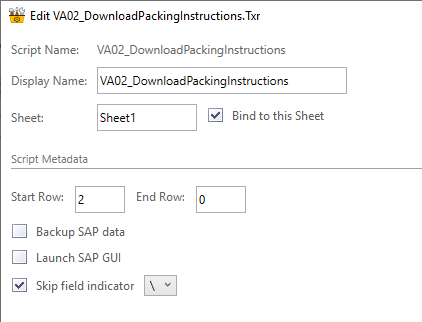

    Perhaps you'll be able to find it if you know the script name?

    Best Regards,
    Sigrid

    ------------------------------
    Sigrid Kok
    PSE | Winshuttle North America
    ------------------------------


  • 4.  RE: Recreate Script from Excel

    Posted 06-25-2019 03:47
    Hi Marty​,

    What version of Winshuttle are you running? I may have a solution for you.

    Regards

    Mark

    ------------------------------
    Mark Tiller | Delivery Enhancement Developer
    Transport for London (TfL) | 0203 054 4196
    ------------------------------


  • 5.  RE: Recreate Script from Excel

    Posted 07-05-2019 10:32
      |   view attached

    Hi All,

    I have attached a document that shows how to extract  a script from an Excel spreadsheet and back into a .TXR  file in 10.7.1.  I've tested it in both Non-Batch without Controls and GUI scripting mode and it was successful both times.

    Unless Winshuttle have changed how Embedded scripts work between versions, I would expect an adaption of the procedure discussed will likely work in later versions, but obviously I can't guarantee that!

    Of course, since this involves looking at worksheets that are normally hidden, please only work with copies!

    Regards

    Mark


    ------------------------------
    Mark Tiller | Delivery Enhancement Developer
    Transport for London (TfL) | 0203 054 4196
    ------------------------------