Automate

 View Only
  • 1.  VD01 / VD02 - Other Communication...

    Posted 05-16-2019 14:44
    Hello...

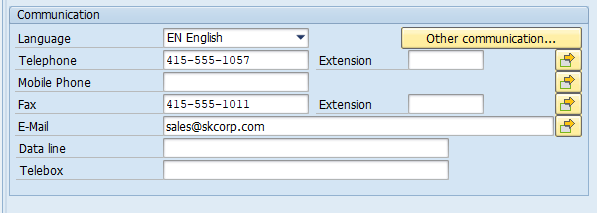
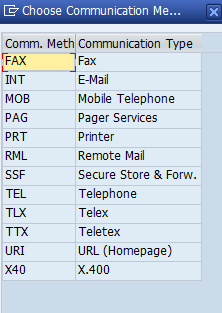
    I am creating a transaction shuttle for a new ship to customer in VD01.  In the Communication section of the General Data Screen there is an option to select 'other communication...'.  This brings you to a list and I want to select one of the options, accept, and close.  However, when I open up the new transaction and try to run it, it fails every time because the list does not even show up.  I clicked open this list in VD02 and if I right click on the list it gives me an option to find, but transaction does not recognize the right click.  Anyone have this issue and if so, has anyone find a solution to it?

    Thanks

    ------------------------------
    Susan Raatz | Data Analyst
    Pactiv LLC | 847-482-3231
    ------------------------------


  • 2.  RE: VD01 / VD02 - Other Communication...

    Employee
    Posted 05-17-2019 20:15
    Hi Susan

    3 options to try:

    (1) try recording in BATCH mode.  Note that the initial screen and address screen will look a bit different.  One of the benefits is you'll see a few of the other fields communications exposed by default, but that is all you get - no button to show more

    non-batch (aka standard) recording mode shows this

    batch recording mode shows this - notice the telex number, data line and internet address

    (2) If that doesn't work, look for a BAPI.  IDK if there is one, but if you know of one, give it a try in Direct

    (3) if neither of the above work, you'll have to use GUI scripting mode, and use the enable identify disabled fields for the other communication pop-up to pick the type of communication method you want to select, and then pass that into the script, such as RML or URI and then click the checkbox and enter your data.  Note that it won't show "URI" in the script but instead a code, like "10" in the script.  Gotta love SAP!  See attached quick example.

    Hope that gives you a few ideas.

    Best Regards
    Sigrid

    ------------------------------
    Sigrid Kok
    PSE | Winshuttle North America
    ------------------------------


  • 3.  RE: VD01 / VD02 - Other Communication...

    Posted 05-21-2019 08:11

    Thank you so much Sigrid... It works now!


    Thank you,


    Susan Raatz

    Pactiv | Senior Data Administrator

    847-482-3231

    sraatz@pactiv.com

     

    Description: one pactiv.jpg


    DISCLAIMER: This electronic message together with any attachments is confidential. If you are not the intended recipient, do not copy, disclose or use the contents in any way. Please also  advise us by return email that you have received the message and then please destroy this message. Pactiv, LLC. is not responsible for any changes made to this message and / or any attachments after sending by Pactiv, LLC.. Pactiv, LLC. uses virus scanning software but excludes all liability for viruses or anything similar to an electronic threat contained within this email, any attachment contained within this message or any content that may be obtained from any URL contained within this message.


  • 4.  RE: VD01 / VD02 - Other Communication...

    Employee
    Posted 05-22-2019 09:00
    That's great, Susan.  Which method worked for you?  Just curious.  :) 

    Best Regards,
    Sigrid

    ------------------------------
    Sigrid Kok
    PSE | Winshuttle North America
    ------------------------------


  • 5.  RE: VD01 / VD02 - Other Communication...

    Posted 05-23-2019 10:42

    I used the batch mode.  I am using it in composer to create a form and I am very thankful for this.


    Thank you,


    Susan Raatz

    Pactiv | Senior Data Administrator

    847-482-3231

    sraatz@pactiv.com


    Description: one pactiv.jpg


    DISCLAIMER: This electronic message together with any attachments is confidential. If you are not the intended recipient, do not copy, disclose or use the contents in any way. Please also  advise us by return email that you have received the message and then please destroy this message. Pactiv, LLC. is not responsible for any changes made to this message and / or any attachments after sending by Pactiv, LLC.. Pactiv, LLC. uses virus scanning software but excludes all liability for viruses or anything similar to an electronic threat contained within this email, any attachment contained within this message or any content that may be obtained from any URL contained within this message.