Automate

 View Only
  • 1.  Script for transaction FV50 with the Long text

    Posted 03-29-2019 09:11
    ​Hi all,

    I am trying to create a script for transaction FV50 with the long text (see the screen shot below). 

    When you double click on a GL line item, a new window opens up. Click on the "Long Texts". This field can be 132 character long.
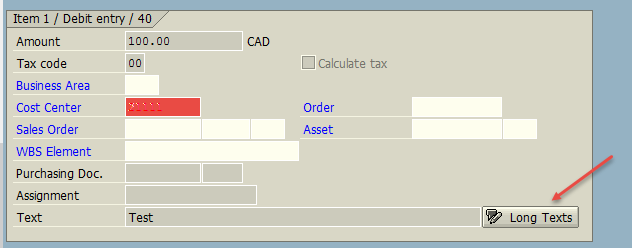
    Long text to FV50
     
    I have the script created without the long text but when I try to add steps to existing script. It gives me an error.

    Can someone please help me on this. It would be great if anyone can share the script or template.

    Thanks,
    Nupur

    ------------------------------
    Nupur Khattar |
    City of Mississauga |
    ------------------------------


  • 2.  RE: Script for transaction FV50 with the Long text

    Posted 03-29-2019 20:21
    Hi Nupur,
    if you are using Studio 11 there is a long text option under the Map tab.  Might be worth exploring.  I believe you can then choose which text you need and assign it where required in the script

    James

    ------------------------------
    James Tobin
    ------------------------------


  • 3.  RE: Script for transaction FV50 with the Long text

    Employee
    Posted 04-02-2019 20:58
    Hi Nupur
    There is new long text functionality you can use in various tcodes starting with v11, adding more with each release.

    It's also possible to record this the "old way". 

    One way is to loop around something like this:
    1. enter the first line item on row 1 and add all data -
    2. select that first line item and click details
    3. click long texts
    4. click the editor
    5. click to insert how ever many lines you want in the editor
    6. enter those lines - each line is limited to 72 characters
    7. back out of editor
    8. accept text
    9. back out to line items
    10. insert new line - make sure you keep a cursor position on this one somewhere on row 1


    I've attached a quick example built in v12, which has some developer notes in it.

    Hope it's helpful.
    Sigrid

    ------------------------------
    Sigrid Kok
    PSE | Winshuttle North America
    ------------------------------

    Attachment(s)