Thank you James for the response!
I have that option ticked as the instructions highlighted. It works just fine for getting into the fire call screen. The issue is the screen does not display all of the columns like it would if I went into it normally.
Here is what it looks like when I go into the firefighter screen without WinShuttle:

Here is what I get when I execute the same t code through WinShuttle:
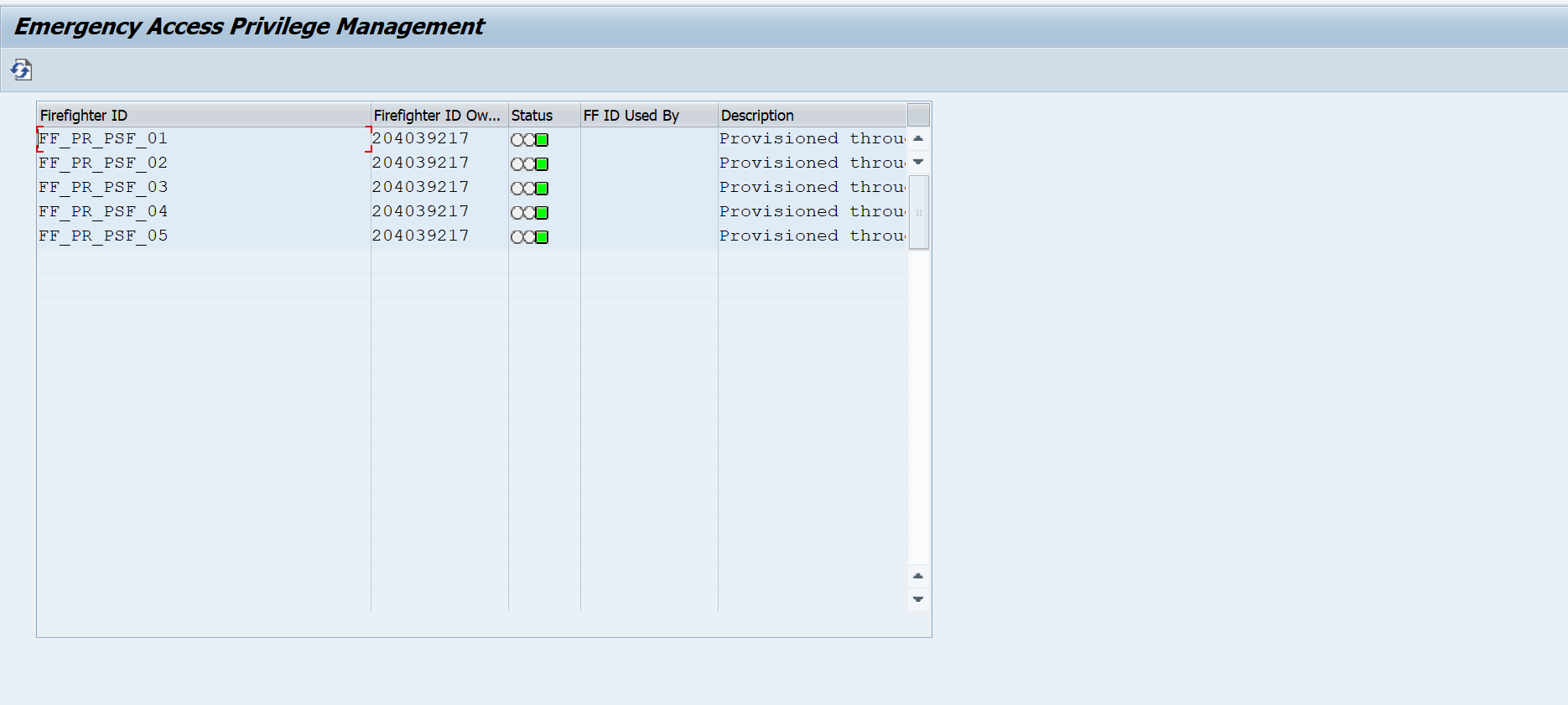
Notice no scroll bar and tabbing does not move column to column. Just wondering if others have had the same issue and if they have, how did they deal with it.
Thanks again!
------------------------------
Michael michael.sherman2 |
Fieldcore Service Solutions International LLC |
------------------------------
Original Message:
Sent: 03-01-2019 15:37
From: James Tobin
Subject: Recording a script through FireFighter ID
In Options under SAP Settings there is a checkbox for "Allow runs using Virsa or Firefighter or GRC". Try checking that.
------------------------------
James Tobin |
Energy Transfer Partners, LP |
Original Message:
Sent: 03-01-2019 10:50
From: Michael michael.sherman2
Subject: Recording a script through FireFighter ID
Greetings All,
I have been asked to update some Withholding Tax codes using FD02. I don't have access to the t-code so I have to use firecall (FireFighter ID or elevated access). I start our my recording with the t-code for firefighter. When SAP opens up to the firefighter screen, I only get half of the screen. I can not select an available ID. Has anyone else experienced this?
Thank You
Michael
------------------------------
Michael Sherman |
Fieldcore Service Solutions International LLC |
------------------------------