When recording an MM02 script, you have to keep in mind that not everyone that uses the script will have the same permissions as you on the material master. For example, in our company, my role grants me permissions to all 27 views on the material master, but someone in Purchasing may only be able to edit 7 views.
So, when I record an MM02 script, I have every view available in the "Select View" dialog box; Purchasing may only have 7 views to pick from, and the first view on their list may be something like the "Purchasing" view, whereas my first view available would be the "Basic Data 1" view (and the "Purchasing" view would be the 9th option in the view select dialog box for me).
Here's the problem.
If I try to choose the "Purchasing" view when I record my script, the 'code' in the script will basically say that I am trying to choose the 9th option in the 'view select' dialog box; if someone from Purchasing comes along to run that script (someone who only has 7 views available to them when they try to update a material with MM02), the script won't work because it's going to try to select the 9th option in the 'view select' dialog box, and the Purchasing user doesn't even have a 9th option to select (due to their more restricted roles/permissions in sap).
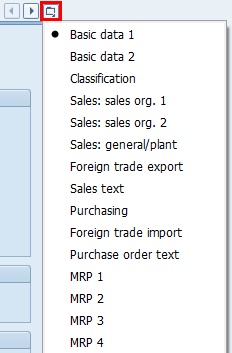
To get around this, one technique is to select the very first option (for me, "Basic Data 1") in the view select dialog box when I create the script, then, once I'm at that first view, use the little 'view navigator' icon to the far right of the view tabs in the material master to pop open the drop down, then select the specific view that I am truly trying to go to... even if you are already at that view (for example, if I create an MM02 script, and, due to my roles/access levels in sap, the first view I wind up when I go into MM02 is the "Purchasing" view, then I would want to use the little drop down view navigator to actually select the "Purchasing" view, even though I'm already there). The reason for this is to account for that fact that not everyone that may run the script has the same number of views to select from in the view select dialog box... when you use the little 'view navigator' dropdown and select a view from there, that selection actually equates to an SP code that is specific to the view you are trying to go to (e.g. the SP code for the Purchasing view, in my company, with the configuration that we use, is SP09).
I've included a screenshot of the little 'view navigator' button that I'm referring to above.
------------------------------
Jeremie Dippel
Project Engineer @ Rockwell Automation
Wisconsin Local Wug Leader
I'm your huckleberry.
------------------------------