Hi Jan
That's a very neat trick.
For anyone else wanting to try this, I found that you can enter the values, message "codes", into SE16N for table T100 for my inputs were
You'll see the message you would get
Hope that helps you Benjamin - and anyone else.
Thanks,
Sigrid
------------------------------
Sigrid Kok
PSE | Winshuttle NA
------------------------------
Original Message:
Sent: 07-24-2020 07:37
From: Jan van Asseldonk
Subject: FS00 - GL Account Creation
Hi Benjamin,
if you look in SAP in trx SE91 you see for this message 2 variables. You need the second one for the number.
Enter &2 in the message text. This should give you only the number.
Regards.
------------------------------
Jan van Asseldonk | Consultant
CTAC | +31629078169
------------------------------
Original Message:
Sent: 07-23-2020 18:12
From: Benjamin Kielas
Subject: FS00 - GL Account Creation
------------------------------
Benjamin Kielas | Data Lead
Generac Power Systems, Inc. | 2625106580
Original Message:
Sent: 11-13-2018 19:32
From: Sigrid Kok
Subject: FS00 - GL Account Creation
James - the last step I shared includes unchecking the option to see the message codes - the technical log information - on the MAP tab. You don't need it anymore, as you've identified the code and swapped the message.
 'Hope that helps,
Sigrid
------------------------------
Sigrid Kok
PSE | Winshuttle North America
Original Message:
Sent: 11-13-2018 00:56
From: James Tobin
Subject: FS00 - GL Account Creation
Thank you both very much for your help, this setting is very useful. Is there a way to suppress the initial error number (eg. "S:FH xxx") on the message? Not too much of a problem if not but thought I would check!
------------------------------
James Tobin |
Original Message:
Sent: 11-09-2018 11:24
From: Jayasri Varyani
Subject: FS00 - GL Account Creation
Hi James,
Studio typically returns the last hard stop message encountered, and because FH-006 is returned by SAP as an information message, the script attempts to carry on.
I tried to replicate your scenario, and you can see that the extended log does show the message you needed (FH-006).
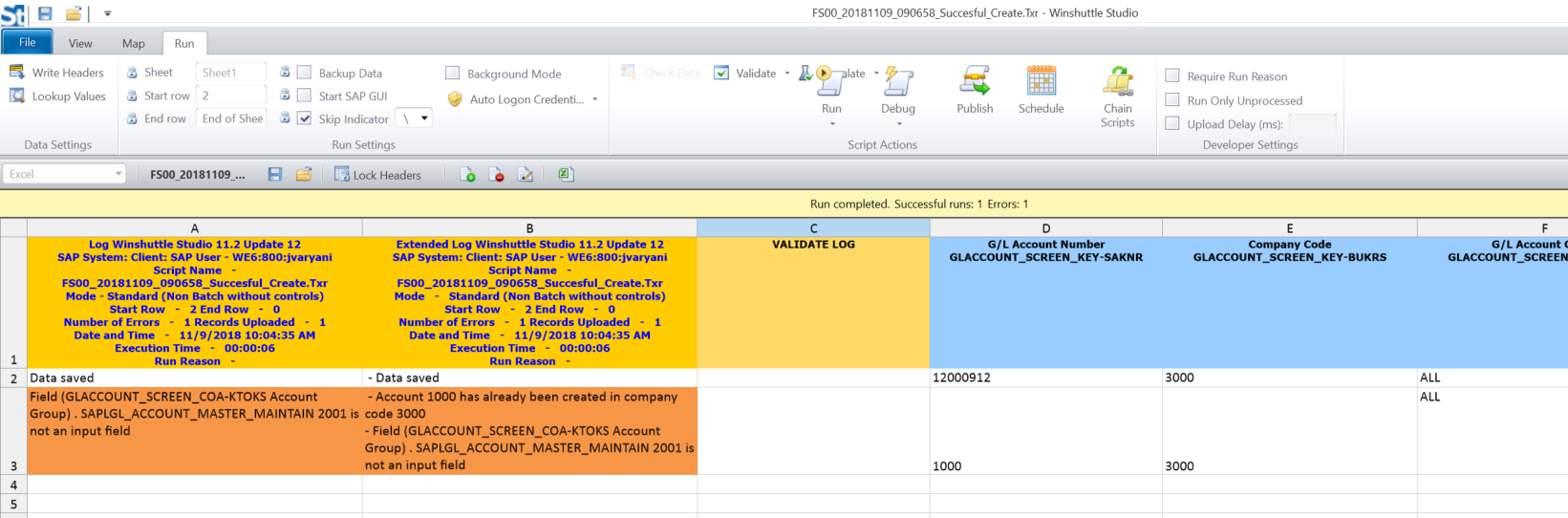
I also tried Sigrid's suggestion to show a friendly message instead of "S:00-347-Field (GLACCOUNT_SCREEN_COA-KTOKS Account Group) . SAPLGL_ACCOUNT_MASTER_MAINTAIN 2001 is not an input field".

Regards
Jayasri
------------------------------
Jayasri Varyani | Solutions Engineer
Winshuttle North America