Automate

Welcome to the Automate community!  Please feel free to start a discussion in the discussion tab or join in a conversation.

Here are some useful links where you can find more information:

Product Announcements  Ideas Portal

Discussions

Members

Resources

Events

 View Only
  • 1.  MIRA

    Posted 10-04-2018 05:33
    Hi Everyone, I'm very new to using Winshuttle (I love it) but I seem to be having an issue with one of my scripts.

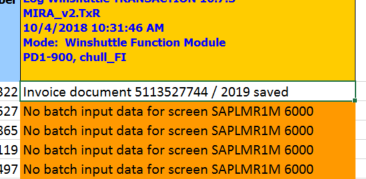
    I have recorded a script for MIRA in SAP, but when I go to run the script it will only run the first line, and show the below error for the following lines. If I then select the error lines, and run them it will again run the first line selected and show the same error message for the rest of the lines. I can run each line at a time and they will work but it just wont batch process them. Any ideas of how to fix this? or it this an issue that MIRA doesn't work with Winshuttle?

    Thanks in Advance everyone

    ------------------------------
    Claire
    ------------------------------


  • 2.  RE: MIRA

    Posted 10-04-2018 05:43
    ​Hello,

    we don't worked with T-MIRA , but may be you choose only 1 line, please check the "End row"


    ------------------------------
    Nadezda Goncharyuk | Head of Master Data department
    SOK Retail Int. Oy | [City] | +79218904047
    ------------------------------


  • 3.  RE: MIRA

    Employee
    Posted 10-04-2018 08:59
    Is the first screen in your script the company code pop-up?  If so, then you'll want to either check the skip screen if not present or put an If First condition around that, since it only shows up the first time.  I believe you may be using version 10, but the functionality is there as well. 

    Skip screens that are not present in the SAP system, Studio v11 

    Add If conditions, Studio v11

    ------------------------------
    Jennifer Hwang | SE
    Winshuttle North America
    ------------------------------