Automate

Welcome to the Automate community!  Please feel free to start a discussion in the discussion tab or join in a conversation.

Here are some useful links where you can find more information:

Product Announcements  Ideas Portal

Discussions

Members

Resources

Events

 View Only
  • 1.  VA01 - Multi line transaction - by EAN number

    Posted 09-21-2018 10:53
    ​Hello,

    Please bear with me - I have limited experience with Winshuttle, and thus far have only created simple scripts/templates for JE's and asset transactions. I have a question regarding the recording/mapping of transaction VA01.

    Our users need to be able to enter one header line in transaction VA01 followed by multiple detail lines that include an International Article Number (EAN) along with a quantity. Unfortunately, even with the Winshuttle support team's assistance, my script fails at the second line of detail, returning a message indicating that the EAN number is incorrect, which is false. I have separately tested the EAN number using a manual transaction, and it is a correct number.

    Transaction VA01

    If anyone can offer suggestions regarding a solution for this issue, my users would greatly appreciate it.

    I use Transaction 10.7.3 with SAP 740.

    Thank you,

    ------------------------------
    Anita Jasso
    Hanesbrands, Inc.
    ------------------------------


  • 2.  RE: VA01 - Multi line transaction - by EAN number

    Posted 09-24-2018 03:23
    Hi Anita,

    here just some wild guesses that might help. 

    1. Have you checked the format of the data in Excel? e.g. make sure there is no digit grouping etc. Or best make it a text. 
      I have seen the strangest things.

    2. Have you tried to record the script with multiple lines? 
      I think I experienced it with Purchase Orders. I had to record the script entering 2 lines into the order. And then repeated the second line in the form of a loop. I think that was due to how the filter were activated in SAP.  It would only allow you to filter after the first line was entered completely.
      But anyway, you might find some minor differences in the script e.g. cursor position


    ------------------------------
    Michael Kiuntke |
    Siemens Gamesa A/S | [City] |
    ------------------------------


  • 3.  RE: VA01 - Multi line transaction - by EAN number

    Posted 09-24-2018 11:31
    ​Hello,

    Thank you for the suggestions! I am now able to post the transaction!

    I recorded the script in Non-Batch with controls mode. I removed all references to curser position in the script. When recording the transaction in Winshuttle, I scrolled to the last row of the detail area to record the line items (I entered 3, each on the last row). Finally, I changed the entire Excel spreadsheet to text.

    Now I just need to determine how I can process multiple header/detail lines in one template.

    Again, many thanks for your help!


    ------------------------------
    Anita Jasso
    Hanesbrands, Inc.
    ------------------------------


  • 4.  RE: VA01 - Multi line transaction - by EAN number

    Posted 09-25-2018 03:03
    Hi Anita,

    you are welcome. Just a little advice:
    Instead of scrolling to the bottom line, you can try and use a filter. I believe the VA01 transaction also allows you to filter the detailed area. You can filter it to line item 9999. That way you never risk to override a line by accident. 
    E.g. if you only scroll down 25 lines but want to add 26 lines into your sales order, the script will just keep overriding line item 25. 

    Regarding the processing of multiple headers and line items, you need to look into how to setup a loop. I recommend you to look into the multisheet setup. I find it much easier to work with if you have a large data set.  The setup in a single sheet requires a special layout that is hard to manage if you have a lot of data - at least in my opinion.

    ------------------------------
    Michael Kiuntke |
    Siemens Gamesa A/S | [City] |
    ------------------------------


  • 5.  RE: VA01 - Multi line transaction - by EAN number

    Employee
    Posted 09-25-2018 08:02
    HI Anita,
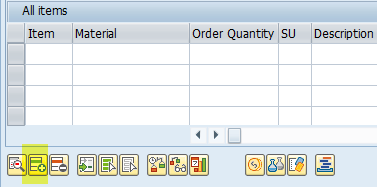
    There is an insert new line button in the item grid on sales order via a button.  If you enter a few materials manually, you'll find that row 2 is always available for input. 
     So to record:
    (1) enter material on line 2
    (2) click insert row
    (3) enter material 2 on line 2, etc
    If you have to go into line item details, use the position button (2 buttons to the right of insert), find the material and then go into line item details (the button to the left of insert row)
    In order to enter multiple documents
    (1) make sure you are using column based mapping.
    (2) enter a new H (header) row, followed by a set of line items - i.e. materials to enter
    (3) and repeat.

    Hope this is helpful.

    Best Regards
    Sigrid

    ------------------------------
    Sigrid Kok
    PSE | Winshuttle North America
    ------------------------------


  • 6.  RE: VA01 - Multi line transaction - by EAN number

    Posted 09-25-2018 10:06
    ^^ I agree! This is the best way to loop through products in VA01. Additionally, this methodology can also be applied to other transactions that have similar functionality.

    ------------------------------
    Alexander Alonso | Business Analyst
    ---
    Medtronic - HQ
    ------------------------------


  • 7.  RE: VA01 - Multi line transaction - by EAN number

    Posted 09-25-2018 11:13
    Hello,

    Thank you both for the helpful information. 

    Unfortunately, I am unable to locate a filter setting in the detail area in in my version of SAP (740). Perhaps that setting does not  not exist in the AFS UPC/EAN tab.

    I created a new script and entered the detail on the second line of the detail area and then used the insert button to insert the data (I have used the insert button all along). I entered a total of two EAN line items and quantities in my recording. I then mapped the second line item in Winshuttle. The multi-line transaction works! Therefore, I will not need to scroll down to the last line in the detail area after all. 
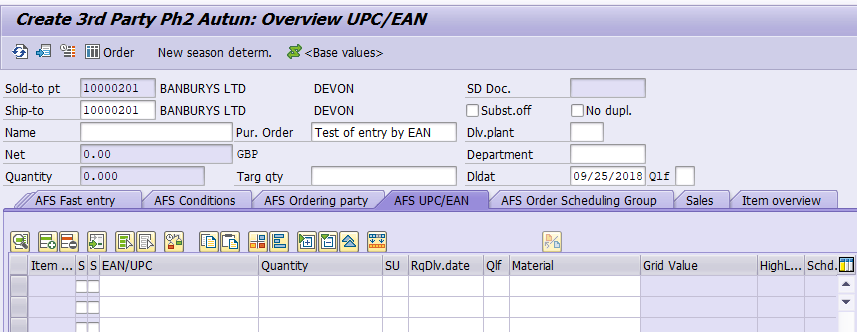
    VA01 by EAN
    I have been using a loop in my script to facilitate the multi-line transaction, yet I cannot post more than one transaction at a time (with a separate header and detail lines). Please see below for the screen shot of the loop.
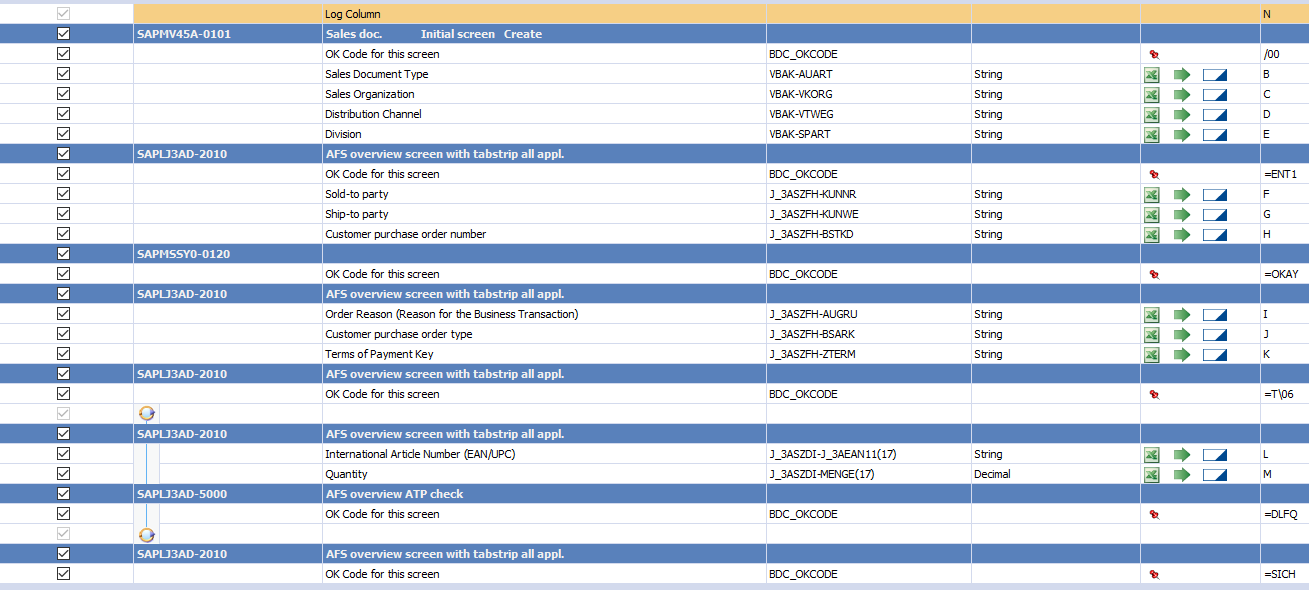
    VA01 by EAN script
    Results of attempt to post more than one transaction:
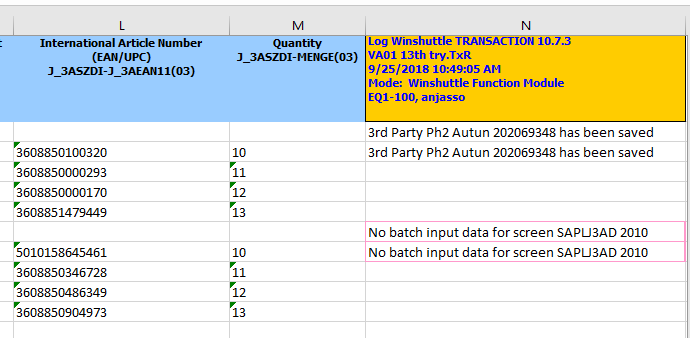
    Results
    I will research the multi-sheet setup, as I have yet to use this feature. 

    Again, thank you for taking the time to respond to my post.

    Best regards,

    ------------------------------
    Anita Jasso
    Hanesbrands, Inc.
    ------------------------------


  • 8.  RE: VA01 - Multi line transaction - by EAN number

    Employee
    Posted 09-25-2018 13:26

    I see  a few issues in your screenshots.  From the way your log message is returning, it seems that you are missing the "D" indicator for line item rows in any of the line items past your first line.  Also, in the mapper itself, within the loop, the set of rows related to the actual EAN entry is missing an OK code (which I think should be "=B1\INSP") so that set of rows has no action to take after it enters the EAN and the quantity.  

    I saw that you have a meeting with Support today.  Good luck!


    ------------------------------
    Jennifer Hwang | SE
    Winshuttle North America
    ------------------------------


  • 9.  RE: VA01 - Multi line transaction - by EAN number

    Posted 09-25-2018 11:20
    Posted twice. Please excuse.


    ------------------------------
    Anita Jasso
    Hanesbrands, Inc.
    ------------------------------


  • 10.  RE: VA01 - Multi line transaction - by EAN number

    Posted 09-28-2018 09:01
    Hello,

    I thought that I would relay the final solution to the VA01 by EAN multi-line transaction error. I imagine that there are multiple solutions to this issue, and that this is just one of them. Many thanks to the Winshuttle Support team for assisting with this error resolution. 

    First, there was an issue with adding the appropriate "okay" code after the various screen pop ups. The issue was with an inconsistency in which transactions resulted in pop ups. Pop ups did not appear with each customer. 

    Then, I had to create two scripts - one to "validate" the transaction and one to "run" it. The validation script returned messages for each line item in the various transactions. Then in the run script, I created an "if" condition in order to continue to process the transaction in the event that a particular response was returned (when the pop ups occurred). 

    Hopefully, this explanation may help others that have a similar situation.

    Validation script:
    Validation script


    Run script:

    Run script
    I'll be happy to answer any questions regarding this solution.

    Thank you to all that offered possible solutions.

    Regards,


    ------------------------------
    Anita Jasso
    Hanesbrands, Inc.
    ------------------------------