I wish to silent install WinShuttle version 20.3.1 ( ws.exe = winshuttle-studio-20.0301.2301.23003.exe ) on several machines.
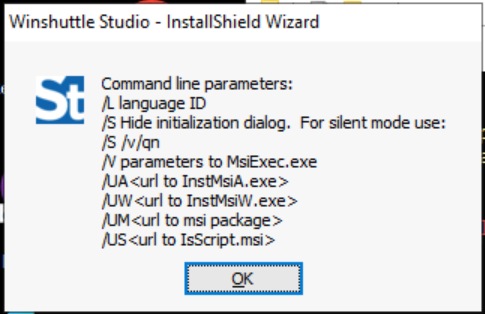
If I run ws.exe /? I get the popup dialog shown below, which has:
For silent mode use: /S /v/qn
When I run ( as admin ) ws.exe /S /v/qn a few things happen:
- there is no start menu icon / shortcut added
- no files are added to c:\program files (x86)\Winshuttle
- control panel programs does not have Winshuttle
- windows event logs have 2 messages telling of install success ( the first one appears twice )
- Windows Installer installed the product. Product Name: Winshuttle Studio. Product Version: 20.0301.2301.23003. Product Language: 1033. Manufacturer: Winshuttle, LLC.. Installation success or error status: 0.
- Product: Winshuttle Studio -- Installation operation completed successfully.
When I run ws.exe ( as admin ) and click through the GUI, it installs fine, with the result:
- there is a start menu icon
- files are added to c:\program files (x86)\Winshuttle
- control panel programs does not have Winshuttle
Silent uninstall mostly works: C:\Temp>wmic product where name="Winshuttle Studio" call uninstall /nointeractive
- remove files and leaves empty folder c:\program files (x86)\Winshuttle
- control panel programs continues to have: Winshuttle Studio
------------------------------
Thomas Coleman
Knowledge Community Shared Account
------------------------------