Log to WS and SAP in Excel
From Excel's Winshuttle ribbon select the correct embedded script
Filter blanks not to be visible on the column that gives the transaction's input
From right side select Specified rows -> Filtered

From the middle select Run -> Run specified range

------------------------------
--
------------------------------
Original Message:
Sent: 07-21-2022 02:15
From: Robert Dudziak
Subject: Winshuttle does not process lines
Hi Henri,
Can you please some screenshot where to find this options?
------------------------------
Robert Dudziak | Senior Procurement Operations Analyst
Kimberly-Clark Corporation |
------------------------------
Original Message:
Sent: 07-20-2022 09:13
From: Henri Mäntysaari
Subject: Winshuttle does not process lines
If you don't wish to alter WS general settings for the sake of getting a single script working, I guess you could also filter Blanks not to be visible from the Agreement number column and use "Specified rows -> Filtered" and "Run Specified range".
------------------------------
--
Original Message:
Sent: 07-20-2022 04:39
From: Robert Dudziak
Subject: Winshuttle does not process lines
Thanks Jan, this was it :D!
So simple, I am not sure why I haven't looked into program options after all.
------------------------------
Robert Dudziak | Senior Procurement Operations Analyst
Kimberly-Clark Corporation |
Original Message:
Sent: 07-20-2022 03:04
From: Jan van Asseldonk
Subject: Winshuttle does not process lines
Hi Robert,
you mentioned "like it detected that few next lines in U are blanks and it's not worth to continue. Many of the lines will be blank in column U,".
There is a setting for stopping the run after [n] empty rows. Did you check that? . 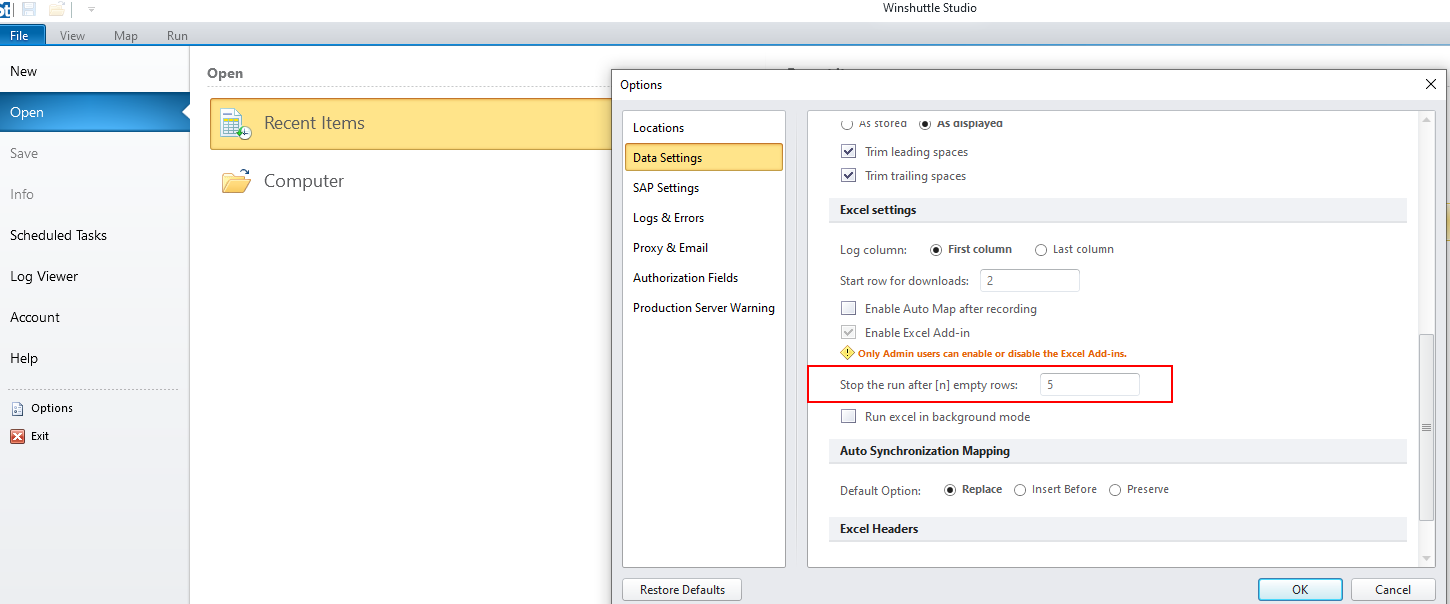
------------------------------
Jan van Asseldonk | Consultant
CTAC | +31629078169
Original Message:
Sent: 07-19-2022 03:28
From: Robert Dudziak
Subject: Winshuttle does not process lines
Hi Henri,
Thanks for response. I tried to remove If condition but it has the same result. It stops after 2nd line, like it detected that few next lines in U are blanks and it's not worth to continue. Many of the lines will be blank in column U, however just some of them will have agreement number.
What I upload in ME33K is agreement number from column U, then download targeted quantity for it. I added this IF condition with column A, just to maybe force script to not disable when U column is mostly empty. Column A will be always populated.
------------------------------
Robert Dudziak | Senior Procurement Operations Analyst
Kimberly-Clark Corporation |
Original Message:
Sent: 07-19-2022 03:13
From: Henri Mäntysaari
Subject: Winshuttle does not process lines
Hi
Are you sure you need a loop for this? Wouldn't ME33K work just as a normal transaction, since it'll need only the agreement number?
In your spreadsheet screenshot the agreement number is found on column A and the script screenshot refers to U for upload, is this correct?