That's excellent, @Andrew Landry, thanks for sharing!
I searched but never thought Other Rules would take me anywhere. Making a mental note to investigate all menu items in the future! I do look at the ok codes and also try all combinations of function keys when I'm stuck (f# and f# plus alt, clt, shift) and sometimes find something that works, but this one had no function key.
For knowing the settlement rule number, you can always extract them using Query ahead of time.
Best Regards,
Sigrid
------------------------------
Sigrid Kok
*Precisely Software Inc.
------------------------------
Original Message:
Sent: 08-13-2025 09:46
From: Andrew Landry
Subject: Updating Settlement Rule on Internal Orders
Jacob,
I recently ran into a similar issue in KO02. You can automate this without GUI scripting. You need to follow the menu path Goto->Other Rules (BDC_OKCODE POSI) while in the "Maintain Settlement Rule: Overview" screen. This will display a dialog box to enter the rule number. Once you've entered the rule number and clicked the "green check" (BDC_OKCODE FURT) the rule you specified will be on line 1 on. Then it is just a matter of updating the field(s) you need, taking into account row number. Also, this method is predicated on you knowing what rule number(s) you want to update. I hope this helps.
Andrew
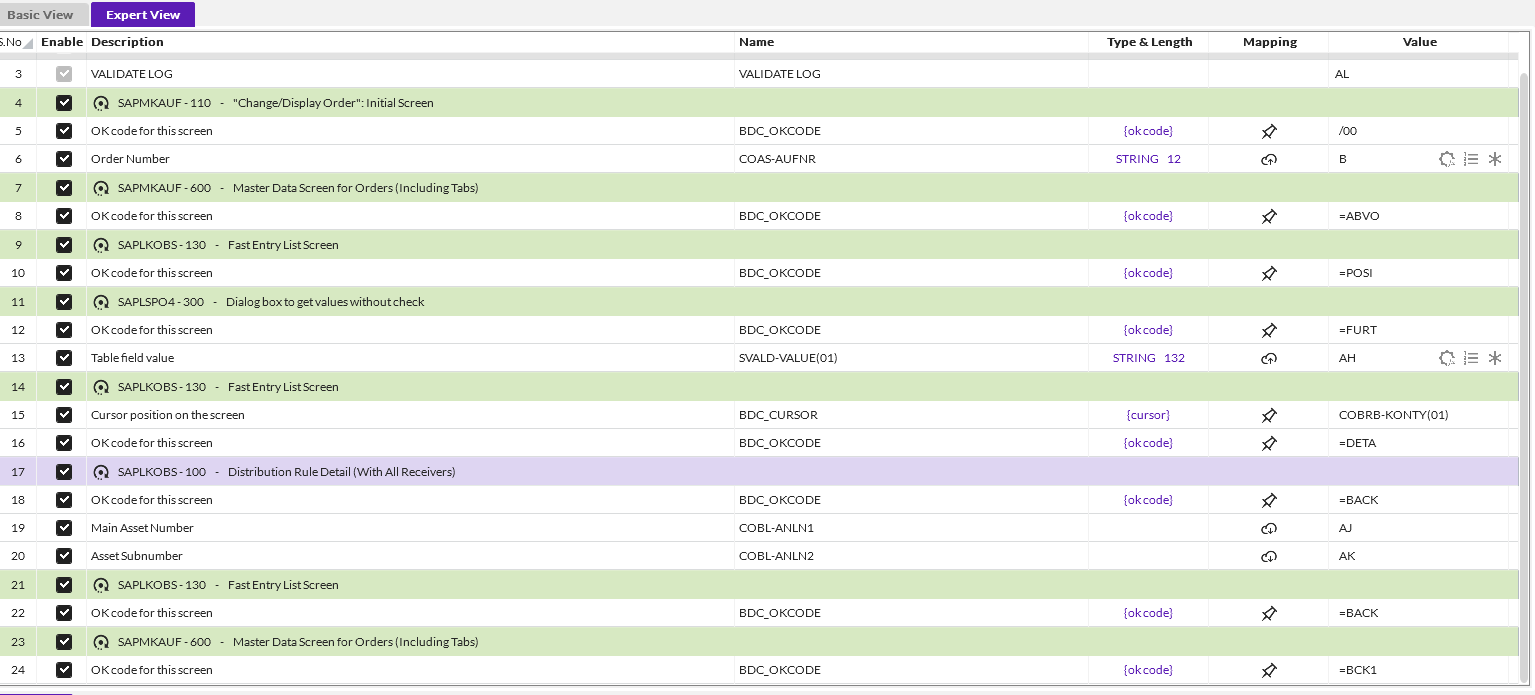
This is an example of grabbing some information from KO03, but the process would be the same in KO02.
------------------------------
Andrew Landry
Leprino Foods Company
CO
------------------------------
Original Message:
Sent: 08-12-2025 21:46
From: Sigrid Kok
Subject: Updating Settlement Rule on Internal Orders
Hi Basil
It's helpful if you - and everyone - specify the tcode and SAP system version - ECC or S4 - TIA :)
With any grid in the SAP GUI - there are a few options
- if there is a find or position, use it to position to the right row - not an option in KO02 - assuming that is what you are trying to automate
- use GUI scripting with an IndexedIf - see documentation: https://help.precisely.com/r/t/1016755804/2023-12-31/Automate-Studio/Connect/Latest/en-US/Automate-Studio-with-Studio-Administrator-User-Guide/Add-If-conditions - you could likely use Distribution Rule Number - the column showing No. 1,2,3 - as the Index - you record changing it but then swap it to the index and disable the update
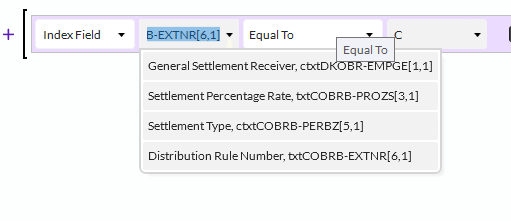
- Use a BAPI - but there doesn't seem to be a BAPI/FM that updates this data that is remote enabled.
So the only option I can think of for this is to use GUI scripting - SAP scripting has to be on in your SAP system - and use the Indexed IF to find the right row via the rule No.
I'm attaching a very quick example. I didn't know what you wanted to update, and I created it in S/4Hana - you didn't specify your system. So it's just an example - you would need to record it in your system.
Best Regards,
Sigrid
------------------------------
Sigrid Kok
*Precisely Software Inc.