Hi Automate Community!
I have a quick Studio tip this week that covers two Query run settings that work together to help you handle large data extracts from SAP more reliably: Query run timeout and data chunks. If you've ever had a Query run take a very long time, or time out unexpectedly, these two settings will help.
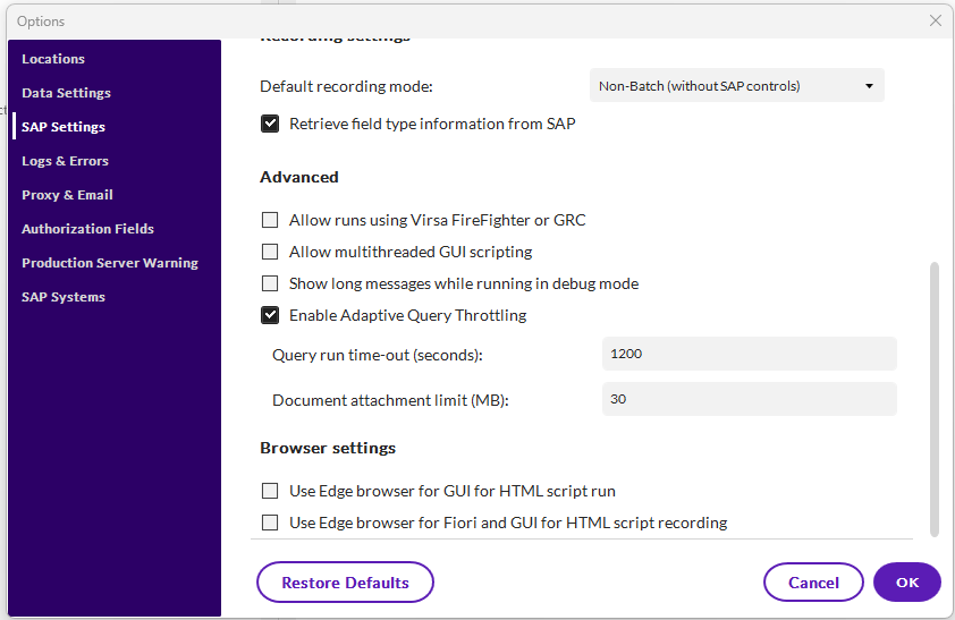
The Query run timeout setting controls how long Studio will wait for SAP to return results before automatically canceling the run. By default, Studio will wait 1200 seconds or 20 minutes. To change this timeout setting, open Studio, click File, then Options, and go to the SAP Settings. Scroll down and you will see "Query execution time-out (seconds)". Enter the maximum number of seconds you want Studio to wait for results. If the query does not return results within that time frame, the run will be automatically canceled.
The data chunks setting is found directly on the Run tab of your Query script. It is designed to improve performance when downloading a large number of records from SAP. Instead of trying to pull all records at once, Query gets the data in smaller groups, or "chunks", and writes them to your Excel file incrementally. When you check the box on the Run tab, the default value is 25,000 and you can change it up to 225,000. If you enter a value above 225,000 it will automatically change to 225,000. This setting works well with the Query run timeout setting and can help prevent any potential SAP timeouts that might occur.
For example, if you are pulling 500,000 records and seeing timeout errors from Studio or SAP, try setting a chunk size of 50,000. Studio will make 10 separate requests of 50,000 records each and write the results to Excel as it runs.

Since we're on the topic of Query performance, I must mention "Adaptive Query Throttling" which is checked by default. This setting slows down the Studio Query run based on SAP resources to ensure optimal SAP performance.
Here is more information on run settings for Query in our documentation: Run settings for Query
I hope this tip helps you get more reliable results with your large Query extracts!
Thanks,
------------------------------
Maria Ebner
*Precisely Software Inc.
------------------------------