Thanks for reaching out. I tend to add tables one at a time and test my query as I go along, getting rid of extra joins.
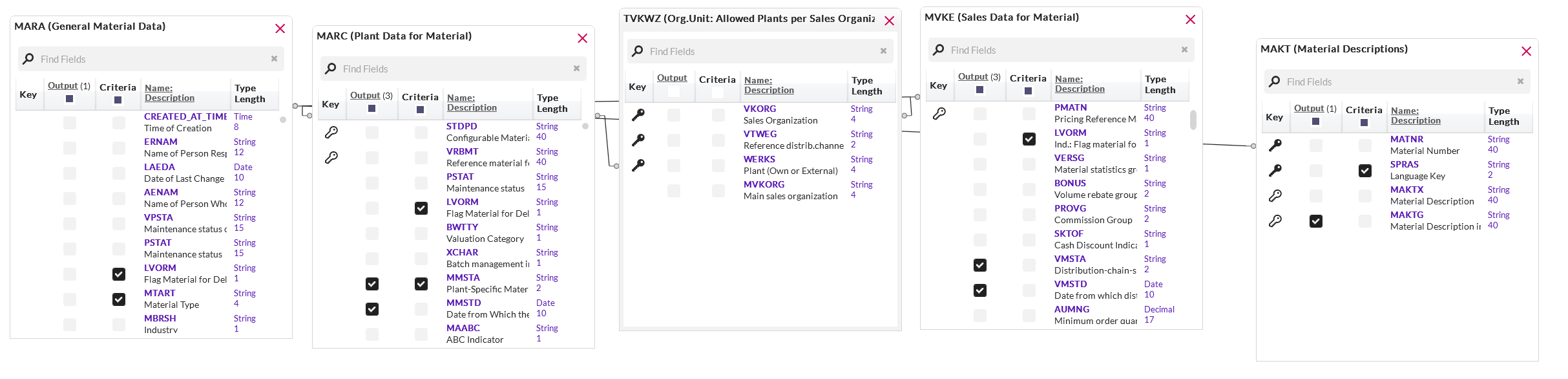
then MVKE - connect to Mara by material number (if there's one also to Marc I remove it)
*Precisely Software Inc.
Original Message:
Sent: 05-11-2026 02:08
From: Ed Meiners
Subject: Tip of the Week – Query In Operator dynamic values from Excel
hi Sigrid, yes that would be a good one.
Would you mind to share your thoughts on how to connect the 4 tables (MARA-MARC-MVKE-TVKWZ)? So, my use case (as example) would be to get from a Material Type, all materials in MARC with status (MMSTA) the corresponding (TVKWZ) entry/entries from MVKE with field value VMSTA.
(would bring in MAKT for the description)
Placing the tables in Query, the connections are automatically made.
------------------------------
Ed Meiners
Lead Consultant MDIM
Wessanen Nederland Holding BV
Amsterdam
------------------------------
Original Message:
Sent: 05-08-2026 10:20
From: Sigrid Kok
Subject: Tip of the Week – Query In Operator dynamic values from Excel
Hi Ed
Thanks for sharing your use case. I think I have run into this prior, but I can't remember where.
Would table TVKWZ help? I believe it shows the valid combinations between sales org + dist channel to plant:
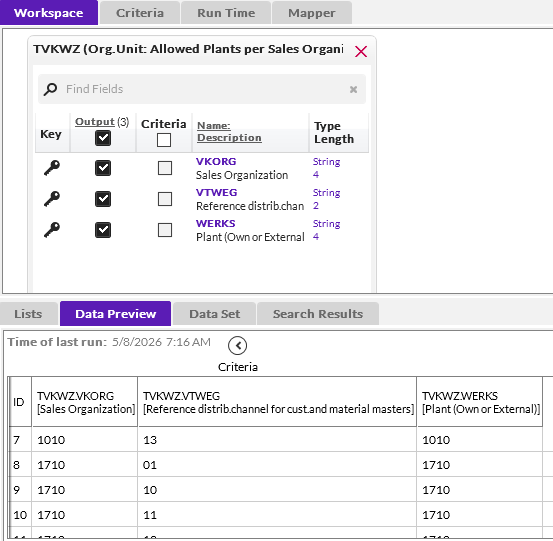
If this isn't it, please let me know.
Best Regards,
Sigrid
------------------------------
Sigrid Kok
*Precisely Software Inc.
Original Message:
Sent: 05-08-2026 02:41
From: Ed Meiners
Subject: Tip of the Week – Query In Operator dynamic values from Excel
Yes thank you Sigrid for your Tip of the week (should say, tipS of the weekS).
I am always struggling with Material Master in the sense that we have Materials which are shared across organizations. I want to be able to query and provide business with, for example, Sales Org Status of a Material that doesn't match with Plant Status. I use MARA, MVKE and MARC. For example from MARA select Material Type and description, criteria on MARC-MMSTA "Plant status is PT" and then show the Sales Status (MVKE-VMSTA) if not ST. Because a Material may exist in multiple Sales Orgs and/or Plants which are not linked to each other, the result is redundant rows showing all for all.
So, i was thinking about a reference data list or a Excel in which I could put the relationship like;
SalesOrg AB00 with Plant AB00
SalesOrg AB00 with Plant AB01
SalesOrg BB00 with Plant AB00
SalesOrg BB00 with Plant BB00
SalesOrg BB00 with Plant BB01
But still... I wouldn't know how to apply...
Not sure if it has impact, I run these queries on the server and scheduled by jobs (like once per month).
Any suggestions?
------------------------------
Ed Meiners
Lead Consultant MDIM
Wessanen Nederland Holding BV
Amsterdam
Original Message:
Sent: 05-07-2026 09:53
From: Sigrid Kok
Subject: Tip of the Week – Query In Operator dynamic values from Excel
That's fabulous to hear, @Pat Shaner, thanks for sharing and well done! I think it's a great use case for Query, and one that I've heard of prior but on a smaller scale.
Is anyone else doing something similar or quite different? This is a great place to share challenges but also ideas on how to get more value from the products you have.
And happy to help with any Transaction skills if you post it on the community. :)
Best Regards,
Sigrid
------------------------------
Sigrid Kok
*Precisely Software Inc.
Original Message:
Sent: 05-07-2026 08:14
From: Pat Shaner
Subject: Tip of the Week – Query In Operator dynamic values from Excel
Great tip, Sigrid. Yes, I use dynamic lookups extensively and frequently chain queries together based on the results of the previous query.
In terms of use cases, I have around 60 daily scheduled query jobs that identify data defects/anomalies, mostly associated with the Material Master. I also use an automated non-Studio job to read all of the result files and alert Material Master Data Stewards of anything that should be looked into. This process is the basis of our Material Master data quality and auditing process.
While we stress getting data right the first time, people do make mistakes. For us, the automated jobs and alerts give us a means to quickly deal with critical errors that could impact International Trade (e.g. country of origin) or accounting (e.g. valuation class, price unit, profit center, etc.) BEFORE any postings are made against the Material.
I've developed a lot of experience with the query tool and rely on it heavily. Sometimes, I create hybrid solutions where my queries use dynamic data from HANA CV, refreshes, other Excel files, or literally wherever I can connect to data.
I only wish that my transaction skills were as good as my query skills!!!
------------------------------
Pat Shaner
Corporate MDM and Governance Manager
The LYCRA Company LLC
Salisbury MD