Automate Studio provides an option to enable the Extended Log, which includes all of the messages that occur during a Transaction posting. This additional information is available for Transaction scripts in non-batch mode, but it is not available for Transaction Batch or GUI scripting nor Direct scripts.
It includes warnings and sometimes is the key to error debugging, such as when you try to post a duplicate customer. You may get an error that a specific screen wasn't expected or field is missing, but prior to that you may have a message about a potential duplicate. It may also help if there are multiple postings or the actual save message is generated before the last action in a script, so you may not see message you want after running the script.
The documentation is located here: https://help.precisely.com/r/t/1016755993/2023-12-31/Automate-Studio/Connect/Latest/en-US/Automate-Studio-with-Studio-Administrator-User-Guide/Run-settings-for-Transaction
Then search for "Extended Log" on that page
To enable it:
· Have a non-batch Transaction script recorded
· Open the script and go to the Map tab
· Go to Expert View
· Check the box to enable the Extended Log

· Map the Extended log
· Run the script
Here's an example with XD01 to create a customer in ECC. This is where I found it useful:
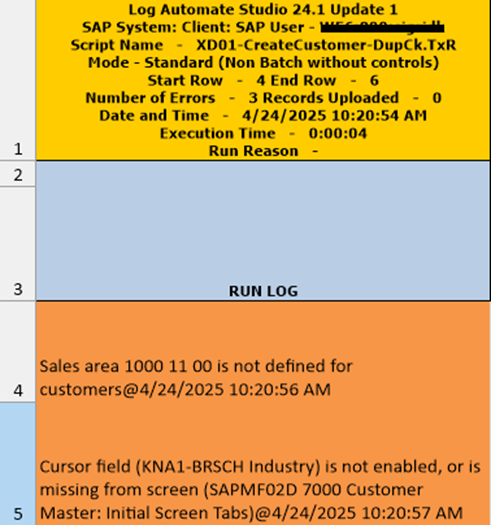
In the Run Log column, the first error message says the sales area is bad, but the next errors show that Industry is not enabled.
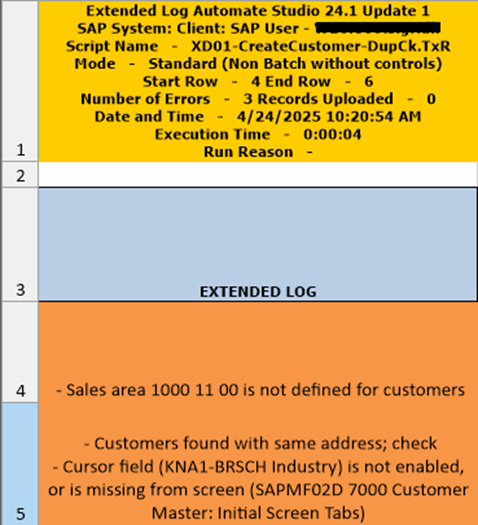
If you look at the Extended Log, you'll have more helpful information as to why the field is missing or not enabled. The first row shows the sales are is bad. But the 2nd row shows that a customer was found with the same address, which is a pop-up, that my script had not accounted for. So the script expected to be able to enter the Industry field, but it's actually on the pop-up that warns about a potential duplicate.
It's also helpful for HR tcodes that post many infotypes. You can see the "Record Created" message for each save. And you can see all warning messages, as well, sometimes helpful for recordings of sales orders, for example.
I'm sure there are other use cases where the Extended Log is helpful. Do any of you have examples where Extended Log has helped you?
Happy Scripting!
Sigrid
------------------------------
Sigrid Kok
*Precisely Software Inc.
------------------------------