Hi Amy
Since we don't support long text via the Function Module for that tcode, I found a BAPI.
The header portion includes values in Header_Data and then upload the delivery # again for Header_Control and put an "X" in the fields you want to update - I selected priority.
I had to play around with the input fields for the text, and it turns out the fields have to be selected in two places - Text_Header and Text_Lines.
I have it hard coded in my system for text id as 0002 which is Header Note 1, but you can find the text by going into your delivery and selecting the text you want to create. then double click in the open window to get to the line editor. Once in the line editor click Goto and then Header in the top menu and see something like this:
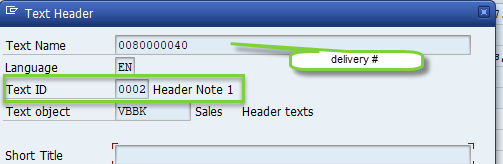 I also hard coded the language but you can map both the language and Text ID and then use a lookup to find a value.
One final note - I created this in S4 2023. I noticed in ECC that long text wasn't in the bapi. Since you didn't specify, I picked the system I use the most often.
I've attached an example. Hope this gives you an option.
Best Regards,
Sigrid
------------------------------
Sigrid Kok
*Precisely Software Inc.
------------------------------