COMUNIDAD. AUT. REG MURCIA
Original Message:
Sent: 01-16-2024 08:58
From: Peter Møller
Subject: SAVE WORKING WHIT MAPBASIC
Hi
I found a workaround using one of the new Events: AddInEvents_MapInfoProExiting.
This event gets called when MapInfo Pro is about to exit, and before Pro asks the user to save any changes.
Here's how you can implement this:
1. Add functions for subscribing to these events
If you are using the RibbonLib you can use these functions to subscribe to the event: RBNEventSubscribe.If you aren't using the RibbonLib, you can add this function to your module and call it here:
'---------------------------------Function RBNEventSubscribe( ByVal nEventType As Integer , ByVal sMBXHandler As String ) As LogicalDim bWasSubscribed As LogicalOnError GoTo ErrorOccuredRBNEventSubscribe = FALSE bWasSubscribed = MIEventsSubscribe(theMapInfoEvents, nEventType, sMBXHandler) RBNEventSubscribe = bWasSubscribed Exit Function'-------------------------ErrorOccured: Note Err() & " " & Error$() & ": RBNEventSubscribe"End Function
2. Define a couple of .NET types to work with the .NET instance IMapInfoPro from MapBasic
Besides the actual MapInfo Pro application, you also need the MapBasic App and Event instances. You can define these in your Main procedure but make sure the Dim these as global or modular variables of type This.
Here's the top of my example where you can see the Main procedure and the module variable:
Dim theMapInfoApplication As ThisDim theMapBasicApplication As ThisDim theMapInfoEvents As This'---------------------------------Sub MainDim bWasSubscribed As LogicalOnError GoTo ErrorOccured '-------------------------------- 'Get MIPro interface theMapInfoApplication = SystemInfo(SYS_INFO_IMAPINFOAPPLICATION) 'Get MapBasic interface theMapBasicApplication = MapBasicApplication(theMapInfoApplication, ApplicationName$()) 'Get the events for the MapBasic application theMapInfoEvents = MIEventsInitEvents(theMapInfoApplication, theMapBasicApplication)
Create Event Procedure
You need a procedure that will get called when the event occurs.
Notice the arguments that are passed to the procedure. In this case, I don't need to use these, but they still have to be defined.
Inside the procedure, I just call another procedure that closes some tables and asks the user if the changes should be saved.
'---------------------------------Sub MENUMapInfoExitingHandler(ByVal args As This)OnError GoTo ErrorOccured Call MENUCloseTables("MENUMapInfoExitingHandler") Exit Sub'-------------------------ErrorOccured: Note Err() & " " & Error$() & ": MENUMapInfoExitingHandler"End Sub
Subscribing to the Event
The final step is to subscribe to the event.
	If NOT RBNEventSubscribe(AddInEvents_MapInfoProExiting, "MENUMapInfoExitingHandler") Then
		Print "MENUMapInfoExitingHandler was not subscribed!"
	End If
Unsubsribe to the event when application is shut down
You should also ensure that you unsubscribe to the event, when your application is unloaded from MapInfo Pro.
Notice that the Endhandler also calls the same produce that is been called when MapInfo Pro is been shut down.
Again, the
'---------------------------------Sub EndHandlerOnError GoTo ErrorOccured Call MENUCloseTables("EndHandler") If NOT RBNEventUnsubscribe(AddInEvents_MapInfoProExiting, "MENUMapInfoExitingHandler") Then Print "MENUMapInfoExitingHandler was not unsubscribed!" End If Exit Sub'-------------------------ErrorOccured: Note Err() & " " & Error$() & ": EndHandler"End Sub
Again, the RBNEventUnsubscribe is part of the RibbonLib or you can add it to your module.
'---------------------------------Function RBNEventUnsubscribe( ByVal nEventType As Integer , ByVal sMBXHandler As String ) As LogicalDim bWasUnsubscribed As LogicalOnError GoTo ErrorOccuredRBNEventUnsubscribe = FALSE bWasUnsubscribed = MIEventsUnSubscribe(theMapInfoEvents, nEventType, sMBXHandler) RBNEventUnsubscribe = bWasUnsubscribed Exit Function'-------------------------ErrorOccured: Note Err() & " " & Error$() & ": RBNEventUnsubscribe"End Function
I have also attached the small sample application I built to prove that this works.
------------------------------
Peter Horsbøll Møller
Principal Presales Consultant | Distinguished Engineer
Precisely | Trust in Data
------------------------------
Original Message:
Sent: 01-16-2024 03:02
From: Mayca González Pérez
Subject: SAVE WORKING WHIT MAPBASIC
Ok .Thanks
------------------------------
Mayca González Pérez
COMUNIDAD. AUT. REG MURCIA
Original Message:
Sent: 01-16-2024 02:44
From: Peter Møller
Subject: SAVE WORKING WHIT MAPBASIC
You are right. This is not what I would have expected.
It seems when MapInfo Pro is shutting down, it will check for unsaved edits before executing any EndHandlers in running MapBasic applications.
I tested this with the attached very basic MapBasic application.
I'd suggest you raise this issue with our support team (support@precisely.com) to get it investigated and potentially fixed. Feel free to also refer back to this thread.
Thanks
------------------------------
Peter Horsbøll Møller
Principal Presales Consultant | Distinguished Engineer
Precisely | Trust in Data
Original Message:
Sent: 01-15-2024 08:18
From: Mayca González Pérez
Subject: SAVE WORKING WHIT MAPBASIC
Yes, the handler code is executed but before I get the dialog box to save changes
------------------------------
Mayca González Pérez
COMUNIDAD. AUT. REG MURCIA
Original Message:
Sent: 01-15-2024 07:31
From: Peter Møller
Subject: SAVE WORKING WHIT MAPBASIC
Hmm, what happens if you close your app?
Does the EndHandler get called in that case?
------------------------------
Peter Horsbøll Møller
Principal Presales Consultant | Distinguished Engineer
Precisely | Trust in Data
Original Message:
Sent: 01-15-2024 02:11
From: Mayca González Pérez
Subject: SAVE WORKING WHIT MAPBASIC
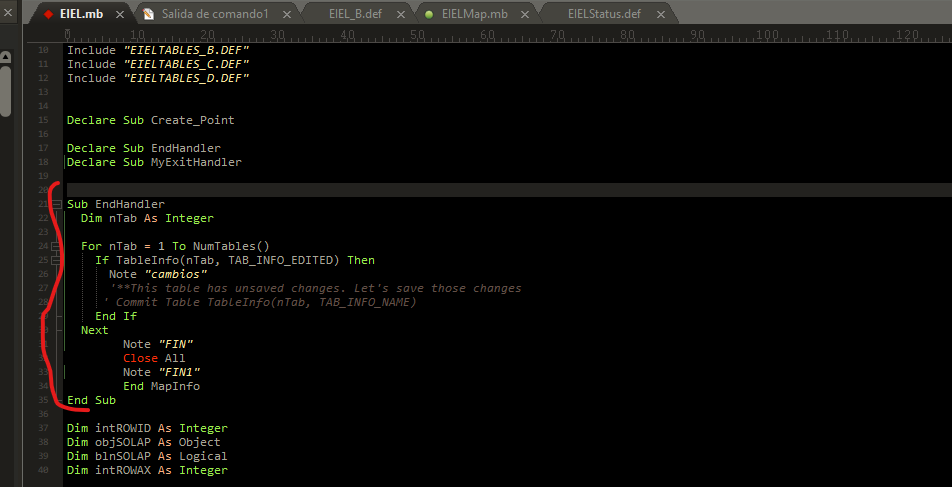
I have placed the code in the handler but the default dialog window is launched before my message
------------------------------
Mayca González Pérez
COMUNIDAD. AUT. REG MURCIA
Original Message:
Sent: 01-15-2024 01:47
From: Peter Møller
Subject: SAVE WORKING WHIT MAPBASIC
I refer back to my first response: Add an EndHandler procedure to your source code. This procedure will be called when the application is ending.
Declare Sub EndHandlerSub EndHandlerDim nTab As IntegerFor nTab = 1 To NumTables() If TableInfo(nTab, TAB_INFO_EDITED) Then '**This table has unsaved changes. Let's save those changes Commit Table TableInfo(nTab, TAB_INFO_NAME) End IfNextEnd Sub
------------------------------
Peter Horsbøll Møller
Principal Presales Consultant | Distinguished Engineer
Precisely | Trust in Data
Original Message:
Sent: 01-15-2024 01:36
From: Mayca González Pérez
Subject: SAVE WORKING WHIT MAPBASIC
But in my source code, where do I have to place that code so that it is executed when the X button to close MAPINFO is pressed?
------------------------------
Mayca González Pérez
COMUNIDAD. AUT. REG MURCIA
Original Message:
Sent: 01-15-2024 01:31
From: Peter Møller
Subject: SAVE WORKING WHIT MAPBASIC
You can do something along these lines:
Dim nTab As IntegerFor nTab = 1 To NumTables() If TableInfo(nTab, TAB_INFO_EDITED) Then '**This table has unsaved changes. Let's save those changes Commit Table TableInfo(nTab, TAB_INFO_NAME) End IfNext
This will loop over all the tables, check if they have unsaved changes, and then save these. You may want to ask the user if she wants to save these or discard the changes.
------------------------------
Peter Horsbøll Møller
Principal Presales Consultant | Distinguished Engineer
Precisely | Trust in Data
Original Message:
Sent: 01-15-2024 01:15
From: Mayca González Pérez
Subject: SAVE WORKING WHIT MAPBASIC
How can I check from the code if there are changes, when the user presses the X close button and go ahead to that dialog window?
Thanks
------------------------------
Mayca González Pérez
COMUNIDAD. AUT. REG MURCIA
Original Message:
Sent: 01-04-2024 02:16
From: Peter Møller
Subject: SAVE WORKING WHIT MAPBASIC
Hi Mayca
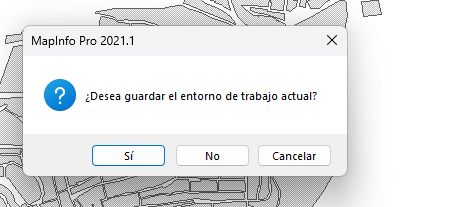
The first dialog appears because there are unsaved changes in your workspace. You may be able to avoid this by closing all at not including the Interactive keyword:
Close All
This depends on what you are doing and if you want to give your user a chance to save the workspace.
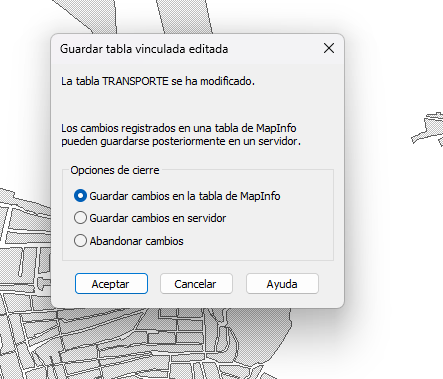
The second dialog appears because there are unsaved changes to a linked database table. That's a MapInfo table that is linked to a table in a database. That's why you have the option to save the changes locally or push them to the database.
To avoid this dialog from appearing, you have to loop through the open tables and see if any of them have unsaved changes. If that's the case. You can either undo these
Rollback Table sTab
or save them
Commit Table sTab
You can of course combine the loop with a dialog asking the user if they want to save to rollback the changes.
------------------------------
Peter Horsbøll Møller
Principal Presales Consultant | Distinguished Engineer
Precisely | Trust in Data
Original Message:
Sent: 01-02-2024 06:19
From: Mayca González Pérez
Subject: SAVE WORKING WHIT MAPBASIC
Hello. I refer to these dialogues. I want the first one not to appear. And in the second window the option (Save changes to MapInfo table) does not appear.
Thanks.
Happy new year!!!
------------------------------
Mayca González Pérez
COMUNIDAD. AUT. REG MURCIA
Original Message:
Sent: 12-20-2023 01:28
From: Peter Møller
Subject: SAVE WORKING WHIT MAPBASIC
When your application is "ending"/is been shut down, MapInfo Pro will call the EndHandler procedure of the application - if it has one.
In the EndHandler, you can do all sorts of things such as saving your tables, saving your workspace, writing settings to a configuration file, deleting temp files, and more.
Here is an example:
Sub EndHandler 'Saving changes to a table and closing the temporary table Commit Table TableWithMyWork Close Table TempData '**Call EndHandler of the RibbonLib to remove controls from Ribbon Call RBNEndHandlerEnd Sub
I hope this helps
------------------------------
Peter Horsbøll Møller
Principal Presales Consultant | Distinguished Engineer
Precisely | Trust in Data