Automate

 View Only
  • 1.  Populate customer number to solution feild

    Posted 07-09-2023 07:42

    Good afternoon, 

    I'm creating a customer master creation  form solution. Workflow is simple submit ==> extend ==> END. The issue is when the W.F request is submitted I'm not able to populate the created customer number from the form to solution field, accordingly the created customer number in not shown on the solution field and the extend plug-in which run the auto extend to the created customer is not able to capture the customer number.

    Have a nice day

    Thanks, 

    Obada 


    ------------------------------
    Obada Halawik
    Alfanar Co.
    ------------------------------


  • 2.  RE: Populate customer number to solution feild

    Employee
    Posted 07-09-2023 11:59

    Hi Obada,

    Is the value visible on the form when you open the document or not?

    Regards


    ------------------------------
    Hammad Naeem
    Precisely Software Inc.
    ------------------------------


  • 3.  RE: Populate customer number to solution feild

    Posted 07-10-2023 01:07

    Hi Hammed, 

    Yes, it is visible when you open the form. 

    Thanks, 


    ------------------------------
    Obada Halawik
    Alfanar Co.
    ------------------------------


  • 4.  RE: Populate customer number to solution feild

    Employee
    Posted 07-10-2023 02:43

    Hi obada,

    Can you please share your form Solution with me, i will try to check if there's any configurational mistake.

    also let me know what is the view name on the form and the field that you are trying to promote.

    Regards


    ------------------------------
    Hammad Naeem
    Precisely Software Inc.
    ------------------------------


  • 5.  RE: Populate customer number to solution feild

    Posted 07-10-2023 03:29

    Hi Hammad,

    Solution FYKI. https://alfanargroup-my.sharepoint.com/:u:/g/personal/obada_halawik_alfanar_com/EYpz2ngpqYdMpfmNwTZLSsIBafYWiv05uylWv2S9xvYQ6Q

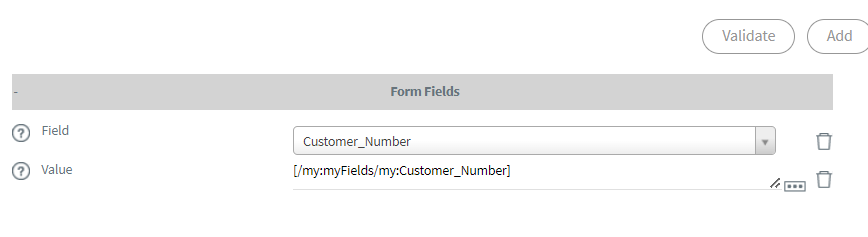
    I'm using requester from. The Feild is /my:myFields/my:Customer_Number  OR /my:myFields/my:Customer  both do the same thing. 

    Also I've tried this plug-in, but not working


    ------------------------------
    Obada Halawik
    Alfanar Co.
    ------------------------------


  • 6.  RE: Populate customer number to solution feild

    Employee
    Posted 07-10-2023 07:57

    Hi Obada,

    I have reviewed the solution at my end, it works fine for me.

    You can raise a ticket on Precisely support regarding your issue.

    Do refer this ticket or mention my name on the support ticket so that I can pick it up and review the solution at your end.

    Regards


    ------------------------------
    Hammad Naeem
    Precisely Software Inc.
    ------------------------------


  • 7.  RE: Populate customer number to solution feild
    Best Answer

    Employee
    Posted 07-12-2023 09:38

    Hi Obada,

    Can you try below mentioned javascript code on Create_Customer_sap Button :

    -----------------------

    if ($form.getValue('/my:myFields/my:Mobile_No_') !== '') {
    callbackFirst(setTimeout(callbackSecond,2000));
                 function callbackFirst(callbackFn) {
        $form.executeWebService('XD01');
                    callbackFn();
                }
     
                function callbackSecond() {
    SVFormDoSetActionsAndSubmit(5,'TODO_ButtonId');
                }}

    --------------------------------

    Deploy the solution and test the scenario.

    Regards


    ------------------------------
    Hammad Naeem
    Precisely Software Inc.
    ------------------------------


  • 8.  RE: Populate customer number to solution feild

    Posted 07-13-2023 00:35
    Edited by Obada Halawik 07-13-2023 00:36

    Hi Hammad, 

    it worked like a charm :), thanks a lot for your support. I noticed there is no way of removing the default form button Save And Rout!


    ------------------------------
    Obada Halawik
    Alfanar Co.
    ------------------------------


  • 9.  RE: Populate customer number to solution feild

    Employee
    Posted 07-13-2023 01:28

    Hi Obada, 

    You can hide the default buttons on the form using workflow configuration keys.

    Regards


    ------------------------------
    Hammad Naeem
    Precisely Software Inc.
    ------------------------------