I definitely appreciate your time. I used your script and removed the quantity changed (attached). The script looks like it ran successfully, but it did not update SAP? I have checked that the BAPI is remote enabled. I also cannot debug, is that normal for BAPI?
------------------------------
Brianna Stirsman | Business Analyst
Cardinal Health | 847.887.1091
------------------------------
Original Message:
Sent: 06-17-2022 13:43
From: Sigrid Kok
Subject: PO Delivery Date Multiple Schedule Lines
Ok, Briana, that sounds like my example, which is attached.
Best Regards,
Sigrid
------------------------------
Sigrid Kok
PSE | Winshuttle NA
------------------------------
Original Message:
Sent: 06-17-2022 13:37
From: Brianna Stirsman
Subject: PO Delivery Date Multiple Schedule Lines
I am only interested in adjusting the delivery date on schedules, be it one line or multiple. Let me try your examples and follow up. Thank you!
------------------------------
Brianna Stirsman | Business Analyst
Cardinal Health | 847.887.1091
Original Message:
Sent: 06-17-2022 13:33
From: Sigrid Kok
Subject: PO Delivery Date Multiple Schedule Lines
Hi Briana
Am not 100% clear on your use case. Are you just interested in schedule lines? Whether one or many? Are you trying to change the qty/date or delete them or both?
In your script you have POITEMS and POSCHEDULE without the accompanying "X" versions, which SAP needs for you to tell SAP out of the 100's of fields, which ones you want to maintain.
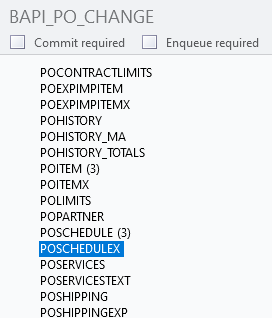
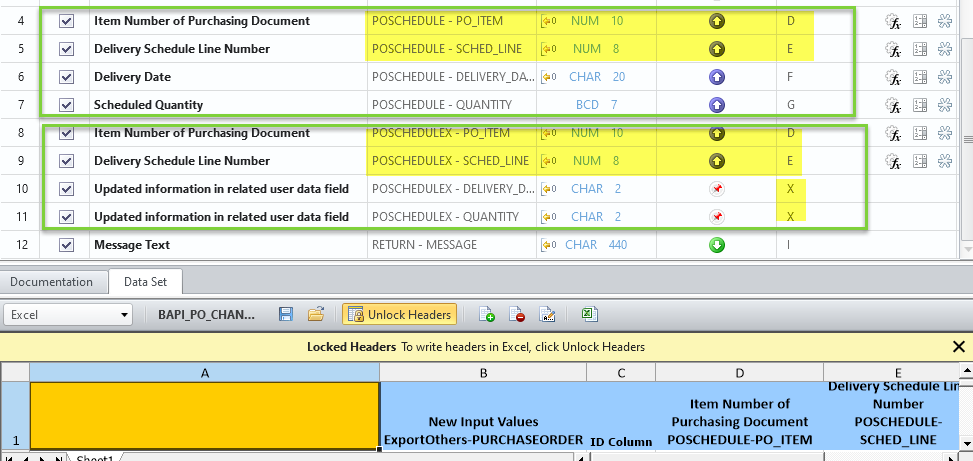
If you want to use POITEMs and/or POSCHEDULE, you will also need to use POITEMSX and POSCHEDULEX. The "X" versions need to pass up the PO Item Number & for POSCHEDULEX also pass up the Schedule line # -you can map to the same columns as the non-X version. Then in the X table, you must hard code a capital "X" in the fields you want to maintain in SAP.
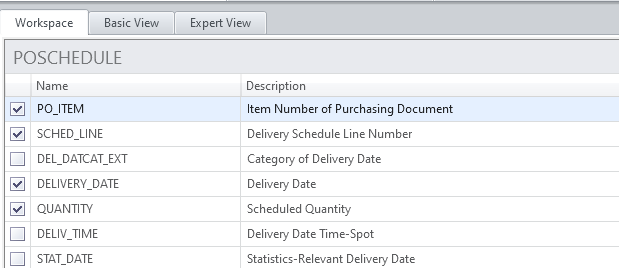
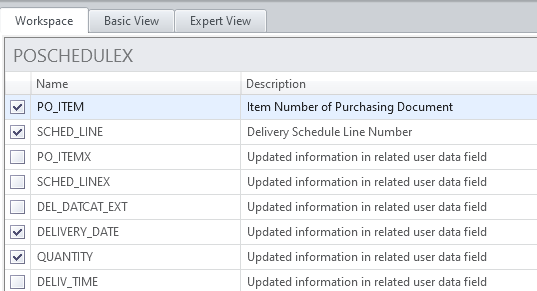
Here's a screen shot of just working with schedule lines - which will just update the quantity and date for a schedule line:
Notice both POSCHEDULE and POSCHEDULEX have the same fields selected. Of course if you pick the delete flag, the "X" table will have an extra field
mapping
Notice both POSCHEDULE and POSCHEDULEX map Item number and Schedule line number to the same fields in the excel template. Then for the other "X" fields, which tell SAP which fields you are updating, you hard code them to "X" as a fixed value.
Hope that helps,
Sigrid
PS: I answer questions as I have time. I cannot promise to reply to posts immediately or even the next day. This is a community, so others can jump in, as well. :)
------------------------------
Sigrid Kok
PSE | Winshuttle NA