Automate

 View Only
  • 1.  MIGO recorded in Batch mode - Causing SAPGui Max Sessions popups

    Posted 11-16-2022 08:16
      |   view attached
    Winshuttle Studio 12.1 has been running fine for years.  Almost every script (40+) recorded in Standard mode.    Transaction MIGO for Goods Receipt wasn't working that way and found that I am supposed to record in Batch mode.  Winshuttle Link That worked!    However, now I get multiple SAP Gui errors where it is acting like it does not close the SAPGui Session after each MIGO post.  Screenshot Attached.  This is the ONLY script where this has happened.

    SAP Netweaver 7.5 ERP 6 Enhancement Pack 8.    
    SAPGui 7.40 - which works fine for Winshuttle Studio 12.1 as well as this version of SAP.  Has worked perfectly for years.


    ------------------------------
    Robert Zsedely | Business Architect
    Seneca Foods Corporation | Fairport, NY |
    ------------------------------


  • 2.  RE: MIGO recorded in Batch mode - Causing SAPGui Max Sessions popups

    Employee
    Posted 11-16-2022 09:40
    Hi Robert,
    Please attach you script so that we can take a look, and if possible the data template - you can scrub the data.  I'm interested in what you're passing in on top


    Also, what version of Studio are you on, please?  SAP GUI 740 is quite old, and I'm wondering about compatibility, as well.   If you're on Studio 12.1 the doc lists this for pre-requisites

    730 - patch 15
    740 - patch 19
    750 - patch 10
    760 - patches 1, 2, 3, 4, 5, 6, 7, 8, and 9

    What's your patch level on SAP GUI 740.

    Thanks,
    Sigrid

    ------------------------------
    Sigrid Kok
    PSE | Winshuttle NA
    ------------------------------


  • 3.  RE: MIGO recorded in Batch mode - Causing SAPGui Max Sessions popups

    Posted 11-16-2022 11:55
    Winshuttle Studio 12.1
    SAPGui 740 Final Release 7400.3.15.1131 build 1785483 patch 15

    files attached.

    ------------------------------
    Robert Zsedely | Business Architect
    Seneca Foods Corporation | Fairport, NY |
    ------------------------------

    Attachment(s)

    Txr
    ACCT-GoodsReceipt-MIGO.Txr   116 KB 1 version


  • 4.  RE: MIGO recorded in Batch mode - Causing SAPGui Max Sessions popups

    Employee
    Posted 11-16-2022 16:25
    Hi Robert

    Was able to use your script and run the first 8 rows, mapping to my data
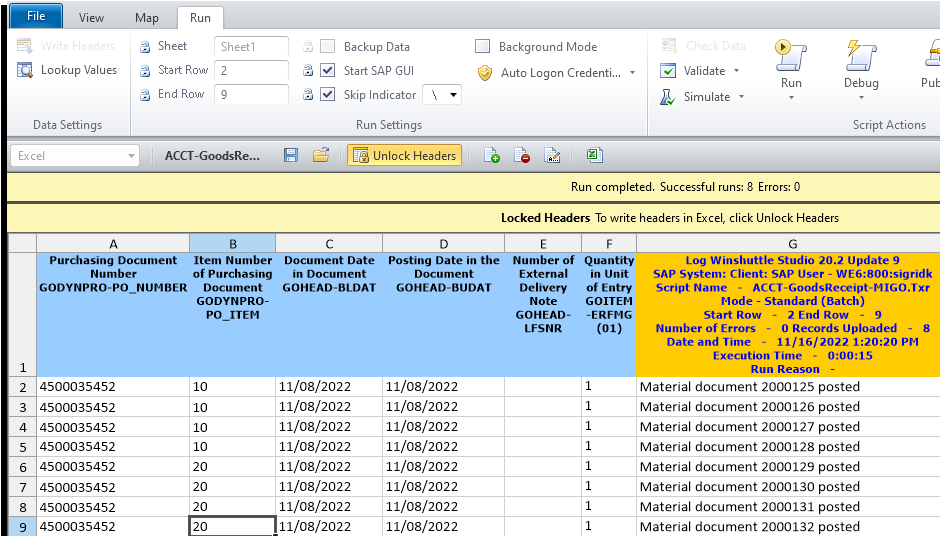

    Also, this looks like an "enjoy" transaction, so launch GUI has to be checked, which it was in your script. 

    For MIGO, I've always used non-batch with controls for this tcode, but I didn't lookup what the best mode should (could) be.  Overall, I like the bapi option that I shared earlier.

    Long story short, if this is the only way you can script it, and you consistently get this message,  I would open a support ticket. 

    Best Regards,
    Sigrid

    ------------------------------
    Sigrid Kok
    PSE | Winshuttle NA
    ------------------------------


  • 5.  RE: MIGO recorded in Batch mode - Causing SAPGui Max Sessions popups

    Posted 11-17-2022 09:53
    Hi @Sigrid Kok - The winshuttle website  says Batch Mode:  https://docs.winshuttle.com/studio-en-12-1-x-online-help-studio-w-connect/12/Recording-modes.htm      I haven't tried non-batch with controls just standard (and it did not work).  Also, what Bapi are you referring to.   Thanks in advance.   Oh, I also have a support ticket out there.​

    ------------------------------
    Robert Zsedely | Business Architect
    Seneca Foods Corporation | Fairport, NY |
    ------------------------------


  • 6.  RE: MIGO recorded in Batch mode - Causing SAPGui Max Sessions popups

    Posted 11-17-2022 10:12
    @Sigrid Kok  I don't see Non-Batch with Controls?  I only see Standard , Batch Input, GUI Scripting


    ------------------------------
    Robert Zsedely | Business Architect
    Seneca Foods Corporation | Fairport, NY |
    ------------------------------


  • 7.  RE: MIGO recorded in Batch mode - Causing SAPGui Max Sessions popups

    Employee
    Posted 11-17-2022 10:16
    HI @Robert Zsedely
    Standard mode is non-batch.  You can set default in Studio​

    I thought I had attached the BAPI example already - here it is now.  

    Hope this helps,
    Sigrid

    ------------------------------
    Sigrid Kok
    PSE | Winshuttle NA
    ------------------------------

    Attachment(s)


  • 8.  RE: MIGO recorded in Batch mode - Causing SAPGui Max Sessions popups

    Posted 12-27-2022 11:20
    Ran some detailed logging with SAPBASIS group here and discovered that the issue was caused by the MIGO transaction taking a little extra time and subsequent Winshuttle calls were consuming more resource and sessions.    Added a 5000ms delay and all is good.

    ------------------------------
    Robert Zsedely | Business Architect
    Seneca Foods Corporation | Fairport, NY |
    ------------------------------