COMUNIDAD. AUT. REG MURCIA
Original Message:
Sent: 06-06-2024 06:51
From: Peter Møller
Subject: Mapinfo v21 Hide tabs
Hi
Your variable EielRTab is of type This.
It must be a string, referring to the name of the tab. I think it's this: "EIELTab"
Try:
Call RBNSelectTab("EIELTab")
Thanks
Peter
-
Peter Horsbøll Møller
Principal Sales Engineer - Distinguished Engineer
Original Message:
Sent: 6/6/2024 6:21:00 AM
From: Mayca González Pérez
Subject: RE: Mapinfo v21 Hide tabs
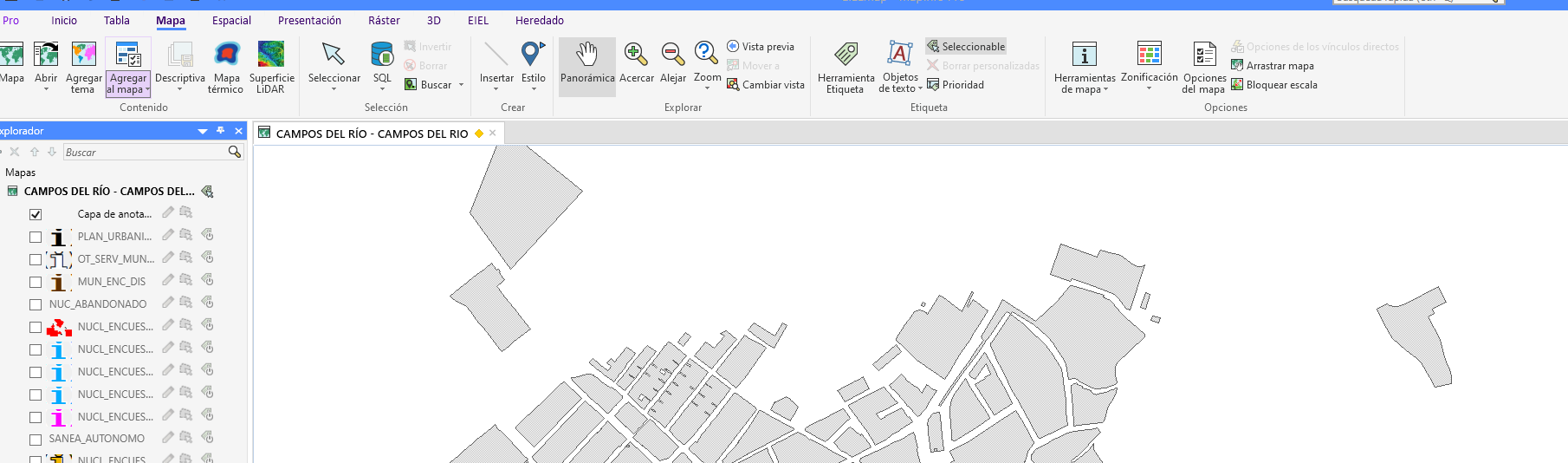
I don't get errors anymore. The only thing that is not placed as default.
It stays on the map. I have put the function after all the maps are loaded
EielRTab = RbnTabCollAddStrStr (RibbonTabColl, "EIELTab", "EIEL")
EielGroupColl = GetRbnTabGrps(EielRTab)
Call RBNSelectTab(EielRTab)
------------------------------
Mayca González Pérez
COMUNIDAD. AUT. REG MURCIA
------------------------------
Original Message:
Sent: 06-04-2024 08:01
From: Peter Møller
Subject: Mapinfo v21 Hide tabs
Hi
OK, I can see that you previously copied the functions (RBNEventSubscribe and RBNEventUnsubscribe) you need from RIBBONLib.mb and the Declare statement.
You can also copy the procedure RBNSelectTab from the file RIBBONLb.mb
In that case, you should not include RIBBONLib.def.
------------------------------
Peter Horsbøll Møller
Principal Presales Consultant | Distinguished Engineer
Precisely | Trust in Data
Original Message:
Sent: 06-04-2024 05:46
From: Mayca González Pérez
Subject: Mapinfo v21 Hide tabs
Te paso fichero donde tengo la implementación y el del menu, la función esta en la linea 1172
------------------------------
Peter Horsbøll Møller
Principal Presales Consultant | Distinguished Engineer
Precisely | Trust in Data
Original Message:
Sent: 06-03-2024 13:13
From: Mayca González Pérez
Subject: Mapinfo v21 Hide tabs
When linking I get the following error I have the library include declared

Include "EIELMAP.DEF"Include "MAPBASIC.DEF"Include "IMAPINFOPRO.DEF"Include "MENU.DEF"Include "MENUTRANSF.DEF"Include "MENUACTION.DEF"Include "MENUQUERY.DEF"Include "MULTIMODIFICAR.DEF"Include "ICONS.DEF"Include "ENUMS.DEF"Include "RIBBONCONTROLS.DEF"Include "RIBBONLIB.DEF"..................Sub Menu_Show64OnError GoTo etiquetaError Dim ribbonGroupsColl as This Dim ribbonGroup as This Dim bRet as logical Dim groupControlColl as This Dim button1 as This Dim iRet as integer Dim homeTab as This Dim tableTab as This Dim mapTab as This Dim spatialTab as This Dim presentacionTab as This Dim rasterTab as This Dim heredadoTab as This Dim eielTab as This dim i as integer Call RegisterUriParser(New_GenericUriParser(1), "pack", -1)mapinfoApplication = SystemInfo(SYS_INFO_IMAPINFOAPPLICATION) 'obeter la interfaz Ribbon8Ribbon = GetRibbon(mapinfoApplication)'obtener colecci?n de tabs RibbonRibbonTabColl = GetTabsColl(Ribbon)'OCULTAR TABS POR DEFECTO'Get the Home tabhomeTab = GetRbnTabCollItemInt(RibbonTabColl, 0) tableTab = GetRbnTabCollItemInt(RibbonTabColl, 1) mapTab = GetRbnTabCollItemInt(RibbonTabColl, 2) spatialTab = GetRbnTabCollItemInt(RibbonTabColl, 3) presentacionTab = GetRbnTabCollItemInt(RibbonTabColl, 4) rasterTab= GetRbnTabCollItemInt(RibbonTabColl, 5) eielTab= GetRbnTabCollItemInt(RibbonTabColl, 7) Call RBNSelectTab(eielTab)
.............................
------------------------------
Mayca González Pérez
COMUNIDAD. AUT. REG MURCIA
Original Message:
Sent: 06-03-2024 09:54
From: Peter Møller
Subject: Mapinfo v21 Hide tabs
If you are using the RibbonLib, you can use this procedure to select a specific tab:
Call RBNSelectTab(sTabName)
where sTabName is the name of the tab. Notice it's the name, not the caption.
The procedure above calls this method in the Ribbon SDK:
Declare Method SetRbnTabIsSelected
Class "MapInfo.Types.IRibbonTab" Lib "MapInfo.Types, Version=23.0.0.0, Culture=neutral, PublicKeyToken=1c8d81d2ee78b75d"
alias set_IsSelected (ByVal IRbnTabInstance As This, ByVal isSelected As Logical)
------------------------------
Peter Horsbøll Møller
Principal Presales Consultant | Distinguished Engineer
Precisely | Trust in Data
Original Message:
Sent: 06-03-2024 09:26
From: Mayca González Pérez
Subject: Mapinfo v21 Hide tabs
Hi
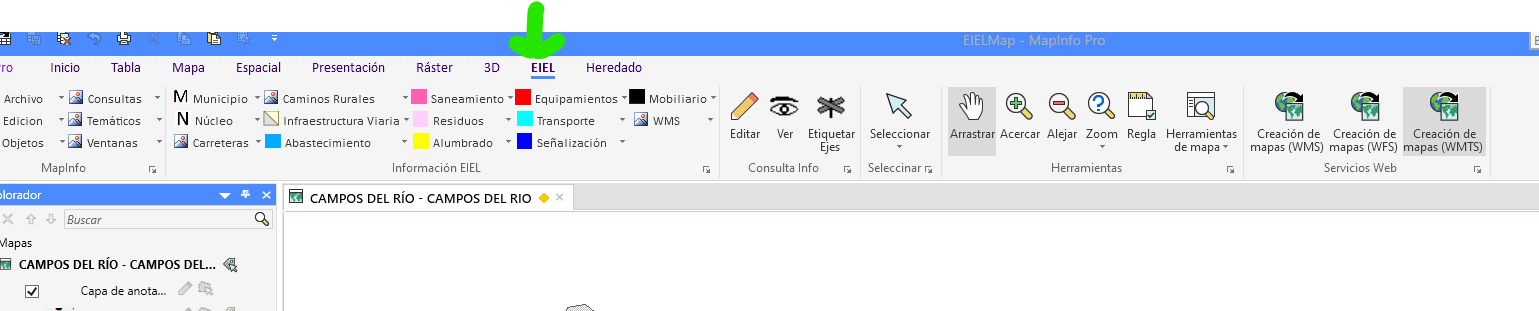
How can I make the EIEL tab when opening the application be checked by default?
------------------------------
Mayca González Pérez
COMUNIDAD. AUT. REG MURCIA
Original Message:
Sent: 12-13-2023 01:49
From: Peter Møller
Subject: Mapinfo v21 Hide tabs
Hi
The PRO tab currently can't be removed or hidden.
PS: You don't have to remove the tabs, you could potentially just hide them via the visibility:
sTabName = "TabTable"
Call RBNTabSetVisibility(sTabName, FALSE)
------------------------------
Peter Horsbøll Møller
Principal Presales Consultant | Distinguished Engineer
Precisely | Trust in Data
Original Message:
Sent: 12-11-2023 12:57
From: Mayca González Pérez
Subject: Mapinfo v21 Hide tabs
I have this code, the tabs that I insert with the code are deleted, but the default tabs, for example the Home one, do not delete them from the screen
Sub Menu_Show64
OnError GoTo etiquetaError
Dim nCtrlIdx, nTabItem as Integer
Dim sTabName, sGroupName, marrModProgramsNames(), marrModProgramsImages() as String
' Check for the existence of the TAB named tabAtlasApp
sTabName = "TabHome"
If RBNTabExists(sTabName) Then
nCtrlIdx = RBNRemoveTab(sTabName)
End If
sTabName = "TabTable"
If RBNTabExists(sTabName) Then
nCtrlIdx =RBNRemoveTab(sTabName)
End If
sTabName = "tbArchivo"
If NOT RBNTabExists(sTabName) Then
nCtrlIdx = RBNAddTab(sTabName,"Archivo","F")
If nCtrlIdx = 0 Then
Note "An error occurred whilst adding a new tab called + '" + sTabName + "' to the ribbon"
Exit Sub
End If
End If
If RBNTabExists(sTabName) Then
nCtrlIdx = RBNRemoveTab(sTabName)
If nCtrlIdx = 0 Then
Note "An error occurred whilst adding a new tab called + '" + sTabName + "' to the ribbon"
Exit Sub
End If
End If
Exit Sub
etiquetaError:
Note "ERROR : " + Chr$(13) & Chr$(10) + Error$()
End Sub
Thanks
------------------------------
Mayca González Pérez
COMUNIDAD. AUT. REG MURCIA
Original Message:
Sent: 12-11-2023 06:23
From: Peter Møller
Subject: Mapinfo v21 Hide tabs
Yeah, it can.
You can use MapBasic statements to hide some tabs and to create your custom tab too.
You can use the Set Ribbon statement that was added to MapInfo Pro v2021 or the RIBBONLib that has been around for a while.
Here's a post on using the Set Ribbon statement: MapBasic Monday: Using the Create Ribbon Tab Statement in MapBasic v2021
And here's one on getting started with the RibbonLib.
------------------------------
Peter Horsbøll Møller
Principal Presales Consultant | Distinguished Engineer
Precisely | Trust in Data
Original Message:
Sent: 12-11-2023 06:14
From: Mayca González Pérez
Subject: Mapinfo v21 Hide tabs
Can this configuration be done programmatically, that is, from the Mapbasic source code?

Thanks
------------------------------
Mayca González Pérez
COMUNIDAD. AUT. REG MURCIA
Original Message:
Sent: 12-11-2023 06:07
From: Peter Møller
Subject: Mapinfo v21 Hide tabs
Hi
From the Customize Ribbon dialog, you can hide tabs simply by unchecking them as I have shown below.
It is also through this dialog that you can add your own tabs and add the groups and controls to it.
You can open the Customize Ribbon dialog from various places inside MapInfo Pro. I'd recommend using the More Commands control from the QAT menu in the upper left corner of the MapInfo Pro application window.
------------------------------
Peter Horsbøll Møller
Principal Presales Consultant | Distinguished Engineer
Precisely | Trust in Data
Original Message:
Sent: 12-09-2023 10:53
From: Mayca González Pérez
Subject: Mapinfo v21 Hide tabs
Hello. In Mapinfo 2021, how can I hide the default tabs and insert the ones I want. Thank you
------------------------------
Mayca González Pérez
COMUNIDAD. AUT. REG MURCIA
------------------------------