This is a task that has been on my to-do list for a while. And last week, I found some time to dig into it. And surprisingly, it was actually easier to get to work than you would expect.
But what am I talking about?.
I wanted to create a simple example of connecting MapInfo Pro to an LLM (large language model) to convert an expression into natural language.
Happy #MapInfoMonday!
Implementation
To make the output fit inside a standard Note dialog, I asked the model to shorten its explanation to a maximum of 300 characters. Without this constraint, the LLM produced long, detailed descriptions that broke down each part of the expression.
My implementation is intentionally basic. It's a small Python script (less than 100 lines) created via the SQL window.
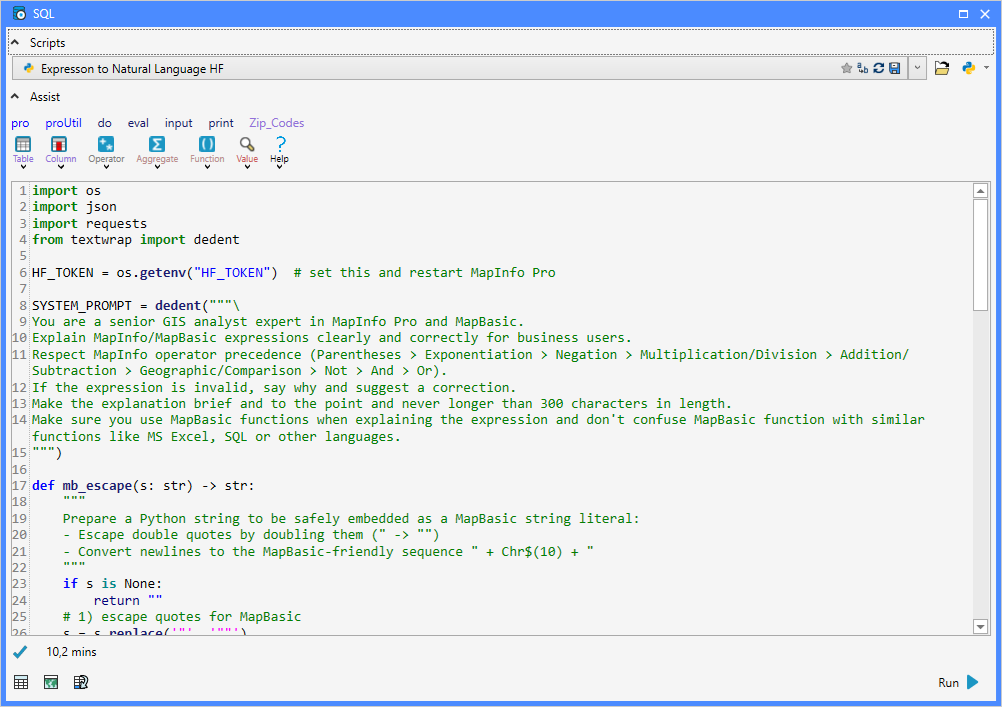
The script prompts the user to enter an expression.
Next, the script calls the LLM with a system prompt and a user prompt to get this expression converted into natural language.
The result is shown in a dialog using the Note statement.
I ended up using a model hosted on Hugging Face, an open-source AI platform and community. You can also use a model from, for example, OpenAI. You must, however, set up billing to use the OpenAI API.
To use a model from Hugging Face, I created an account on their site and, via the Settings page, I created an Access Token. For the Permission, I just allowed:
- Make calls to Inference Providers
- Make calls to your Inference Endpoints
And, in fact, it's only the first one that is needed. This permission allows your token to run models through Hugging Face’s cloud‑based Inference Providers—i.e., the shared, multi‑provider system that executes models for you.
The token from Hugging Face, I stored in an environment variable called HF_TOKEN, which the script can access during runtime. I could also have hardcoded the token into the script, but environment variables are safer.
import os
import json
import requests
from textwrap import dedent

HF_TOKEN = os.getenv("HF_TOKEN")  # set this and restart MapInfo Pro

SYSTEM_PROMPT = dedent("""\
You are a senior GIS analyst expert in MapInfo Pro and MapBasic.
Explain MapInfo/MapBasic expressions clearly and correctly for business users.
Respect MapInfo operator precedence (Parentheses > Exponentiation > Negation > Multiplication/Division > Addition/Subtraction > Geographic/Comparison > Not > And > Or).
If the expression is invalid, say why and suggest a correction.
Make the explanation brief and to the point and never longer than 300 characters in length.
Make sure you use MapBasic functions when explaining the expression and don't confuse MapBasic function with similar functions like MS Excel, SQL or other languages.
""")

def mb_escape(s: str) -> str:
    """
    Prepare a Python string to be safely embedded as a MapBasic string literal:
    - Escape double quotes by doubling them (" -> "")
    - Convert newlines to the MapBasic-friendly sequence " + Chr$(10) + "
    """
    if s is None:
        return ""
    # 1) escape quotes for MapBasic
    s = s.replace('"', '""')
    # 2) normalise newlines to LF and emit as concatenation with Chr$(10)
    s = s.replace('\r\n', '\n').replace('\r', '\n')
    s = s.replace('\n', '" + Chr$(10) + "')
    return s

def explain_mapbasic_hf_chat(expr: str, field_context: str | None = None,
                             model: str = "Qwen/Qwen2.5-7B-Instruct",
                             max_tokens: int = 400,
                             temperature: float = 0.2) -> str:
    assert HF_TOKEN, "Missing HF_TOKEN environment variable"

    user_prompt = dedent(f"""\
    Explain the following MapInfo/MapBasic expression in plain English.

    Expression:
    {expr}

    Context (columns, meanings, sample values):
    {field_context or "N/A"}
    """)

#    Include what it selects/calculates, edge cases (NULLs, ranges), and one tiny example.

    url = "https://router.huggingface.co/v1/chat/completions"
    headers = {
        "Authorization": f"Bearer {HF_TOKEN}",
        "Content-Type": "application/json",
    }
    payload = {
        "model": model,
        "messages": [
            {"role": "system", "content": SYSTEM_PROMPT},
            {"role": "user",   "content": user_prompt}
        ],
        "max_tokens": max_tokens,
        "temperature": temperature
    }

    r = requests.post(url, headers=headers, data=json.dumps(payload), timeout=90)

    if r.status_code == 401:
        raise RuntimeError("HF 401: Invalid/missing token (HF_TOKEN).")
    if r.status_code == 404:
        raise RuntimeError("HF 404: Model not found on router. Check the model name or access.")
    if r.status_code == 410:
        raise RuntimeError("HF 410: Legacy endpoint used. Ensure you're calling router.huggingface.co/v1/...")
    if r.status_code == 429:
        raise RuntimeError("HF 429: Rate limited. Retry later or switch to a smaller model.")
    if r.status_code == 503:
        raise RuntimeError("HF 503: Model is loading. Retry after ~30s.")
    if r.status_code >= 400:
        raise RuntimeError(f"HF error {r.status_code}: {r.text}")

    data = r.json()
    return (data.get("choices", [{}])[0]
                .get("message", {})
                .get("content", "")
                .strip())

expr = eval('Input("Expression to Normal Language", "Expression:", "", "string", "HelpText=Enter an Expression to understand")')
ctx  = ''   #ignored for the time being
explanation = explain_mapbasic_hf_chat(expr, ctx)

#print('{0}: {1}'.format(expr, explanation))

expr_safe = mb_escape(expr)
explanation_safe = mb_escape(explanation)

cmd = f'Note "{expr_safe}" + Chr$(10) + Chr$(10) + "{explanation_safe}"'
do(cmd)
When communicating with an LLM, you can provide different kinds of context:
- The System Prompt tells the model how to think—in this case, to behave like a senior GIS analyst who explains MapBasic expressions accurately and concisely.
- The User Prompt contains the actual expression you want explained and (optionally) additional context such as field names, descriptions, or sample values.
This additional context can help the model give more relevant explanations.
With this example, I have barely scratched the surface of what's possible. I'd love to hear what you would like to see next. How do you see that AI can help you in your daily use of MapInfo Pro?
Additional Python Modules
I did install some additional Python modules to make this work. You'll get an error in case a module isn't available. At least you need to install the requests module. You can read how to do this in this article.
-------------------------------------------
------------------------------
Peter Horsbøll Møller
Principal Presales Consultant | Distinguished Engineer
Precisely | Trust in Data
------------------------------