I'm not going to say this is the last article in the series, as we seem to keep surfacing new issues to solve.
In the previous article, we moved our small script into a MapBasic add-in, which made the code easier to reuse and more flexible.
Today, we will look at reassigning a service engineer to the enclaved areas. We saw last time that some service areas had been assigned to a different service engineer, and all the areas around this area had been assigned to another service engineer. This is what I refer to as enclaved areas.
In the map below, you can see single green areas within the light red area and also light red areas within the other green area.
We will identify areas completely surrounded by areas assigned to another service engineer. We will then assign the neighboring service engineer to these areas.
To do this, we will start by creating a copy of our Service Areas table so we can join it to the original.
Now we can join the two Service Area tables, identifying joins where the objects intersect to find the neighbors for each service area, and excluding those joins where the postsect of the two tables is the same to avoid joining identical records with itself.
We are saving the result and adding a new column to the new table to hold the number of unique neighboring service engineers.
	sTempFile	= sTempPath & "Service Areas join Service Areas.TAB"
	Commit Table _sa_j_sa
		As sTempFile TYPE NATIVEX Charset "UTF-8" supportmz off
	Close Table _sa_j_sa
	Open Table sTempFile
	sTabJoin = PathToTableName$(sTempFile)
	Alter Table sTabJoin
		(add CountJoins Integer)
Let's calculate the number of joins for each service area using an aggregate Select statement and update the join table with the counts using the Add Column statement. The Add Column statement allows you to update one table with values from another table.
	'**Counting number of neighbors for each service area
	Select postsect1
			, Count(*) As "NumJoins"
		From sTabJoin
		Group By postsect1
		Into _count_joins NoSelect

	'**Updating join with number of neighbors
	Add Column sTabJoin
		(CountJoins)From _count_joins
			Set To NumJoins
			Where postsect1 = postsect1
	Close Table _count_joins
	Commit Table sTabJoin
We can now find all service areas where:
- The surrounding areas are served by one service engineer
- The service engineer from the surrounding areas is not the same as the one serving this service area.
	'**Selecting service areas where all neighbors are handled by another service engineer
	Select saj.postsect1, saj.NameNew2
		From sTabJoin As "saj"
		Where saj.CountJoins = 1
		And saj.NameNew1 <> saj.NameNew2
		Into _enclaved_codes NoSelect
I can now select all the enclaved service areas using the postal sector code from the query result above. And I can update these with the service engineer from the neighboring service areas using the Add Column statement.
	Select *
		From msTabServiceAreas
		Where postsect In (Select postsect1 From _enclaved_codes)
		Into _enclaved_areas NoSelect
	nReassignedRows = TableInfo(_enclaved_areas, TAB_INFO_NROWS)

	'**Resetting enclaved areas to the neighbor service engineer
	Add Column _enclaved_areas (NameNew)
		From _enclaved_codes
			Set To NameNew2
			Where postsect = postsect1
	Close Table _enclaved_codes
This map shows all the service areas that have been assigned a service engineer different from those of their neighbors (highlighted with a thicker border). You can see that they have a different color from all their neighbors.
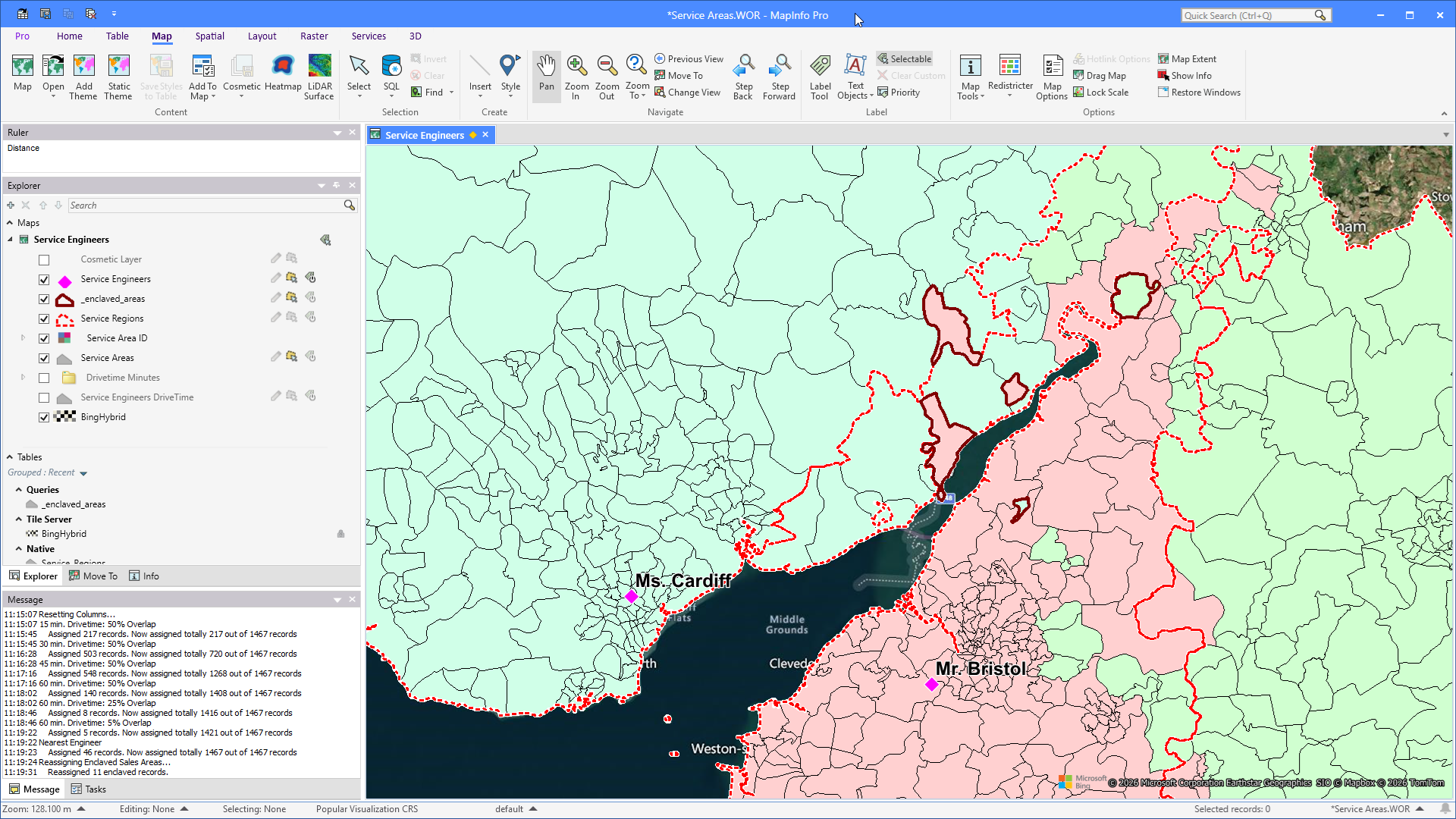
And here is a map showing that these areas have been assigned the same service engineer as their neighbors.
And that's basically it. I have included the source code and compiled application.
However, this logic only fixed those enclaved areas that were fully enclosed by areas with a different service engineer. If two or more adjacent areas were enclosed by a different service engineer, they would not be fixed using this logic.
In the map above, you can see a few two to three adjacent green areas inside the red area. We need to find another logic for these areas where more adjacent areas are surrounded by a different service engineer.
Whether they need fixing at all is another question. And if they do, where lies the limit? Is it 2, 3, or 4 adjacent areas that should be merged back into the surrounding area?
We'll investigate this in an upcoming article in this never-ending series.
Happy #MapInfoMonday!
------------------------------
Peter Horsbøll Møller
Principal Presales Consultant | Distinguished Engineer
Precisely | Trust in Data
------------------------------