Hi Sigrid,
Thank you.
Unfortunately, CK74N doesn't have the 'Add item' button like BoM.
My solution was having 2 scripts.
1.Creating an item as a Header
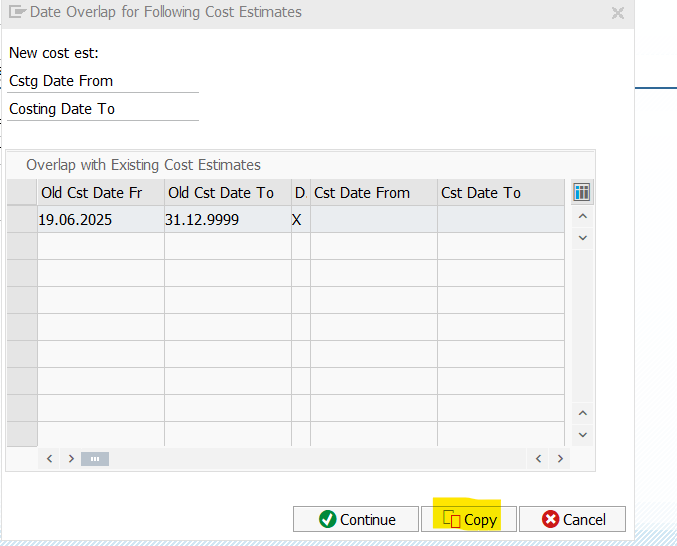
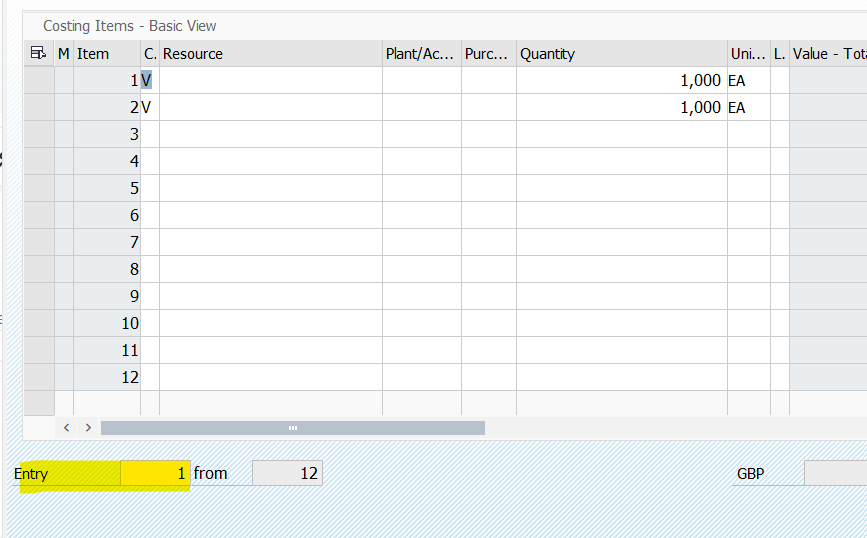
2.Overwriting the Costing by Copying the existing (it will copy the item that was previously created) and add the item in by Entry number. Example, if put 2 in the Entry field, it will show the 2 entries as the first row, and then just add the item in.
I hope this solution works for other user that is trying to script CK74N with multiple items.
------------------------------
Best Regards,
Nart
------------------------------
Original Message:
Sent: 06-18-2025 14:07
From: Sigrid Kok
Subject: Does Looping works with CK74N?
Hi Nart
This isn't an area that I know very well, so I can answer in general terms.
In a loop, you want a repeatable step or set of steps.
- if you're adding rows, you want to have the same row empty each time. Do that with an insert row button - or use the navigation on top to page to the bottom and then page down to get an empty row each time
- if you're updating rows, you have to find a way to position yourself to the same place each time with a find, position, search
Also I took a look at your script - please ensure you are including the screen name(s) an OK code(s) in the loop
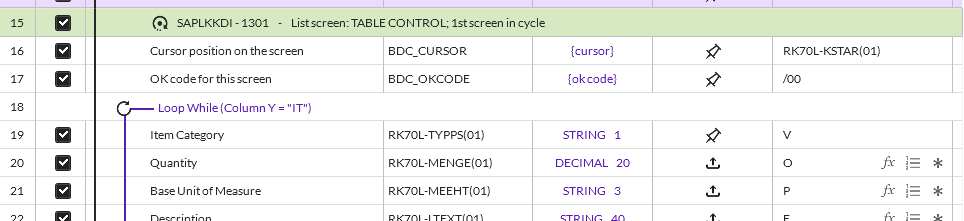
You will want all of the section that starts with row 15 above through whatever the end of your loop will be. So please click on the loop line and have it start with row 15.
I finally was able to see the item list, and there is an insert button - it pushes down the prior entered rows and the first row is always empty. You can also use the navigation buttons on top to page to bottom + page down. Make sure that is all in the loop

I think you can change your script like this and it should help:

Hope this gives you some ideas.
------------------------------
Sigrid Kok
*Precisely Software Inc.
------------------------------