Automate

 View Only
  • 1.  Define line break in default value

    Posted 05-18-2022 08:37
    Hello

    my situation:
    If the user is clicking on a specific option button the basic data text should insert automatically in the field for it. I have a rule that set a field value --> 
    The value is the basic data text. which should be with 3 rows that means I have 2 line break.

    The text uploaded in SAP should be in this way:

    Bestehend aus
    - Wagen
    - 2 Traversen
    - 4 Winden

    How can I define that after the words "bestehend aus" is a line break?

    Thanks so much

    ------------------------------
    Jana Kuschmierz | Leitung VID
    Rigips AG | 0041628877034
    ------------------------------


  • 2.  RE: Define line break in default value

    Employee
    Posted 05-18-2022 17:14
    Hi Jana

    If I understand you correctly, you want to set a long text field in a form with a hard-coded default value.  And you want the long text to have multiple lines with specific placement of carriage returns/new lines.  Is that correct?

    Please note using the below method to set a default in the field properties didn't work, so I would use a rule instead to set the default value that runs on form load if the field is blank.

    I tried this in a rule, and it seems to work using the new line  indicator: \n
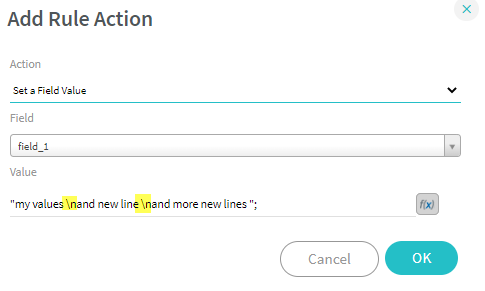

    first text area is set based on a rule from the button, the 2nd is set based on a form view rule - if text area is blank set the default
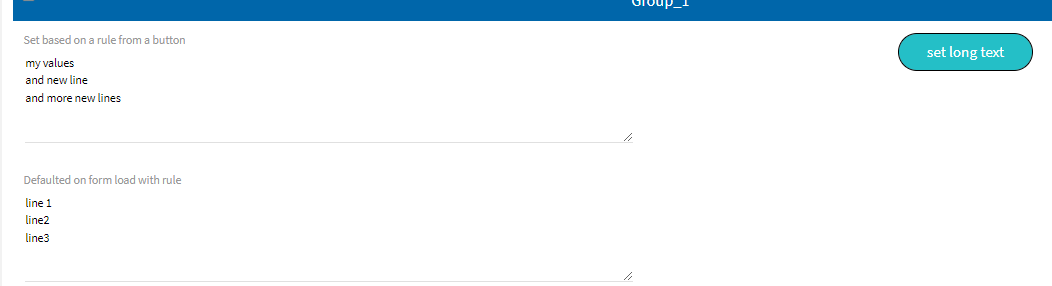
    Does that work for your needs?


    Best Regards,
    Sigrid


    ------------------------------
    Sigrid Kok
    PSE | Winshuttle NA
    ------------------------------


  • 3.  RE: Define line break in default value

    Posted 05-19-2022 10:34

    Hello


    It's works many thanks!!! But only with a textarea.


    Just one more question.

    If I have a text area in the form I need to give more space that you can read it.


    In the solution the form is like this


    After the rule is filling the lines you cannot read it.


    You have to give more space by manually enlarging the area.


    But it should have enough space without manually enlarging


    Thanks for your feedback.


    Freundliche Grüsse

    Jana Kuschmierz
    Leiterin Verkaufsinnendienst

    Tel. direkt: +41 62 887 70 34
    Mobil: +41 79 127 07 74
    jana.kuschmierz@rigips.ch

    _____________________________

    Rigips AG
    Gewerbepark – Hintermättlistrasse 1 – 5506 Mägenwil – Schweiz
    Tel. +41 62 887 44 44 – www.rigips.ch


    Es gelten die Allgemeinen Geschäftsbedingungen der Rigips AG, abrufbar unter rigips.ch/agb.


  • 4.  RE: Define line break in default value

    Employee
    Posted 05-19-2022 13:40
    Hi Jana

    Glad it works!  And yes, of course, only in a text area, as the rest of the possible display elements won't show more than 1 line.

    There's an option for how many lines you want to show for a text area.  It defaults to 5.  That should work for an individual field and in a table.


    Best Regards,
    Sigrid

    ------------------------------
    Sigrid Kok
    PSE | Winshuttle NA
    ------------------------------


  • 5.  RE: Define line break in default value

    Posted 05-20-2022 02:13

    Hello Sigrid


    Thank you so much, my default value for the text area was 1 row.

    Now it works.


    Freundliche Grüsse

    Jana Kuschmierz
    Leiterin Verkaufsinnendienst

    Tel. direkt: +41 62 887 70 34
    Mobil: +41 79 127 07 74
    jana.kuschmierz@rigips.ch

    _____________________________

    Rigips AG
    Gewerbepark – Hintermättlistrasse 1 – 5506 Mägenwil – Schweiz
    Tel. +41 62 887 44 44 – www.rigips.ch


    Es gelten die Allgemeinen Geschäftsbedingungen der Rigips AG, abrufbar unter rigips.ch/agb.