Hi Lisa
If I try to scale back your script and tweak it for my system, the text doesn't get overwritten for me.

I'm in an S4 system (1909), so IDK if that makes a difference.
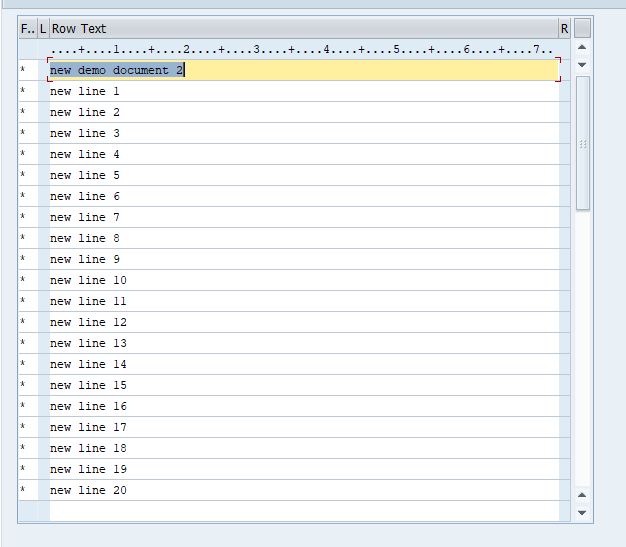
I did create a simple example with looping - the result is below. It:
-goes to the line editor
-hits page to the bottom (from the navigation buttons on the very top)
-hits page down (again navigation buttons on the very top)
-enters the text in the last row
-hit enter, which moves the text to the bottom of the prior text
It will mean reformatting your input, which is why you might want to reconsider setting a max length, since you have class characteristics in there too.
To have to "flat", I tend to hit LINE for as many lines as I want, and then write values in each with a line number, so that when I map, I know which is which. I then put an IF around uploading the value only if the excel template has a value for each line.
HTH
Sigrid
------------------------------
Sigrid Kok
Precisely Software Inc.
------------------------------
Original Message:
Sent: 06-21-2024 07:29
From: Lisa Johnston
Subject: CV01N - Create Document Description Long Text
Thank you, I have been able to create long text but not utilizing looping. I selected a set number of text lines to fill in but this limits the capabilities of the automation. The script I'm attaching works but anytime we have more description then what I have accounted for, we would have to update. I feel like there has to be a way to loop thru it, but I'm just not seeing it.
I've also attached screen shots, to show what I'm seeing from the t-code side.
------------------------------
Lisa Johnston
Dominion Energy, Inc.
Richmond VA
------------------------------
Original Message:
Sent: 06-20-2024 15:53
From: Sigrid Kok
Subject: CV01N - Create Document Description Long Text
Hi Lisa
If you're in the line editor, you will need to ensure you are on a blank row for each line. Some whats to do that include:
(1) click to add multiple new lines - choose a maximum number - and then put some text on each line so that you know which is which
(2) Use the navigation buttons on the very top - page to the bottom, then page down, then enter the text on the last line and hit enter (which moves the text up). Put a loop around that. this also works good for adding text to the bottom of existing text.
Hope that gives you some ideas. If you try one and are still stuck, please be sure to attach your script and template so that we can try to help you debug it.
Best Regards,
Sigrid
------------------------------
Sigrid Kok
Precisely Software Inc.