Automate

 View Only
  • 1.  COR2 Material Allocation

    Posted 4 days ago
    image
    I would like to consult with you guys how can i automate the COR2 Material Allocation, the twist is, there is Item (0010, 0020, .....) and that needs to follow, let say i have 10 materials to put in 0010 till 0100.


    ------------------------------
    Dennis Magsisi
    NXP USA Inc.
    ------------------------------


  • 2.  RE: COR2 Material Allocation

    Employee
    Posted 4 days ago

    Hi Dennis

    Thank you for reaching out. Can you please share the complete steps that you are trying to achieve and the T-code, then we can advise accordingly.

    Alternatively, you can create a support ticket at support.precisely.com, and we can assist you.

    Thanks

    Archana


    ------------------------------
    Archana Chandar
    *Precisely Software Inc.
    ------------------------------


  • 3.  RE: COR2 Material Allocation

    Posted 3 days ago

    Hi,

    Never had to use this transaction, but seems similar to many other ones. That "+" button..... doesn't it set first line in the table as a new row? Meaning if you already have something entered in your list, when you click that "+", is it moving existing entries up and first line is blank?
    If yes, then you can just enter your header parameters from the first three boxes and then loop through the items using the "+" button, including the item line number, but I guess that SAP will keep existing numbering so this is optional.


    ------------------------------
    Tomasz Tomaszewski
    Self-Registration Shared Account
    ------------------------------


  • 4.  RE: COR2 Material Allocation

    Employee
    Posted 2 days ago
    Edited by Sigrid Kok 2 days ago

    Hi Dennis

    If you are trying to find a line - here is my simple test with the binoculars on top 
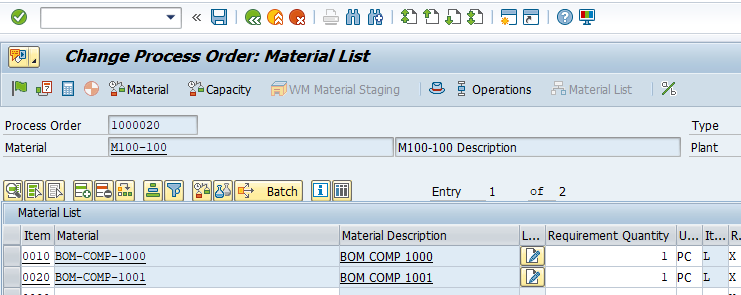
    you will see something like this
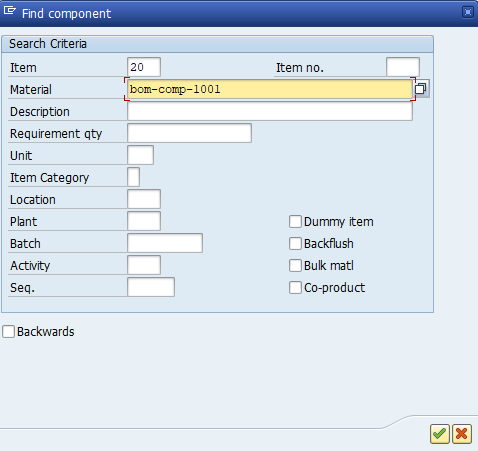
    fill in what you need to find the right row

    It will position it to the top row and you can update or do whatever you need to do with that component.

    If you are trying to add a row, then please use Tomasz's suggestion to use the insert button 

    If you use the insert/add row button, then input the item number if you want to maintain a specific order. 

    OR, you can use the navigation buttons on the top 

    First, Double down arrow says to page to the bottom 

    Then page down (single down arrow)

    the 2nd row is available each time to add something to the bottom

    put a loop around those steps

    Does that help?

    Best Regards,

    Sigrid


    ------------------------------
    Sigrid Kok
    *Precisely Software Inc.
    ------------------------------


  • 5.  RE: COR2 Material Allocation

    Posted 2 days ago

    Thanks Sigrid, i have noticed that, surely this will work.


    ------------------------------
    Dennis Magsisi
    NXP USA Inc.
    ------------------------------