Thank you for your clarification. I understand that you would like to retrieve unique records based on a few specific columns.
Currently, when grouping is applied, it merges duplicate rows into a single row. However, in your case it may not appear as expected because the GROUP BY is applied to all columns, while the Repeating Table is only displaying a subset of those columns. This can make some rows appear as duplicates.
Original Message:
Sent: 03-04-2026 08:32
From: Norbert Prumbs
Subject: Automate EVOLVE - How to query Reference Data List by Query Element using GROUP BY
Sorry Verma,
I have to disagree:
The "<>" can be intentional part of a criterion in the reference data list. So please note, for example the packaging type criterion "<>SA" in the reference data list.
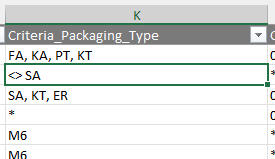
This excludes the label data within this row for materials of packaging type "Sack" (bag).
So for instance: when searching for label data to packaging type "SA", the query must consider all rows in the reference data list where packaging type contains "SA" and (!) ignore those rows where this packaging type explicitly is excluded by "<>SA".
In your screenshots of outputs generated, I miss several other label data (e.g. ZLB_PRCN) also fitting to your search criteria (assumingly: MM_Material_Type "IDEN" + Plant1 "310" + HLP_Container_Type_PH "KA".
This is because your code includes "KA" by LIKE and excludes "KA" by NOT LIKE at same time. So only the rows with packaging type "*" are considered for output.
Please do not change the selection criteria within the code, but investigate more focus on the GROUP BY functionality.
P.S.: In case the character string "<>" within the code is interpreted by the system as a not equal operator, please show me how to code it explicitly as text.
Regards
------------------------------
Norbert
------------------------------
Original Message:
Sent: 03-03-2026 03:20
From: Divya Verma
Subject: Automate EVOLVE - How to query Reference Data List by Query Element using GROUP BY
Hi Norbert,
The contradiction you mentioned already exists in your original query - I have verified this. My change was limited only to removing the <> from the NOT LIKE condition and did not introduce any new logical conflict.
Regarding the GROUP BY, it is working correctly and grouping the similar rows as expected. I have tested it, and the results are consistent.
Please find attached a screenshot of the output generated from your query for your reference.
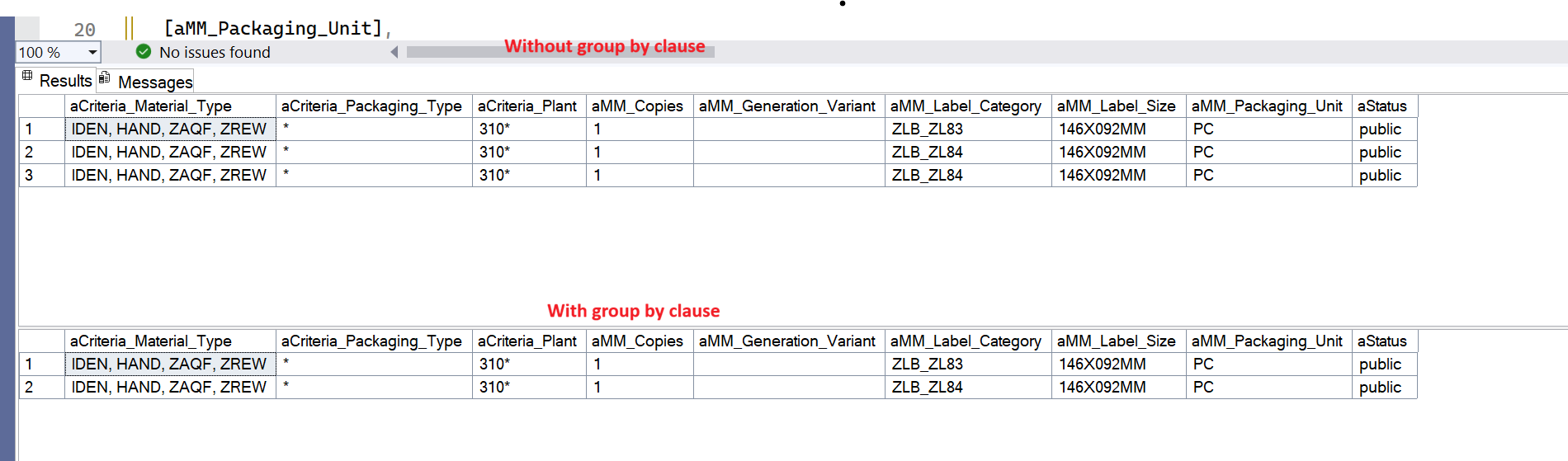
Let me know if you would like me to further analyze the grouping logic.
Thanks.
------------------------------
Divya Verma
*Precisely Software Inc.
Original Message:
Sent: 03-03-2026 02:48
From: Norbert Prumbs
Subject: Automate EVOLVE - How to query Reference Data List by Query Element using GROUP BY
Thanks Divya,
for your try. But before testing your suggestion: What do you hope to achieve with your suggestion to change the filter condition? Please note the contradiction between the two filter criteria:
... AND ([Criteria_Packaging_Type] LIKE '%[/my:myFields/my:HLP_Container_Type_PH]%' ...
versus
... AND [Criteria_Packaging_Type] NOT LIKE '%[/my:myFields/my:HLP_Container_Type_PH]%'
...
I suspect that this does not solve my actual GROUP BY problem.
Please keep on trying on a solution.
Regards
------------------------------
Norbert
Original Message:
Sent: 03-03-2026 02:30
From: Divya Verma
Subject: Automate EVOLVE - How to query Reference Data List by Query Element using GROUP BY
Hi Norbert,
Your solution is perfectly fine. I've just made a small change to the query - I removed the <> from the NOT LIKE condition, as it isn't required.
The final query is provided below. Other than removing <>, no additional changes were made to the original query.
[MM_Packaging_Unit] = 'PC'
AND ([Criteria_Material_Type] LIKE '%[/my:myFields/my:MM_Material_Type]%' OR [Criteria_Material_Type] = '*')
AND ([Criteria_Plant] = '[/my:myFields/my:Plant_1] ' OR [Criteria_Plant] = '*' OR [Criteria_Plant] = '[/my:myFields/my:Plant_1]*')
AND ([Criteria_Packaging_Type] LIKE '%[/my:myFields/my:HLP_Container_Type_PH]%' OR [Criteria_Packaging_Type] = '*')
AND [Criteria_Packaging_Type] NOT LIKE '%[/my:myFields/my:HLP_Container_Type_PH]%'
AND [Status] = 'public'
GROUP BY
[Criteria_Plant],
[Criteria_Material_Type],
[Criteria_Packaging_Type],
[Status],
[MM_Label_Category],
[MM_Packaging_Unit],
[MM_Label_Size],
[MM_Generation_Variant],
[MM_Copies]
I'm attaching the updated solution for your reference.
Regards,
------------------------------
Divya Verma
*Precisely Software Inc.