So if you change the data set to Excel, add in the new condition group, then change it back to XML, the script will keep the if condition intact and it worked correctly in the form for me. Not sure why there isn't an option in Studio Web-Form(XML) data sets to easily add to these if conditions.
The only issue I noticed is if you toggle the script back and forth to XML/Excel, you lose all your form fields that were created for other if conditions. My way around this was to make a copy of the script and create the if condition I wanted in the Excel data set then copy/paste that new if condition into the actual script with the XML data set.
As always, thanks for your help Sigrid and I hope this will help out someone else in the future.
Original Message:
Sent: 06-11-2025 20:34
From: Sigrid Kok
Subject: Adding "AND" or "OR" to if conditions in XML for Automate Studio
Hi Knavis,
Sorry if I missed that.
There isn't the same ability to add Ands and Ors to scripts mapped to XML. You might be able to accomplish the same with
(1) IN operator
(2) Nested IF's with Else's. Maybe something similar to: 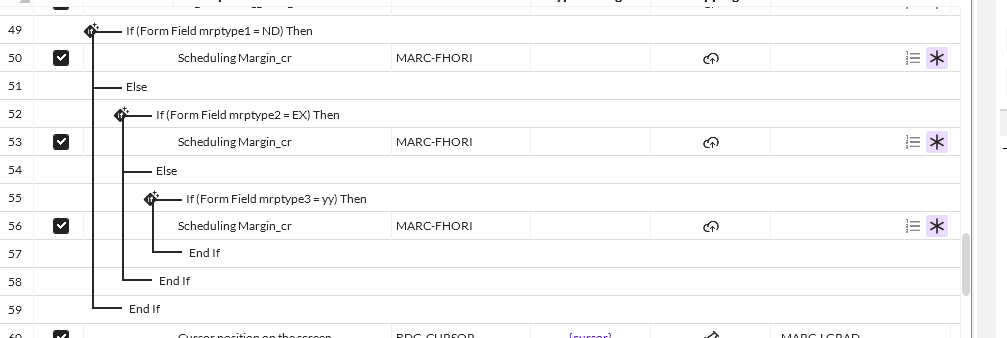
(3_ I was able to map to Excel and add it and then change mapping to XML, but I'm not 100% sure it will work correctly in a form. 😁 I don't have time to try it right now, but maybe you can and report back?
HTH a little
Sigrid
------------------------------
Sigrid Kok
*Precisely Software Inc.
------------------------------
Original Message:
Sent: 06-10-2025 22:11
From: Knavis McGowan
Subject: Adding "AND" or "OR" to if conditions in XML for Automate Studio
Hi Sigrid,
Thank you for the detailed response. I found this if condition in an old script that was created by a developer who no longer works for our company so it was not me who created it. I am however tasked with fixing/adding to it!
I am still confused on how to add another "OR" to the current if condition. I would like to make the statement: If accountGroup = "0001" OR accountGroup = "0002" OR accountGroup = "ZRP1". For the Excel based data files, there is a button that adds these in the If condition wizard but I do not see this same button for XML data files: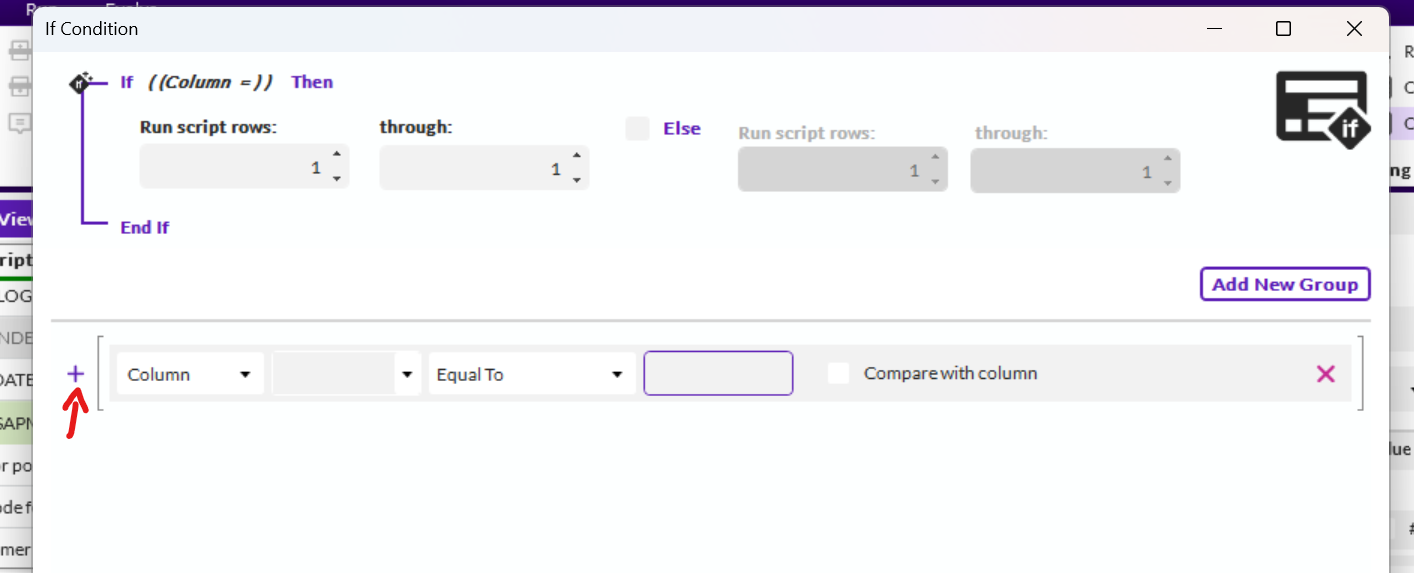
Apologies if I am not understanding your reply above and thank you for the help.
Thanks,
Knavis McGowan
------------------------------
Knavis McGowan
Winshuttle Developer
ABBOTT RAPID DX INTERNATIONAL LIMITED
FL
Original Message:
Sent: 06-10-2025 17:56
From: Sigrid Kok
Subject: Adding "AND" or "OR" to if conditions in XML for Automate Studio
Hi Knavis
It looks like you did it already :)
You would basically do the same type of IF statement - and you can use AND's and OR's. You can also use the IN operator for something like above.
When you create that IF statement, it is going to ask for a fieldname, which will then be mapped to a field in the form when you import it. That fieldname should be different from the SAP field name.
When you import it in Composer, you can either track two fields and keep them in sync, or map both fields to the same form field, which is what I do.
For example, you may have an SAP field called "Account Group". In the IF statement, I like using formAccountGroup or ifAccountGroup, so that it's clear this is not an SAP field but used in an IF statement.
When you're in Studio testing the script, please ensure you set both fields to the same value, so that it's a proper test, i.e Account Group = 0001 and formAccountGroup = 0001.
Then when I import the script in Evolve Composer, I will have Account_Group and formAccountGroup to map. I normally end up mapping both to whatever field I display and use in my form - usually using the SAP field name, like Account_Group. So both Account_Group and formAccountGroup map to the solution form field Account_Group. That way you don't have to write rules to keep them in sync. Then the script IF statement is always pointing to the right value. This is a personal preference - you're more than welcome to have two different fields and use rules to synchronize the form field to the "if field".
Please note with an IN operator, it will generate a repeating value which correlates to a table in a form. If that's not going to work, please continue to use the AND or OR.
Here's a script that uses an IF for material create on MRP Type

You must type in the name you want to use in the IF statement to the right of "Form Field", like below:

In the form script mapping you can keep them separate, which is the default, but then you have to use a rule that when MRP Type changes, you update the FormMRPType field:
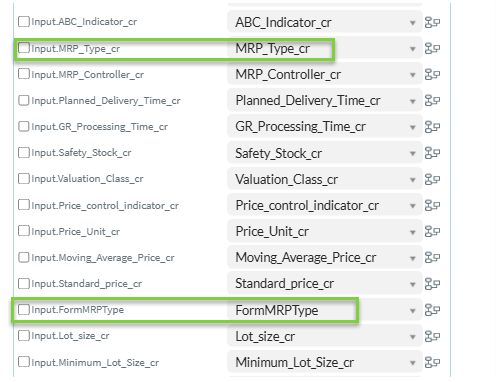
or you can map them both to the same field for simplicity - no rules required to keep them in sync, because they're pointing to the same field.
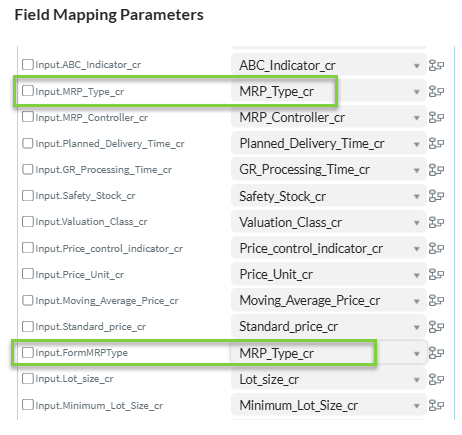
If you have multiple IF statements on the same field, I usually name them formMRPType1 and FormMRPType2, etc. and then map them to the same form field, but again - that's just a preference.
I hope that helps.
Best Regards,
Sigrid
------------------------------
Sigrid Kok
*Precisely Software Inc.