Happy to try to help, Kurt.
I have tried file types: doc, docx, xls, xlsx, pdf, txt, jpg & png over time. File size may make a difference.
Have you checked the Evolve logs? It may give you some insight, and support will likely want to look at it.
*Precisely Software Inc.
Original Message:
Sent: 03-05-2026 10:52
From: Kurt Marshman
Subject: Add Blank Documents on Form Load
Sigrid,
I appreciate you sticking with this as long as you did.
I am going to try a different file type just to see if there is anything there then look to support.
Again... thanks for your time and efforts.
Stapuff
------------------------------
Kurt Marshman
Self-Registration Shared Account
------------------------------
Original Message:
Sent: 03-05-2026 10:36
From: Sigrid Kok
Subject: Add Blank Documents on Form Load
Hi Kurt
If those files exist, then I believe it should work. I'm not sure what else I can offer, as everything I have tried works for me but doesn't seem to work for you.
I would suggest opening a support ticket to see if they can work with you on this.
Best Regards,
Sigrid
------------------------------
Sigrid Kok
*Precisely Software Inc.
Original Message:
Sent: 03-05-2026 10:18
From: Kurt Marshman
Subject: Add Blank Documents on Form Load
Sigrid,
I tried changing the Filename parameter
------------------------------
Kurt Marshman
Self-Registration Shared Account
Original Message:
Sent: 03-04-2026 18:12
From: Sigrid Kok
Subject: Add Blank Documents on Form Load
Hi Kurt
What is the contents of the field you are using for the file - field_73? That's likely the key to figuring this out.
This is a different attachment type, so I tried it
I have this file in the folder Assets: CustomerPriceMaintenance_Setup.xlsx
I filled in the parameters
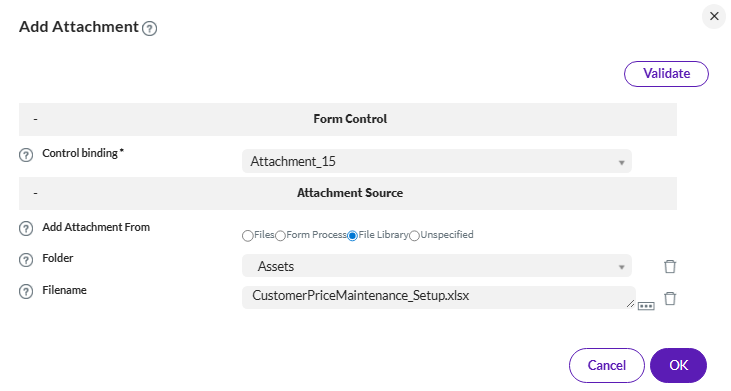
and I see it at the end

so then I created a field that has it as the value
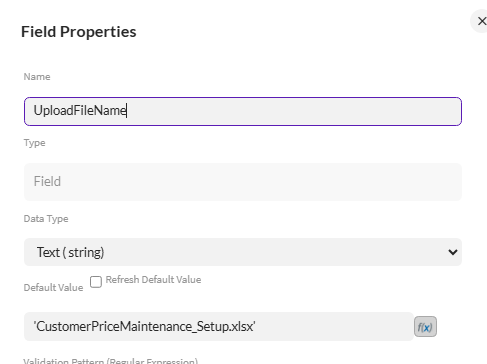
updated the plugin
and it's there

FYI
Sigrid
------------------------------
Sigrid Kok
*Precisely Software Inc.
Original Message:
Sent: 03-04-2026 17:52
From: Kurt Marshman
Subject: Add Blank Documents on Form Load
Sigrid,
Here is what I have done so far. I have the plug in with parameters set, file in the Library, fields on the form. I still do not see any results.
Thoughts,
Stapuff
------------------------------
Kurt Marshman
Self-Registration Shared Account
Original Message:
Sent: 03-04-2026 16:36
From: Sigrid Kok
Subject: Add Blank Documents on Form Load
Hi Kurt
My process is a simple attachment test to add it in the start (or through the plugin) and then post it to SAP on an object on the last step. Your process will definitely be different. :)
So yes it would still attach. It doesn't have to be that node after the add attachment plugin. It would be visible in any next step in your process.
Best Regards,
Sigrid
------------------------------
Sigrid Kok
*Precisely Software Inc.
Original Message:
Sent: 03-04-2026 16:30
From: Kurt Marshman
Subject: Add Blank Documents on Form Load
Sigrid,
I appreciate the time, effort & response back. My workflow is setup in the same orders as the image you posted except for Post Attachment. I never had that. Would it not attach or be visible without Post Attachment?
Stapuff
------------------------------
Kurt Marshman
Self-Registration Shared Account
Original Message:
Sent: 03-04-2026 15:31
From: Sigrid Kok
Subject: Add Blank Documents on Form Load
Hi Kurt
You can use the plugin, and it does work.
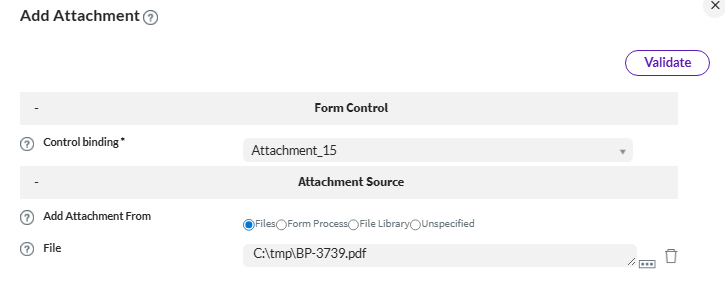
My process
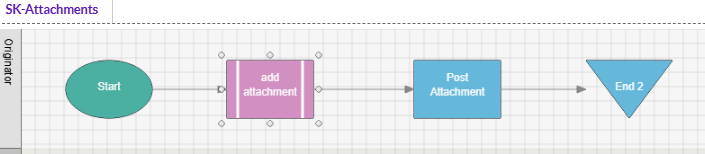
at the post attachment step I see it pre-populated

You can't do that before the initial step (start node) however.
Hope that helps,
Sigrid
------------------------------
Sigrid Kok
*Precisely Software Inc.
Original Message:
Sent: 03-04-2026 14:36
From: Kurt Marshman
Subject: Add Blank Documents on Form Load
I found the Add Attachments Plug-in and have everything setup, however, I do not get the attachment added to the Attachment Element.
Below is how I set everything up. Is there something I may have missed? I do not get any errors when I run the Solution and not sure how to even test for it.
Thanks,
Stapuff
-------------------------------------------------------------------------------------------------------------------------
In the File Library I have successfully added a folder and added a sample file Hello.txt file.
In the Action node I have selected Plug In Name: Add Attachment
In the Plug In parameters:
Control bindings: I selected Attachment_6 (from the drop down)
Add Attachments From: File Library
Folder: I selected Test folder (from the dropdown)
Filename: [/my:myFields/my:field_3] (selected from Field Value) field_3 = Hello.txt
I have run the Valid button which is successful.
------------------------------
Kurt Marshman
Self-Registration Shared Account