Automate

Expand all | Collapse all

MM02 CLASSIFICATION VIEW UPLOAD ISSUE

  • 1.  MM02 CLASSIFICATION VIEW UPLOAD ISSUE

    Posted 02-26-2021 13:13
    Hello Te@m,

    Need your help regarding script mm02 for Characteristic modification in view Classification.
    Normally the script below attached work well for a single value with a unique characteristic description.
    But i have many description that are very close in terms of designation and it require a new window with selection during the mapping selection (screenshoot attached)
    How i can fix that with my script or with the relevant settings needed for this kind of situation
    Many thanks for your help/support
    Best regards


    ------------------------------
    jerome gaden | [Logistic analyst]
    Atlas Copco Power Tools Distribution N.V. | +33 02.40.80.20.63
    ------------------------------


  • 2.  RE: MM02 CLASSIFICATION VIEW UPLOAD ISSUE

    Posted 02-28-2021 23:31
    Hi  Jerome,

    I would recommend to use the T-Code CLMM for classification details update.  SAP already provided mass T-code for classification update. But of course you can use the WS with GUI scripting to update your character value in CLMM.  You need not to search your Character value the way you did in your script MM02, which means CLMM will be the faster compared to MM02 for classification update.

    ------------------------------
    RajeshN
    ------------------------------


  • 3.  RE: MM02 CLASSIFICATION VIEW UPLOAD ISSUE

    Posted 03-01-2021 10:10
      |   view attached
    Hi Jerome,

    I had some difficulties too with classification uploads. Until Sigrid posted a BAPI example on this forum for classification uploads that really helped me on my way. You may want to try that particular BAPI too. Please find my version of Sigrids BAPI in attachment.
    Starting from her example, I applied some minor modifications to adjust it to my needs, it worked perfectly.
    One little thing about the object key, that's 100 length, whereas mat n° is only 18 long. Here a formula is the solution: =text(c2,000000000000000000)

    bonne chance ! a+

    ------------------------------
    jan ketele | Sr engineer release mgt
    Xeikon Manufacturing NV | +32 34 43 1 875
    ------------------------------

    Attachment(s)

    Txr
    18-BAPI-classification.Txr   62 KB 1 version


  • 4.  RE: MM02 CLASSIFICATION VIEW UPLOAD ISSUE

    Employee
    Posted 03-02-2021 08:28
    Hi Jerome

    There is a transaction script template here:  https://community.winshuttle.com/sap-module-templates/viewdocument/change-material-class-001-charact?CommunityKey=8a12989f-fefe-4b81-8147-4bbb11af6820&tab=librarydocuments 
    However if the character description (which is what you see in the tcode) does not allow you to find a unique row, a BAPI might be better, as Jan suggested.

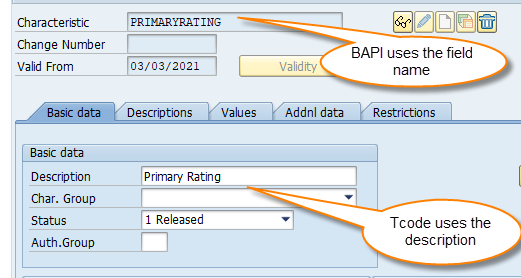
    The BAPI will use the characteristic field name instead of the description to find the right row to change, which is always unique.  The only difficulty is that SAP wants to load numeric and character values separately.  So I used an IF statement and additional field that had a flag sharing which data type was being uploaded.  

    Reattaching the example here.

    Best Regards,
    Sigrid

    ------------------------------
    Sigrid Kok
    PSE | Winshuttle NA
    ------------------------------


  • 5.  RE: MM02 CLASSIFICATION VIEW UPLOAD ISSUE

    Posted 03-03-2021 08:52
      |   view attached
    Dear all,

    Thanks for your time and support i would never have found the logic alone  regarding the BAPI script provided.
    But i still get an error with, (object does not exist assignment was not created, despite object exist).
    I have used the recommandations from Sigrid/Jan (as i'm not allowed to use T-code CLMM) about script and template and just replaced by the value i need for the loop. I'm not sure about the classnum field and/or how to proceed to be close from your solution. You will find attached screen shoot in order to compare yours and mine. Many thanks for your feedbacks.
    Best regards

    ------------------------------
    jerome gaden | [Logistic analyst]
    Atlas Copco Power Tools Distribution N.V. | +33 02.40.80.20.63
    ------------------------------

    Attachment(s)


  • 6.  RE: MM02 CLASSIFICATION VIEW UPLOAD ISSUE

    Employee
    Posted 03-03-2021 10:11
    Hi Jerome
    I thought the issue was that the description names brought back more matches than you needed. 

    The BAPI uses the SAP field name, not the description, so it's always unique and always finds the right one to update/set.

    In CT04 you'll see the field name and description
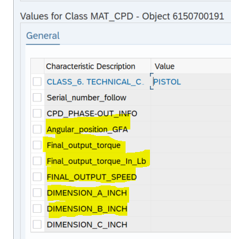
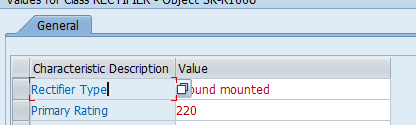
    From your screen shot, you're showing the descriptions, not the field names.
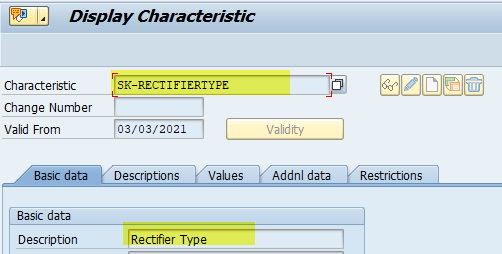
    If you go into the tcode, position your cursor on a characteristic description and hit F1, it will pull up the characteristic in display mode
    There you will find the Characteristic field name - in my case SK-RECTIFIERTYPE.  

    Note that BAPIs are case sensitive, so please use the right case for those field names.


    FYI
    Sigrid

    ------------------------------
    Sigrid Kok
    PSE | Winshuttle NA
    ------------------------------


  • 7.  RE: MM02 CLASSIFICATION VIEW UPLOAD ISSUE

    Posted 03-03-2021 14:10
      |   view attached
    Hello Sigrid,

    Yes indeed my mistake, i have corrected as suggested but still an error as below screen shoot, i think we are close to an end, thanks for your last advise (i hope for this topic ;-)

    Many thanks for your time

    ------------------------------
    jerome gaden | [Logistic analyst]
    Atlas Copco Power Tools Distribution N.V. | +33 02.40.80.20.63
    ------------------------------

    Attachment(s)


  • 8.  RE: MM02 CLASSIFICATION VIEW UPLOAD ISSUE

    Employee
    Posted 03-03-2021 14:23
    Hi Jerome

    ECC or S4? Material number is 18 digits for ECC and 40 in S4.  

    If S4, please adjust the formula in the script to account for 40 digits.

    If that doesn't work, can you please attach you script so that we can take a look?

    Thanks,
    Sigrid

    ------------------------------
    Sigrid Kok
    PSE | Winshuttle NA
    ------------------------------


  • 9.  RE: MM02 CLASSIFICATION VIEW UPLOAD ISSUE

    Posted 03-03-2021 15:08
    Hi Sigrid,

    ECC, therefore formula on 18 digits should be ok ?
    Thanks in advance


    ------------------------------
    jerome gaden | [Logistic analyst]
    Atlas Copco Power Tools Distribution N.V. | +33 02.40.80.20.63
    ------------------------------


  • 10.  RE: MM02 CLASSIFICATION VIEW UPLOAD ISSUE

    Employee
    Posted 03-03-2021 15:39
    Hi Jerome

    I just tried your script, swapping out your data for mine, and it worked.
    For ECC it is normally 18 digits.  Can you double check:
    • open MM02/3 
    • put your cursor on the material number field and hit ,F1.
    • click technical details
    • then double click on the field name
    • you'll see it in a list of fields with the data type, length & description like below, which will confirm the field length

    FYI
    Sigrid

    ------------------------------
    Sigrid Kok
    PSE | Winshuttle NA
    ------------------------------


  • 11.  RE: MM02 CLASSIFICATION VIEW UPLOAD ISSUE

    Employee
    Posted 03-04-2021 09:27
    Hi Jerome - got a few messages over night, the last one sharing that you got this working without the formula for the material number.  While different from most people's experiences, I'm happy it works that way for you!

    Best Regards,
    Sigrid

    ------------------------------
    Sigrid Kok
    PSE | Winshuttle NA
    ------------------------------