Hi Benjamin,
One idea is to create a loop, passing in multiple PO numbers. So instead of entering the PO number on the PO tab
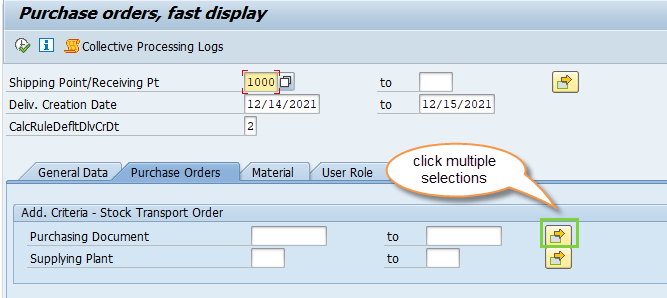
then on the selection screen
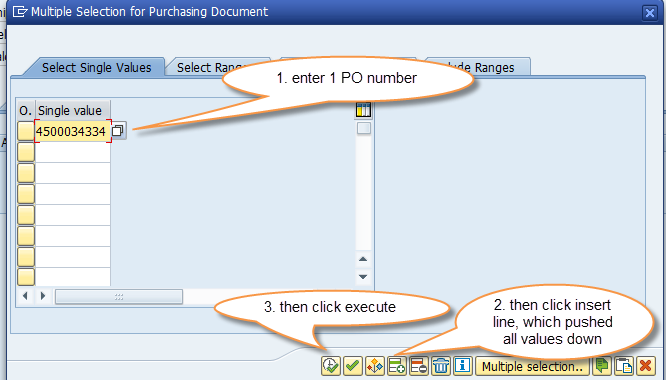
then execute but before hitting background, click select all

Put a loop around the PO # entry - it would look something like this in expert mode
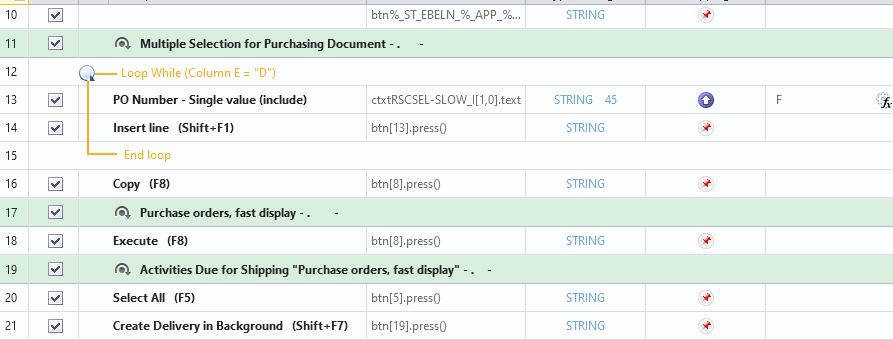
Hope that helps speed things up,
Sigrid
------------------------------
Sigrid Kok
PSE | Winshuttle NA
------------------------------
Original Message:
Sent: 12-13-2021 11:50
From: Benjamin Kielas
Subject: VL10B using GUI currently is there other T-code to create deliveries faster for migration project
Hi users,
Looking for other t-codes or ways to create deliveries as I was shown how to use VL10B to create 1 by 1 deliveries. We would like to maintain creating 1 by 1 deliveries but at a much faster speed then GUI scripting speed. I have tried to used standard and batch but Winshuttle will not run with the steps that I am needed to use in the t-code of VL10B only GUI scripting works that I have seen. I have attached the steps as well the script. Are there other t-codes that I can use standard Winshuttle that can speed up creating the delivery? Or am I am I doing something wrong in this t-code? Thanks
------------------------------
Benjamin Kielas | Supervisor SAP Master Data
Generac Power Systems, Inc. | (262) 510-6580
------------------------------