Hey Jan, thx for an response. I got you, didn't knew it's also possible to turn it off in general. But the information is useful in case of some errors or wrong created items. And the embedded script makes sure u use the right embedded script, but in the suggested header u would see if u perhaps opened the wrong excel template. in our case the excel is named
IE01 create box with class xxx and the other sheet starts also with the name
IE01 create box with class yyy. So my idea was to set an header in the sheet to make visible "thats the right" Template coz the user can see it in the 1. row. Sorry for my bad english :)
------------------------------
Matthias Lautenschlaeger | PLM Assistant
GSI Helmholtzzentrum für Schwerionenforschung GmbH | +49 6151 712 094
------------------------------
Original Message:
Sent: 08-30-2021 08:50
From: jan ketele
Subject: Run Log position
Hi Matthias,
I don't see how the log can be written starting from the 2nd row either.
but:
- you chose NOT to write the Error Log header: 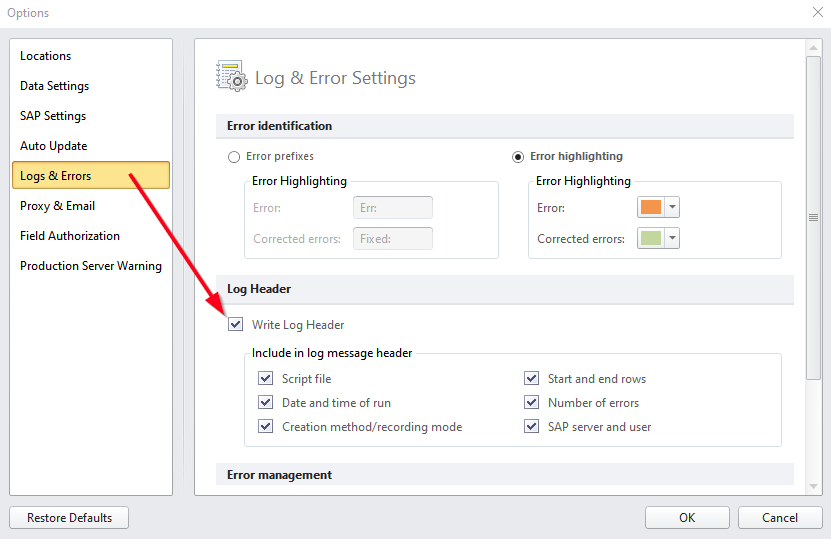 -or you can embed the script in the excel, so that only that script can be run on that specific sheet, runners don't even have to chose the script to run anymore.
Select 'publish' from within the RUN tab.
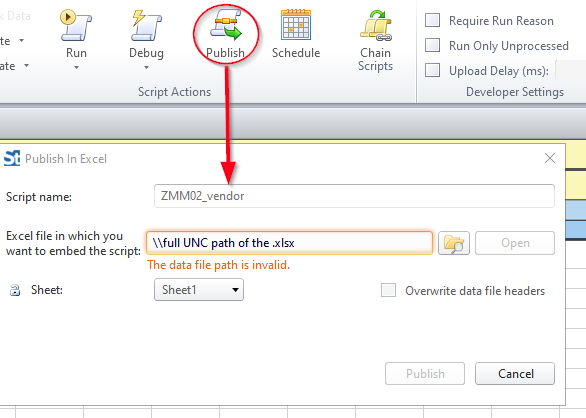
enjoy!
------------------------------
jan ketele | Sr engineer release mgt
Xeikon Manufacturing NV | +32 34 43 1 875
Original Message:
Sent: 08-30-2021 05:04
From: Matthias Lautenschlaeger
Subject: Run Log position
Hi Community, just a question regarding the run log in winshuttle
I would like to have an header in my runner script, just to make sure the user is running the right script. The yellow row in this example
But after winshuttle was running it writes the log information in Cell A1 instead of Cell A2 how can i fix that if it's possible?
Thanks for an idea
------------------------------
Matthias Lautenschlaeger | PLM Assistant
GSI Helmholtzzentrum für Schwerionenforschung GmbH | +49 6151 71xxxx
------------------------------