Automate

  • 1.  ME51N PR line item option for Account Category "standard or service"

    Posted 02-17-2021 22:41
    Hello,

    With ME51N, we need help on creating a script that will allow an option for the PR line item to have either (Item category "Standard PR " or "Service PR"). When "Service" item category is chosen the "Service" tab will appear where user can input service number. If Standard PR  is chosen the general standard PR tabs will appear for input.
    Have anyone came across this process and created a successful script.
    Please advise.
    Thanks,​

    ------------------------------
    JR Dira | Business Systems Analyst
    Inland Empire Utilities Agency | 909-993-1898
    ------------------------------


  • 2.  RE: ME51N PR line item option for Account Category "standard or service"

    Posted 02-18-2021 10:04
    Hi JR -

    How I would typically approach this is by getting each scenario to work successfully on its own first. So I would make sure to get an ME51N script working that just has Standard, with the looping and all. Then I would make sure to get a separate ME51N script working that has just Service. Once I have both separate scenarios working successfully, then I would combine the two ("save as" one of the scripts and rename and then copy and paste sections from the other script) and use If statements to tell it when to run which line item scenario, using the item category column as the base of my If conditions. 

    We do have a template available for ME51N, but it is a bit simple. But it will give you the general idea of how your script will look, with the first line item outside of the loop and needing to use the filter
    https://community.winshuttle.com/sap-module-templates/viewdocument/create-purchase-request?CommunityKey=8a12989f-fefe-4b81-8147-4bbb11af6820&tab=librarydocuments 

    We also have an older Youtube video on this t-code. It is using an older version of Studio, but the process for recording the t-code would be similar. 
    https://www.youtube.com/watch?v=vHDW794dyM0 

    Thank you!

    ------------------------------
    JENNIFER HWANG | SE
    Winshuttle North America
    ------------------------------


  • 3.  RE: ME51N PR line item option for Account Category "standard or service"

    Posted 02-18-2021 10:39
    Hi JR,

    This method will definitely work as we built a script for ME21N using the same process with Account Assignment differences and multiple If statements.  You may also want to add in the property condition to ignore a screen if not present if the two item categories produce separate screens although it probably is only separate tabs.

    Darryl

    ------------------------------
    Darryl Odger | IT Solutions Delivery
    Canadian National Railway Co. | (514) 399-5577
    ------------------------------


  • 4.  RE: ME51N PR line item option for Account Category "standard or service"

    Posted 03-25-2021 16:59
    Hi Jennifer,
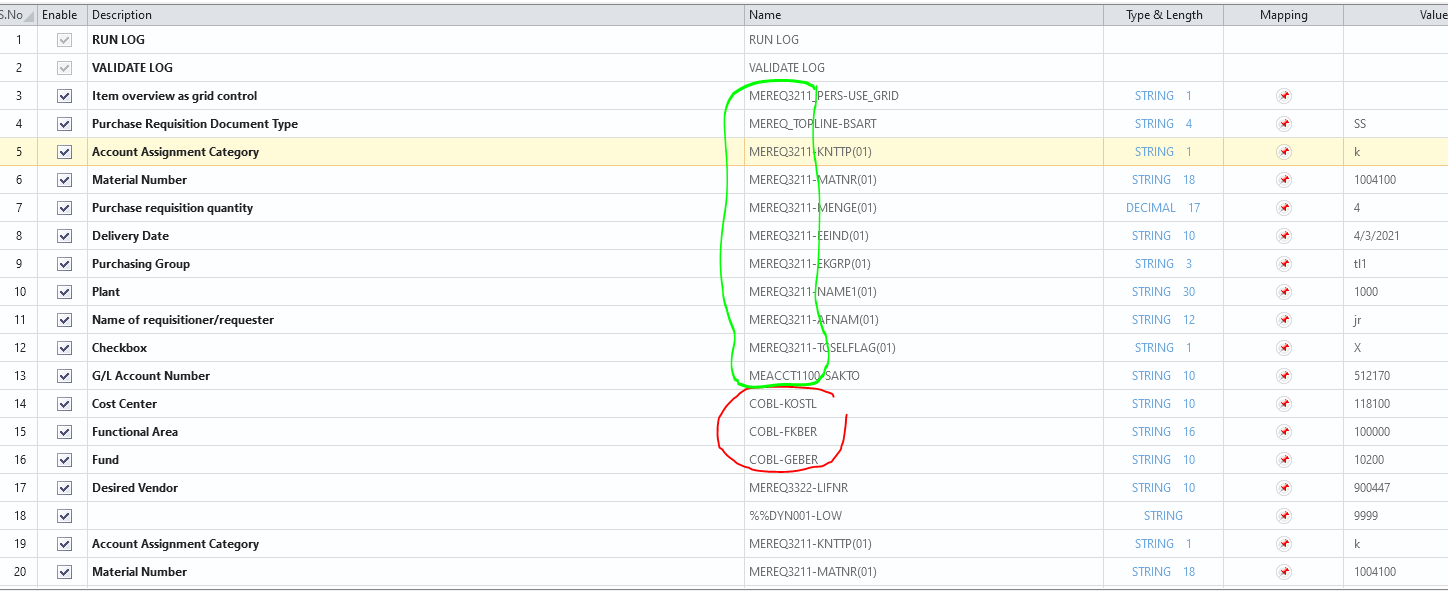
    Has anyone successfully created a script for Purchase Requisition ME51N that included Cost Assignments like (Cost Center, Fund, and Functional Area).
    I followed your example and included a loop but I keep on receiving this error when I run my script.

    Cursor field (COBL-FKBER Functional Area) . SAPLMEGUI 0014 does not exist in dynpro winshuttle
    Cursor field (COBL-GEBER Fund) . SAPLMEGUI 0014 does not exist in dynpro winshuttle
    Cursor field (COBL-KOSTL Cost Center) . SAPLMEGUI 0014 does not exist in dynpro winshuttle


    It looks like those fields are missing the first "MERE" on the name. Maybe that is why those fields are getting an error.
    Would you happen to have a solution for that.
    Please advise.
    Thanks 

    ------------------------------
    JR Dira | Business Systems Analyst
    Inland Empire Utilities Agency | 909-993-1898
    ------------------------------


  • 5.  RE: ME51N PR line item option for Account Category "standard or service"

    Employee
    Posted 03-26-2021 08:36
    Hi JR - there's a template example for ME51N here:  https://community.winshuttle.com/sap-module-templates/viewdocument/create-purchase-request?CommunityKey=8a12989f-fefe-4b81-8147-4bbb11af6820&tab=librarydocuments

    You can find all sorts of templates in the community under resources - > Studio templates.

    Best Regards,
    Sigrid

    ------------------------------
    Sigrid Kok
    PSE | Winshuttle NA
    ------------------------------


  • 6.  RE: ME51N PR line item option for Account Category "standard or service"

    Posted 03-26-2021 08:54
    Hi JR -

    Yes, you can certainly create ME51N scripts that include fields such as Cost Center, Fund, and Functional Area, or any of the fields that are within the item details tabs.  I cannot tell from your screenshot, it's only showing basic view, how you've created your loop, or where you are getting the error (header row? first detail row? second detail row?). What happens when you run it step-by-step? 

    One recommendation is that when you go into the detail tabs, initially, it might take you to a particular tab if that tab includes a field requiring data, or if not, it will take you to the first tab. I tend to explicitly include going to the necessary tab as part of my recording, in case I end up elsewhere, and I also include going back to the first tab at the end of my loop.  Sometimes SAP tries to "help" by remembering the last tab I was in, instead of bringing me into the first tab, so I like to explicitly go back to the beginning as part of the end of the loop.

    Thanks,


    ------------------------------
    Jennifer Hwang | SE
    Winshuttle North America
    ------------------------------


  • 7.  RE: ME51N PR line item option for Account Category "standard or service"

    Posted 03-26-2021 11:26

    JR,


    It appears you are trying to use the table or view field names for the following fields rather than the dynpro names

    Cursor field (COBL-FKBER Functional Area) . SAPLMEGUI 0014 does not exist in dynpro winshuttle
    Cursor field (COBL-GEBER Fund) . SAPLMEGUI 0014 does not exist in dynpro winshuttle
    Cursor field (COBL-KOSTL Cost Center) . SAPLMEGUI 0014 does not exist in dynpro winshuttle

    I do not currently have an SAP session available to me but I would think the Dynpro screen names would be more like the following:


    MEACCT1100-KOSTL(01)
    MEACCT1100-GEBER(01)
    MEACCT1100-FKBER(01)

    You can go into the SAP screen presented with the account assignment and press F1 in the field and then the tool box to get the actual screen field name.


    If you use the Non-basic view you can edit the field names within the script and you can also review the loop sequence for any other details.  You have to also remember screen content in the Account Assignment tab changes based upon the entry used in Account Category field for the line item.

    Good luck, 


    Darryl Odger
    Everyone is still learning.
    There are no right answers, fundamental truths or holy grails.
    There are only lessons learned.
    What works for me, may not work for you.


  • 8.  RE: ME51N PR line item option for Account Category "standard or service"

    Posted 03-30-2021 12:54
    Hi JR -

    You've got your four acct assign related fields in 4 different screens in your mapper, but since they belong in the same detail tab, they should be grouped together so that it is a much cleaner and single action. Then you can have the action of going to the other detail tab where the desired vendor is. Per my recommendation in my last reply, I would go back to the acct assign detail tab before ending my loop. I know you're not entering data in there again, but I had mentioned that sometimes SAP remembers the last tab you were on. When the loop ends, if you stay on the vendor related tab, it might bring you back there when the loop starts again, which is why it can't find the acct assign related fields. For the initial line item that is outside of the loop as well, I would also include a similar action where you go back to the account assignment detail tab before you do the filtering so that you can start the looping. 

    The easiest way to see what your recording is doing is by running in Debug mode so that you can see what is happening when the loop tries to start. That should tell you if this is related to the last tab being remembered or not.

    Thank you,

    ------------------------------
    Jennifer Hwang | SE
    Winshuttle North America
    ------------------------------