Automate

  • 1.  How to select a specific view in MM02

    Posted 12-03-2018 16:04
    Hi,

    Need some help with a script for MM02. I recorded a script to change some fields in MRP2 view of material masters (t-code MM02).  Script works fine when the materials have the views existed during recording; but fails for materials where some of the views before 'MRP2' view is not maintained (for example 'Classification' view was there in the material used in recording, but we have materials without 'Classification' view).

    Do I have to record two scripts (with and without classification view) or is there a better workaround?

    I didn't find any help documentation in Winshuttle support site on this. Appreciate if anyone has any suggestions/comments. 

    Thank you,
    Ravi
    City of Ottawa.

    ------------------------------
    Ravichandran Govindasamy | SAP Business and Configuration Analyst
    City of Ottawa | [City] | 613 580 2400
    ------------------------------


  • 2.  RE: How to select a specific view in MM02

    Posted 12-04-2018 02:36
    Hi,

    Before you make a recording in MM02 go normally there.. and select only the MRP2 view and save it as an "Default Setting"
    This way you will land to MRP2 tab automatically no matter what tabs are active on material.

    select view in mm02

    Br,
    -Heikki-

    ------------------------------
    Heikki Heinonen | SAP Specialist
    Saint-Gobain Finland Oy | [City] |
    ------------------------------


  • 3.  RE: How to select a specific view in MM02

    Posted 12-04-2018 03:46

    Hi Ravi


    Once you have recorded your script (that includes the Classification screen) select the line within the script that relates to the Classification Window, select "Conditions" and then tick the "If first transaction" button.

    This will prevent if failing after the first transaction.

    If this window is random, then I suggest that you highlight the relevant line in the script and then using "Properties" on the right-hand side and select "Skip Screen If not Found"


    I hope this helps?


    Kind regards,


    Martin Burrage
    Master Data Manager
    CMS Distribution Ltd


    Disclaimer

    The information contained in this communication from the sender is confidential. It is intended solely for use by the recipient and others authorized to receive it. If you are not the recipient, you are hereby notified that any disclosure, copying, distribution or taking action in relation of the contents of this information is strictly prohibited and may be unlawful.

    This email has been scanned for viruses and malware, and may have been automatically archived. To find out more about email security, ransomware, anti-malware, spam filtering and archiving solutions from CMS Distribution, either on-premise or in-cloud, please click here.


  • 4.  RE: How to select a specific view in MM02

    Posted 12-04-2018 09:51
    ​​When recording an MM02 script, you have to keep in mind that not everyone that uses the script will have the same permissions as you on the material master.  For example, in our company, my role grants me permissions to all 27 views on the material master, but someone in Purchasing may only be able to edit 7 views.

    So, when I record an MM02 script, I have every view available in the "Select View" dialog box; Purchasing may only have 7 views to pick from, and the first view on their list may be something like the "Purchasing" view, whereas my first view available would be the "Basic Data 1" view (and the "Purchasing" view would be the 9th option in the view select dialog box for me).

    Here's the problem.

    If I try to choose the "Purchasing" view when I record my script, the 'code' in the script will basically say that I am trying to choose the 9th option in the 'view select' dialog box; if someone from Purchasing comes along to run that script (someone who only has 7 views available to them when they try to update a material with MM02), the script won't work because it's going to try to select the 9th option in the 'view select' dialog box, and the Purchasing user doesn't even have a 9th option to select (due to their more restricted roles/permissions in sap).

    To get around this, one technique is to select the very first option (for me, "Basic Data 1") in the view select dialog box when I create the script, then, once I'm at that first view, use the little 'view navigator' icon to the far right of the view tabs in the material master to pop open the drop down, then select the specific view that I am truly trying to go to... even if you are already at that view (for example, if I create an MM02 script, and, due to my roles/access levels in sap, the first view I wind up when I go into MM02 is the "Purchasing" view, then I would want to use the little drop down view navigator to actually select the "Purchasing" view, even though I'm already there).  The reason for this is to account for that fact that not everyone that may run the script has the same number of views to select from in the view select dialog box... when you use the little 'view navigator' dropdown and select a view from there, that selection actually equates to an SP code that is specific to the view you are trying to go to (e.g. the SP code for the Purchasing view, in my company, with the configuration that we use, is SP09).

    I've included a screenshot of the little 'view navigator' button that I'm referring to above.
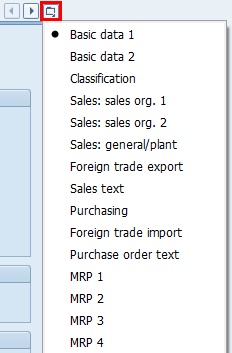
    view navigator dropdown

    ------------------------------
    Jeremie Dippel
    Project Engineer @ Rockwell Automation
    Wisconsin Local Wug Leader
    I'm your huckleberry.
    ------------------------------


  • 5.  RE: How to select a specific view in MM02

    Posted 12-04-2018 09:58
    I would deselect all your default options and always start with basic data 1 only. This way regardless of what the runners defaults are stored to, you would always start with the same screen and then use the dropdowns to go to the tab you want to go to.  We make MRP tab updates using this process, it skips over all other tabs and only updates the data for the tab you select.

    ------------------------------
    isra azam | Business Systems Analyst
    The Chamberlain Group Inc | [City] | (630) 234-8986
    ------------------------------


  • 6.  RE: How to select a specific view in MM02

    Posted 12-04-2018 11:12
    Hi All,

    Thank you all for your suggestions. I revised the script (followed Jeremie's suggestion), it works well.

    I didn't expect so many responses, that too this fast. Great community.

    We can close this thread.

    Thanks once again.

    Regards,
    Ravi

    ------------------------------
    Ravichandran Govindasamy | SAP Business and Configuration Analyst
    City of Ottawa | [City] | 613 580 2400
    ------------------------------


  • 7.  RE: How to select a specific view in MM02

    Posted 12-05-2018 02:45
    When recording the MM02 script, start with the first view. Then, select the views from the top line-menu  (Goto(1) and Goto(2)). The views that are not active are grayed-out in these menus, and the script will remember the views you selected weather they are active for your materials or not.

    ------------------------------
    Jan Ketele | Sr engineer release management
    Xeikon Manufacturing NV | [City] | +3234431875
    ------------------------------


  • 8.  RE: How to select a specific view in MM02

    Employee
    Posted 12-05-2018 13:16
    Great recommendations by many people in the community!

    One point to add - if the position of the view is challenging, even with the suggestions, you can always leverage a BAPI to do the update.  The BAPI doesn't care how many views are created, or not, and it will do an "UPSERT" - update view if it exists, create view if it doesn't.

    Cheers,
    Sigrid

    ------------------------------
    Sigrid Kok
    PSE | Winshuttle North America
    ------------------------------