Hi Marino
Here is an option to do this using the Distance Calculator and a bit of MapBasic Magic :-)
0. Make sure you have a unique ID for all your roads.
1. Make a copy of the Roads table. Let's call the copy Roads_Start
2. Open the table Rads_Start into the same map window as your roads
3. Run this MapBasic statement via the MapBasic window:
Set CoordSys Table Roads_StartUpdate Roads_Start Set OBJ = CreatePoint(ObjectNodeX(OBJ, 1, 1), ObjectNodeY(OBJ, 1, 1))Make sure to position the cursor in each line and hit enter.
Make sure to save the changes to the table too.
You have now created a new table where the objects represent the starting point of each road segment.
4. Now load the Distance Calculator and launch the Distance Analysis dialog by double clicking on the tool in the Tools window.
The idea is to calculate the distance from all the points in Roads_Starts to the 2 nearest objects in the Roads table.
If both these distances are zero, we know that the starting point of the roads are aligned with at least two roads segments.
If one of the distances are larger than zero, we know that the starting point is a "dangling node" not connected to other line segments
5. In the Distance Analysis dialog make these settings:
- The first table is the Roads_Start table and the column is the unique ID
- The second table is the Roads table and the column is the unique ID.
- Uncheck Ignore Distsances of 0
- Set the Number of Distances to Find to 2
- And set the distance unit to meters or similar
6. Hit Calculate and let the dialog process your data.
As it calculates, you will see the result in the browser view.
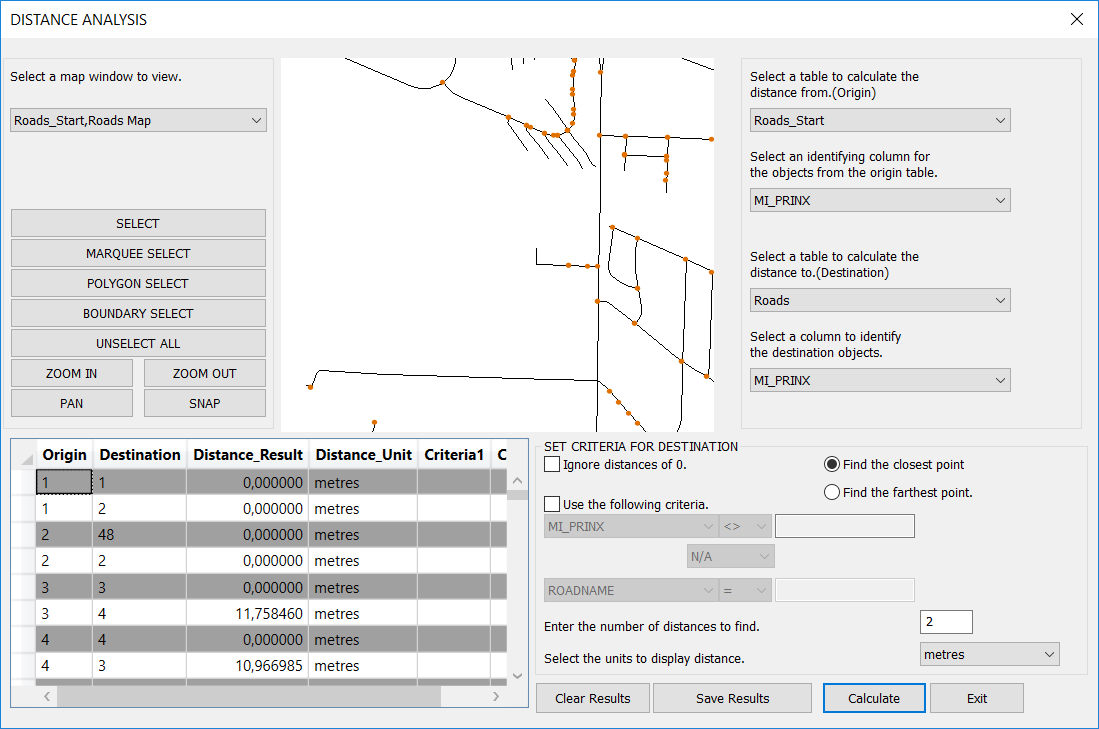
7. Use Save Results to save the results out to a new table. We can call this Dangling Start Nodes and close the dialog via the Exit button.
8. Open the new table Dangling Start Nodes into your map window and into a browser window.
9. Filter the browser to only show distances larger than 0.
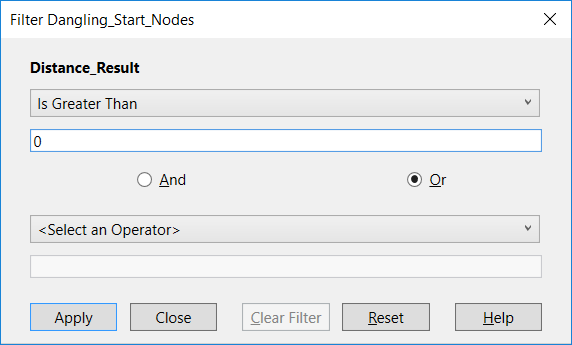
The list now holds all the places where the start node of a road isn't connected or snapped to another road. Sometimes this might be correct, sometimes it isn't. Consider using the distance as a help. Small distances could means that it's a snap issue where larger distances could tell you that the nearest road is a bit away.

You will also have to go thru the process above with the end points of the roads.
Repeat the process but make sure to use this statement to update the Roads_End table:
Update Roads_Start Set OBJ = CreatePoint(ObjectNodeX(OBJ, 1, ObjectInfo(OBJ, 20)), ObjectNodeY(OBJ, 1, ObjectInfo(OBJ, 20)))where
ObjectInfo(OBJ, 20) returns the number of nodes in the polyline.
------------------------------
Peter Horsbøll Møller
Pitney Bowes
------------------------------
Original Message:
Sent: 05-09-2019 20:51
From: Marino Carhuapoma
Subject: Conected Polylines
It is some utility in Mapinfo to detect connected or disconnected nodes from polylines ?
Thanks