Hi Jeff,
here is some info on how to set up DAM Link set up and use case for it. This is based on our data model.
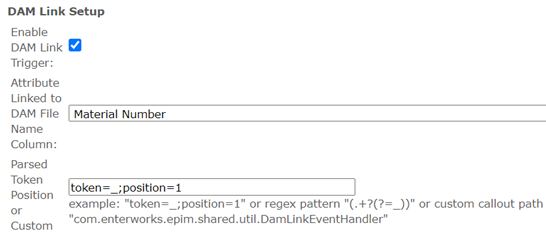
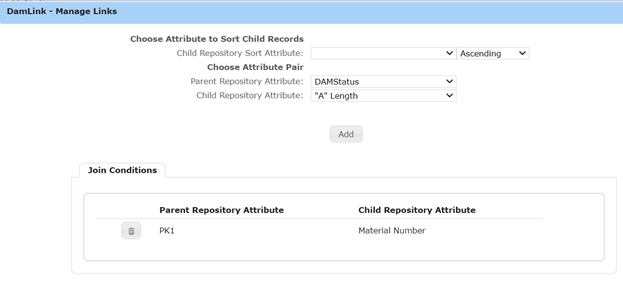
DAM Link set up helps to auto link digital assets to products/materials repository. Before setting up this, you need to set up Link Relationship DAM to DAMLink, and DAMLink to Material/Product repository, please see the screenshot shared below. Let's say you have digital asset named with certain pattern: 123456_Main_product_shot.tiff and you want to auto link the asset to material/product called 123456. The DAM Link set up helps to achieve the goal.
Here Attribute Linked to DAMFile Name Column is the key attribute that is linking DAMLink and Materials repository, it happens to be primary key of material repository – Material Number in the screenshot shown.
Parsed Token Position is the way to identify the material number in a digital asset file name, in this case we are configuring it as first string (position 1) of file name with delimiter "_" (token). We can use regular expression to identify the position and token as well.
With this configuration, when you upload an asset file with name 123456_Main_product_shot.tiff, the asset gets automatically linked to material/product # 123456.
You can modify the set up based on your environment/data model. hope it helps, let me know if you have further questions.
Link relationship between DAMLink and Material/Product repository -
Link relationship between DAM and DAMLink –

Best Regards,
Sreehari
------------------------------
Sreehari Seerla | Senior Developer
HD Supply | 3054961536
------------------------------